Gmail OpenAI AI Automation Email Management n8n

Create AI-Summarized Email Digests from Gmail Labels

Transform email overload into actionable insights with automated daily digests powered by OpenAI O4-Mini.

Download Template JSON · n8n compatible · Free
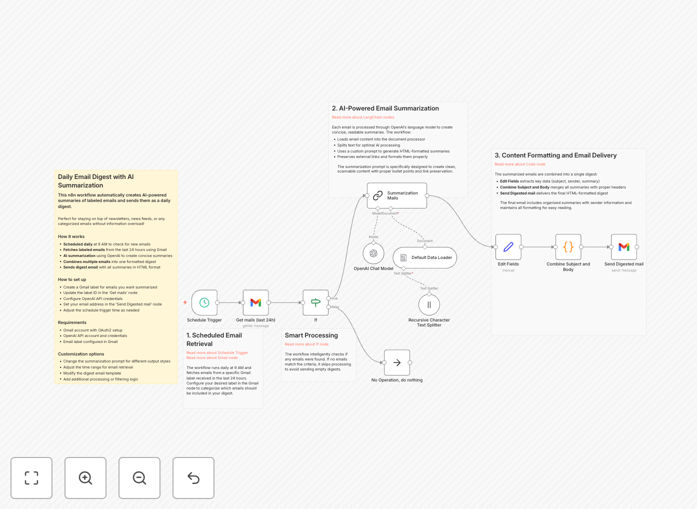
AI email summarization workflow diagram showing Gmail integration with OpenAI processing

What This Workflow Does

Email overload is a modern productivity killer. Professionals spend hours daily reading through newsletters, updates, and communications that could be condensed into minutes of reading. This workflow solves that problem by automatically creating AI-powered daily digests from your labeled Gmail emails.

Each morning at 9 AM, the system fetches emails from your specified Gmail labels received in the last 24 hours. Using OpenAI's advanced language model, it creates concise, readable summaries that preserve important links and formatting. All summaries are then combined into a single, well-formatted digest email sent directly to your inbox.

This isn't just basic filtering—it's intelligent information extraction that helps you stay informed without the inbox overwhelm. Whether you're tracking industry news, monitoring competitor updates, or managing content subscriptions, this automation extracts key insights efficiently.

How It Works

1. Scheduled Trigger

The workflow activates daily at your chosen time (default 9 AM) using n8n's schedule trigger. This ensures you receive your digest consistently without manual intervention.

2. Gmail Email Retrieval

The system connects to your Gmail account via OAuth2 and fetches all emails from specified labels received in the last 24 hours. You can customize which labels are processed based on your needs.

3. AI-Powered Summarization

Each email is processed through OpenAI's O4-Mini model using LangChain. The AI extracts key points, preserves important links and formatting, and creates concise summaries that capture the essence of each message.

4. Digest Compilation

All individual summaries are combined into a single, well-formatted HTML email. The system structures the digest with clear headings, maintains original links, and organizes content for easy reading.

5. Delivery to Your Inbox

The completed digest is sent to your specified email address, giving you one comprehensive overview instead of dozens of individual emails to process.

Who This Is For

This workflow is ideal for busy professionals, executives, content creators, researchers, and anyone who needs to stay informed without spending hours reading emails. Marketing teams tracking industry trends, project managers monitoring updates, entrepreneurs following competitor activity, and newsletter subscribers will find particular value.

It's especially useful for professionals who receive high volumes of informational emails but need to extract key insights quickly. If you find yourself saving emails "to read later" that never get read, this automation provides the solution.

What You'll Need

  1. A Gmail account with OAuth2 access enabled
  2. An OpenAI API account with valid API key
  3. At least one Gmail label set up for email categorization
  4. Basic understanding of n8n workflow execution
  5. Self-hosted n8n instance (required for community nodes)

Pro tip: Create specific labels like "Industry News," "Competitor Updates," or "Project Alerts" to get categorized digests. This helps you process information by context rather than as one overwhelming batch.

Quick Setup Guide

  1. Import the template into your n8n instance using the downloaded JSON file
  2. Configure Gmail OAuth2 credentials in the Gmail node with proper authentication
  3. Add your OpenAI API key to the OpenAI chat model node
  4. Update the Gmail label ID in the "Get mails (last 24h)" node with your specific label
  5. Set your recipient email address in the "Send Digested mail" node
  6. Adjust the schedule trigger if you prefer a different time than 9 AM
  7. Test with a few labeled emails to ensure proper formatting and delivery

Key Benefits

Save 5-10 hours weekly by replacing lengthy email reading with concise AI summaries. Professionals typically spend 28% of their workweek on email—this automation reclaims most of that time for higher-value work.

Improve information retention with structured digests that highlight key points. Our brains process organized information 40% more effectively than scattered messages across an inbox.

Never miss important updates because all labeled emails are automatically processed and summarized. Even when you're busy or traveling, you stay informed through consistent daily digests.

Reduce decision fatigue by presenting information in a clean, organized format. Instead of processing dozens of individual emails, you review one comprehensive digest with clear sections.

Scale your information intake without increasing time commitment. As you subscribe to more newsletters or monitoring services, the system handles the increased volume automatically.

Frequently Asked Questions

Common questions about AI email summarization and automation

Automating email summarization saves professionals 5-10 hours weekly by condensing lengthy emails into actionable insights. It improves information retention, ensures team members stay updated on critical communications without inbox overload, and helps prioritize important messages based on AI-extracted key points.

Businesses benefit from reduced time spent on information processing, better knowledge management, and improved decision-making speed. Teams can focus on strategic work rather than administrative email processing.

AI models like OpenAI's O4-Mini analyze email content to identify main topics, action items, deadlines, and key decisions. They preserve important links and formatting while removing redundant information.

The system works well with newsletters, project updates, industry news, and team communications, adapting the summary length and tone based on content type. Technical documents get more detailed extraction, while casual updates receive concise overviews.

Basic filtering organizes emails into folders or labels, but you still need to read each message. AI summarization actually processes the content to extract and condense information into digestible insights.

This means you get the value of the email without spending time reading through lengthy messages, attachments, or redundant information. It's the difference between organizing a library and having a librarian tell you what each book is about.

Businesses should use self-hosted automation platforms that keep data within their infrastructure, implement proper API key management, ensure emails are processed without permanent storage, and use enterprise-grade AI services with strong data protection agreements.

Always review the privacy policies of AI providers and consider data anonymization for sensitive content. For highly confidential communications, implement additional security layers or exclude certain email categories from automated processing.

Newsletters, industry updates, project status reports, competitor monitoring alerts, and subscription content work exceptionally well. These typically contain structured information that AI can effectively extract and condense.

Less suitable are highly confidential communications, complex legal documents requiring precise interpretation, and emails where nuanced emotional context is critical to understanding the message. Personal correspondence also benefits less from automated summarization.

Professionals receiving 50+ relevant emails daily can save 5-7 hours weekly. Teams can reduce meeting time by 20-30% when status updates are automatically summarized and distributed.

Organizations can cut information processing time by 60-80% for routine communications, allowing staff to focus on strategic work rather than information consumption. The time savings compound as email volume increases.

Yes, summarized emails can be sent to Slack/Teams channels, saved to Notion or Confluence pages, added to project management tools like Asana or Trello, logged in CRM systems for client communications, or compiled into weekly reports for management.

This creates a seamless information flow across your entire tech stack. For example, competitor updates could go to a dedicated Slack channel, project updates to Asana, and industry news to a shared knowledge base.

Yes, GrowwStacks specializes in building custom email automation systems tailored to your specific business needs. We can create workflows that integrate with your existing tools, handle your unique email types, implement custom summarization prompts, and ensure proper security and compliance for your industry.

Our team works with you to understand your information flow, identify optimization opportunities, and build a system that saves time while improving information accessibility. We handle everything from initial consultation to implementation and ongoing support.

  • Custom integration with your current tech stack
  • Industry-specific summarization templates
  • Multi-channel delivery options
  • Advanced security and compliance features

Need a Custom Email Automation?

This free template is a starting point. Our team builds fully tailored automation systems for your specific business needs.