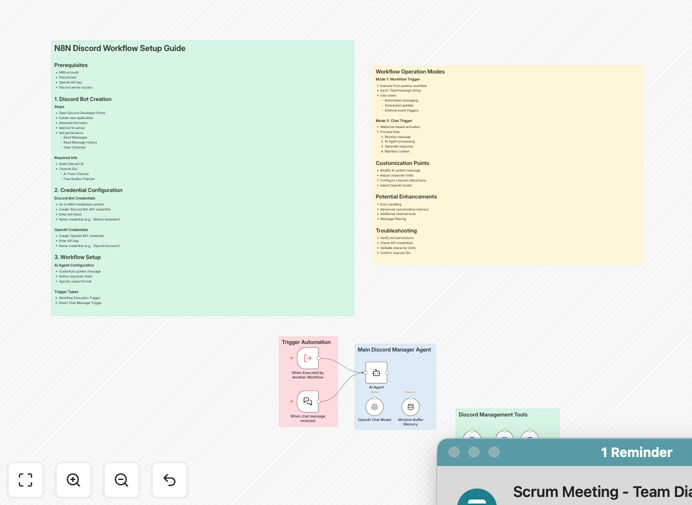
What This Workflow Does
Managing an active Discord community requires constant attention, timely responses, and consistent engagement—tasks that can overwhelm even dedicated community managers. This AI-powered Discord assistant solves that problem by transforming your server into an intelligent, automated communication hub that operates 24/7.
The workflow connects Discord with OpenAI's GPT-4o to create a responsive AI assistant that can handle multiple channels simultaneously. It processes incoming messages, generates context-aware responses, manages support inquiries, welcomes new members, and maintains engagement—all without manual intervention. This automation reduces response times from hours to seconds while ensuring your community receives accurate, helpful information consistently.
How It Works
1. Message Detection & Triggering
The workflow monitors specified Discord channels for new messages or can be triggered by external workflows. It captures message content, user information, and channel context, then prepares this data for AI processing while filtering out spam or inappropriate content.
2. AI Context Processing
GPT-4o analyzes the message context, conversation history, and channel purpose to understand the user's intent. The system applies your custom instructions, brand voice guidelines, and response parameters to ensure the AI assistant aligns with your community's tone and values.
3. Intelligent Response Generation
Based on the analyzed context, the AI generates appropriate, helpful responses. It can answer FAQs, provide support guidance, share resources, engage in conversation, or escalate complex issues to human moderators—all while maintaining character limits and Discord's formatting requirements.
4. Multi-Channel Delivery
The workflow delivers responses to the appropriate Discord channels, tagging users when necessary and maintaining conversation threads. It can operate across support channels, welcome areas, general chat, and announcement channels with channel-specific behaviors.
Pro tip: Configure different AI personalities for different channels—a formal tone for support channels and a friendly, engaging tone for community chat areas.
Who This Is For
This workflow is ideal for Discord community managers, gaming server administrators, SaaS companies with customer communities, educational groups, NFT projects, and any organization maintaining an active Discord presence. It's particularly valuable for communities with 100+ members where repetitive questions strain moderator resources, or for teams needing 24/7 support coverage across time zones.
Businesses using Discord for customer support, product feedback, or community building will see immediate benefits through reduced response times and increased member satisfaction. Content creators with engaged follower communities can maintain interaction even during offline periods.
What You'll Need
- A Discord server with administrator or appropriate bot management permissions
- Discord bot token (created through Discord Developer Portal)
- OpenAI API key with GPT-4o access
- n8n instance (cloud or self-hosted)
- Basic understanding of Discord channel structure and community guidelines
Quick Setup Guide
- Download the template using the button above and import it into your n8n instance
- Configure Discord credentials by adding your bot token to the Discord trigger node
- Add your OpenAI API key to the AI agent node with GPT-4o selected as the model
- Customize AI instructions to match your community's tone, FAQs, and response guidelines
- Specify channel IDs for where the assistant should listen and respond
- Test with a single channel first, then expand to multiple channels once working correctly
- Monitor initial interactions and refine instructions based on response quality
Pro tip: Start with a dedicated testing channel before deploying to your main community channels. This allows you to refine the AI's responses without affecting your entire community.
Key Benefits
Reduce community management workload by 60-80% by automating repetitive questions, welcome messages, and basic support inquiries. Your moderators can focus on complex issues and community growth instead of answering the same questions daily.
Provide 24/7 instant responses to community members across all time zones. Unlike human moderators who need sleep, your AI assistant maintains consistent engagement and support availability around the clock.
Ensure consistent information delivery across all channels and interactions. The AI assistant provides accurate, up-to-date answers based on your knowledge base, eliminating contradictory information from different moderators.
Scale community support effortlessly as your Discord grows. The same AI assistant that handles 100 members can effectively serve 10,000+ without additional resources or response time degradation.
Gather valuable community insights from conversation patterns, frequently asked questions, and member sentiment. Use these analytics to improve your documentation, product features, and community engagement strategies.