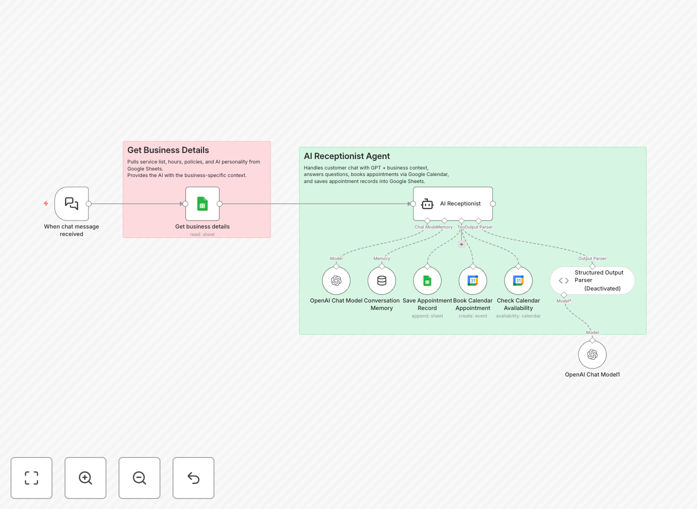
What This Workflow Does
Service businesses lose countless opportunities when customers can't reach them after hours, get put on hold, or face confusing booking processes. This AI-powered virtual receptionist solves that by providing 24/7 conversational automation that feels human.
The system acts as your first point of contact, engaging customers in natural dialogue, answering their questions about your services and availability, and seamlessly booking appointments directly into your Google Calendar. Every interaction and booking detail is automatically logged in Google Sheets for follow-up and reporting.
Whether you run a salon, clinic, consulting practice, or any appointment-based service, this automation handles the repetitive front-desk work so your team can focus on delivering exceptional service.
How It Works
1. Customer Initiation & Welcome
When a customer initiates contact (via website chat, WhatsApp, or other channels), the AI greets them warmly with your business name and a personalized introduction. It establishes a friendly, professional tone from the first interaction.
2. FAQ Handling & Context Gathering
The system references your business information sheet to answer common questions about services, pricing, hours, location, and policies. It intelligently extracts the customer's needs through conversational prompts.
3. Real-Time Availability Check
The workflow queries your Google Calendar to find available slots based on the requested service duration and preferred timing. It presents options that fit both your schedule and the customer's preferences.
4. Customer Information Collection
For confirmed bookings, the system collects essential details—name, contact information, and specific service requirements—using conversational forms that feel natural rather than interrogative.
5. Calendar Booking & Confirmation
Once details are confirmed, the automation creates the appointment in Google Calendar with all relevant details, sends a confirmation to the customer, and provides any necessary pre-appointment instructions.
6. Data Logging & Record Keeping
Every booking is automatically recorded in Google Sheets with timestamps, service details, and customer information, creating a searchable database for business analytics and customer relationship management.
Who This Is For
This template is ideal for service-based businesses that rely on appointments and face high volumes of customer inquiries. Beauty salons, barbershops, and spas can automate booking for haircuts, coloring, and treatments. Medical clinics, therapists, and wellness centers can handle initial patient inquiries and scheduling.
Consultants, coaches, and agencies can qualify leads and schedule discovery calls automatically. Fitness studios, tutors, and repair services can manage their booking calendars without manual intervention. Essentially, any business that spends significant time on phone calls, emails, or manual scheduling will benefit from this automation.
Pro tip: Start by automating just your most frequently asked questions and your most popular service bookings. Once you see the time savings and customer satisfaction improvement, expand to handle more complex scenarios.
What You'll Need
- Google Calendar account with your business availability properly configured
- Google Sheets for storing business information and customer records
- AI API access (OpenAI or similar) for natural language processing
- n8n instance (cloud or self-hosted) to run the automation
- Communication channel (optional but recommended) like WhatsApp Business, website chat, or SMS integration
Quick Setup Guide
Follow these steps to get your virtual receptionist up and running in under 30 minutes:
- Download and import the template JSON file into your n8n instance
- Connect your Google account to authorize Calendar and Sheets access
- Configure your business information sheet with services, pricing, hours, and policies
- Set up your AI credentials (OpenAI API key or use n8n's built-in AI nodes)
- Test the conversation flow by simulating customer interactions
- Connect your communication channel (website, WhatsApp, etc.) to go live
Key Benefits
24/7 availability without staffing costs: Your virtual receptionist works around the clock, capturing leads and bookings even when your physical location is closed. This can increase bookings by 20-30% for businesses with after-hours demand.
Eliminate scheduling errors and double-bookings: By integrating directly with Google Calendar, the system ensures real-time accuracy. No more manual entry mistakes or overlapping appointments that damage customer trust.
Consistent, professional customer experience: Every customer receives the same warm welcome, thorough information, and efficient booking process. The AI never has a bad day or gets impatient with repetitive questions.
Valuable customer data collection: Automatic logging in Sheets creates a marketing goldmine—you'll have detailed records of customer preferences, popular services, and booking patterns to inform business decisions.
Scalable front-desk operations: As your business grows, the automation handles increased inquiry volume without requiring additional staff. It's like having a receptionist that scales instantly with demand.