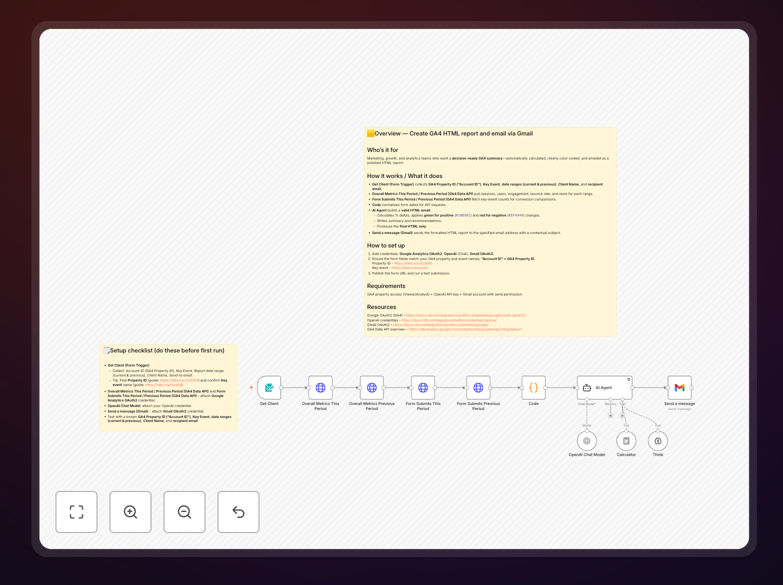
What This Workflow Does
Marketing, growth, and analytics teams often spend hours manually extracting Google Analytics 4 data, calculating trends, and formatting reports for stakeholders. This repetitive process delays insights, introduces human error, and consumes valuable analyst time.
This automation solves that by automatically pulling GA4 metrics for specified date ranges, calculating percentage changes, applying color-coded visual indicators (green for positive trends, red for negative), generating AI-powered summaries with recommendations, and emailing a polished HTML report directly to recipients. It transforms raw analytics data into decision-ready narratives without manual intervention.
How It Works
Step 1: Collect Input Parameters
A form trigger collects the GA4 Property ID, key event to track, current and previous date ranges for comparison, client name, and recipient email address. This configures the report scope and destination.
Step 2: Fetch GA4 Metrics
The workflow uses the Google Analytics Data API to pull sessions, users, engagement rate, bounce rate, and other core metrics for both the current and previous periods. Simultaneously, it fetches counts for the specified key event (like form submissions or purchases) for conversion analysis.
Step 3: Normalize and Calculate
A code node normalizes date formats for API consistency. The system then calculates percentage deltas between periods for each metric, determining performance trends.
Step 4: Generate Insightful Report
An AI agent analyzes the calculated trends, writes a concise summary explaining performance changes, provides actionable recommendations, and builds a valid HTML email with color-coded metrics (using #10B981 for positive changes and #EF4444 for negative). It produces only the final HTML content.
Step 5: Deliver via Email
The formatted HTML report is sent via Gmail to the specified recipient with a contextual subject line, completing the automated reporting cycle.
Who This Is For
This workflow is ideal for marketing teams, growth analysts, digital agencies managing client reports, product managers tracking user engagement, and business leaders needing regular performance insights. It benefits anyone who currently manually prepares GA4 reports or desires more consistent, timely, and insightful analytics distribution.
What You'll Need
- Access to a Google Analytics 4 property (Viewer or Analyst permissions)
- An OpenAI API key for AI analysis and summarization
- A Gmail account with sending permissions
- n8n instance (cloud or self-hosted) to run the workflow
- Basic understanding of your key GA4 events and metrics
Quick Setup Guide
- Download the template JSON file and import it into your n8n instance.
- Add credentials: Google Analytics OAuth2, OpenAI (Chat), and Gmail OAuth2 in n8n's credential management.
- Ensure form fields match your GA4 property ID and event names. Note that "Account ID" in the form refers to your GA4 Property ID.
- Publish the form trigger URL and test with a submission using your actual GA4 data.
- Monitor the first run to verify metrics are pulled correctly and the email delivers properly.
Pro tip: Before full deployment, run a test with a small date range and send the report to yourself. This validates data accuracy and email formatting before sharing with stakeholders.
Key Benefits
Save 5–10 hours monthly per analyst by eliminating manual data extraction, calculation, and report formatting. Automation handles the repetitive tasks while analysts focus on strategy.
Ensure consistent reporting quality with standardized calculations, color-coding, and AI-generated narratives. Every report follows the same professional format, reducing variability.
Deliver insights faster by automating the entire process. Reports can be generated and emailed immediately after data availability, enabling quicker decision-making.
Reduce human error risk in metric calculations and trend analysis. Automated systems apply consistent formulas and validation checks.
Scale reporting effortlessly across multiple clients, properties, or stakeholders. Once configured, the same workflow can serve many recipients with minimal additional effort.