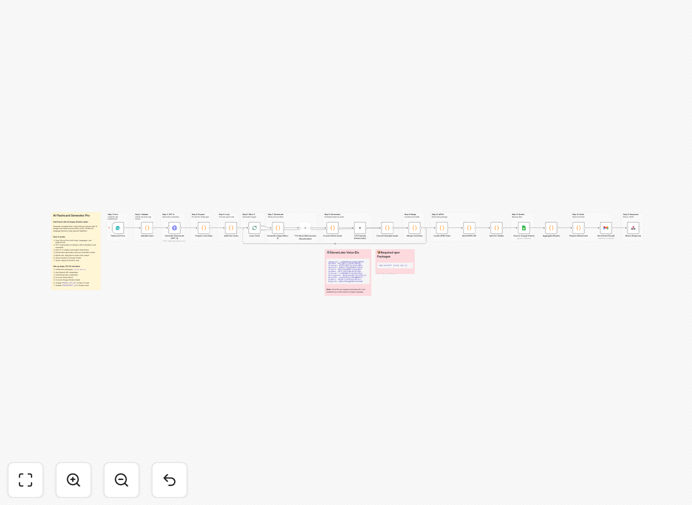
What This Workflow Does
Manually creating effective language flashcards is a time-consuming bottleneck for serious learners. You need to find accurate translations, source memorable images, record or find native pronunciation, and format everything correctly for Anki's spaced repetition system. This process can take hours for a single deck, slowing down your learning progress.
This n8n automation solves that problem completely. It turns a simple topic request into a complete, professional-grade Anki deck in minutes. The workflow intelligently coordinates multiple AI services: GPT-4 generates vocabulary and context, DALL-E creates unique visual cues, and ElevenLabs provides authentic audio. The final .apkg file is emailed to you, ready for immediate import into Anki desktop or mobile.
The business value is immense for educators, language schools, and corporate training departments. It transforms a manual, expert-dependent content creation process into a scalable, on-demand system. You can generate tailored learning materials for any subject, language, or difficulty level without increasing staff workload.
How It Works
The automation follows a logical, multi-stage pipeline that mimics—and vastly improves upon—the manual creation process.
1. Topic & Configuration Input
You submit a web form or trigger the workflow with a topic (e.g., "Business Spanish for meetings"), target language, native language, difficulty level (A1-C2), and desired number of cards. This sets the parameters for the entire generation process.
2. AI-Powered Content Generation
GPT-4 takes the topic and generates a structured vocabulary list. For each term, it provides the translation, phonetic reading, and an example sentence in context. This ensures the flashcards teach practical, usable language, not just isolated words.
3. Visual & Audio Asset Creation
For each vocabulary word, DALL-E 3 generates a custom image based on a detailed prompt that includes the word and desired style (minimal, realistic, etc.). Simultaneously, ElevenLabs' high-quality text-to-speech API generates audio files for both the word and its example sentence, using a native speaker voice.
4. Anki Deck Assembly & Delivery
The workflow packages all components—text, image URLs, audio files—into the proprietary Anki .apkg file format using code nodes. It then emails this file directly to you as an attachment. A backup of all generated data is also logged to a Google Sheet for record-keeping and future reuse.
Who This Is For
This automation is a game-changer for several key audiences. Independent language learners who use Anki seriously can finally create high-quality decks without the drudgery. Language tutors and teachers can generate custom supplemental materials for each student in seconds, enabling truly personalized learning paths.
EdTech companies and language learning platforms can integrate this workflow to offer "generate a deck from any article or video" as a premium feature. Corporate L&D teams can rapidly create specialized vocabulary decks for employees learning industry-specific terminology in a second language, such as medical Spanish or technical German.
What You'll Need
- An n8n instance (cloud or self-hosted) to run the workflow.
- OpenAI API credentials with access to GPT-4 and DALL-E 3.
- An ElevenLabs API key for generating pronunciation audio.
- Gmail or Google Workspace account (configured via OAuth in n8n) to send the final deck.
- Google Sheets access (OAuth) for the backup logging step.
- Basic npm package installation (
jszipandsql.js) on your n8n server if self-hosting, handled automatically in n8n cloud.
Pro tip: Start with the free tiers or credits offered by OpenAI and ElevenLabs. Generating a 20-card deck costs just pennies, allowing you to test the workflow thoroughly before any significant investment.
Quick Setup Guide
Importing and configuring this template is straightforward, even if you're new to n8n.
- Download & Import: Click the "Download Template" button above to get the JSON file. In your n8n instance, go to Workflows > Import from File and select the downloaded file.
- Configure API Credentials: Click on the "OpenAI" node and add your API key. Repeat for the "ElevenLabs" node and the "DALL-E" code node (which also needs the OpenAI key).
- Set Up Google Connections: Click the "Gmail" node and authenticate with your Google account via OAuth. Do the same for the "Google Sheets" node, specifying the ID of your backup spreadsheet.
- Test the Trigger: The workflow is triggered by an n8n webhook or form. Use the test button in the trigger node to generate a sample payload and run the workflow once to ensure all connections work.
- Deploy & Use: Activate the workflow. You can now trigger it manually via the n8n UI or set up a simple form (using the "Form Trigger" node) for a user-friendly interface.
Key Benefits
Save 5-10 hours per deck. What used to be a half-day research and creation task is now a 3-minute automated process. This time can be redirected to actual learning, teaching, or business development.
Superior learning outcomes with multi-sensory cards. Flashcards with relevant images and native audio significantly improve memory encoding and recall compared to text-only cards, leading to faster vocabulary acquisition.
Unlimited scalability and customization. Generate decks for 20+ languages, any topic imaginable, and seven different visual styles. The system adapts to beginner or advanced learners with a simple parameter change.
Eliminate human error and inconsistency. The AI delivers perfectly formatted cards every time, with consistent styling and structure. No more typos in translations or mismatched images.
Future-proof your learning material creation. As AI models improve, your generated content automatically improves with them. You benefit from the latest advances in language and image generation without changing your process.