What This Workflow Does
Google Alerts is essential for staying informed, but it creates notification fatigue. You receive dozens of emails daily, each containing multiple articles, leading to information overload where critical insights get buried in your inbox.
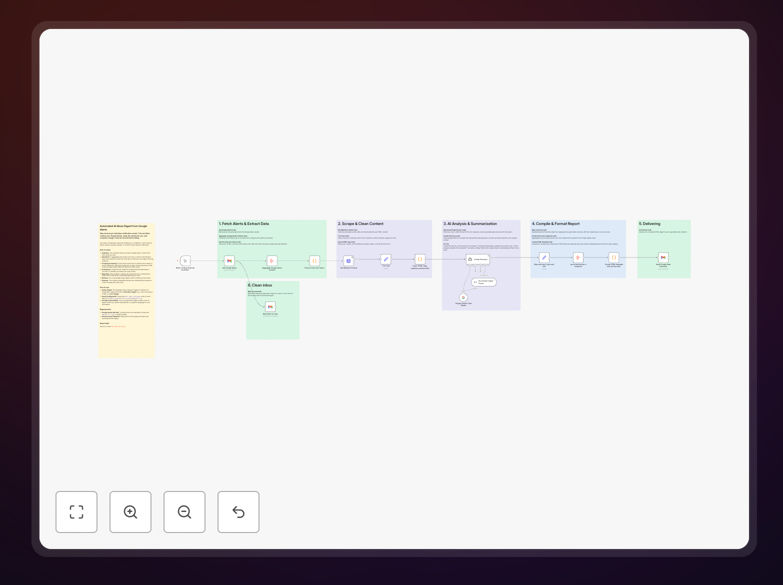
This automation solves that problem by acting as your personal research assistant. It systematically fetches unread Google Alerts emails, extracts article links, scrapes and cleans the actual content, then uses Google's Gemini AI to generate concise 2-4 sentence summaries of each piece. Finally, it compiles everything into a structured HTML digest and sends it to you at a scheduled time, marking the original alerts as read.
The result? Instead of spending 30-60 minutes daily scanning emails, you get a 5-minute executive briefing that highlights trends, competitor moves, and industry developments—all formatted for quick consumption and decision-making.
How It Works
1. Email Ingestion & Processing
The workflow connects to your Gmail account and searches for unread emails from Google Alerts. It extracts all article URLs from each email body, handling various email formats and link structures to ensure comprehensive coverage.
2. Content Extraction & Cleaning
Each article URL is fetched, and the main content is extracted while stripping away ads, navigation, comments, and other webpage clutter. This cleaning process ensures the AI receives high-quality text for summarization, improving accuracy and relevance.
3. AI-Powered Summarization
Google Gemini AI processes each cleaned article with specific instructions to identify key points, extract actionable insights, and condense information while preserving context. The AI is prompted to focus on business implications, trends, and competitive intelligence relevant to your industry.
4. Digest Compilation & Delivery
Summaries are organized by topic or alert category, formatted into a professional HTML email with clear headings, bullet points, and source links. The digest is sent to your specified email address, and all processed Google Alerts emails are automatically marked as read to keep your inbox clean.
Who This Is For
This workflow delivers exceptional value for executives and business leaders who need to monitor industry developments without drowning in information. Marketing and competitive intelligence teams can track brand mentions and competitor activities systematically. Researchers, consultants, and analysts across any industry can automate their environmental scanning process. Startup founders and small business owners who wear multiple hats and need efficient market monitoring will find this particularly transformative.
If you currently spend more than 2 hours per week manually checking Google Alerts or worry about missing important industry news, this automation is designed for you.
What You'll Need
- A Gmail account receiving Google Alerts emails (works with Google Workspace accounts too)
- Google Gemini API access with an active API key (available through Google AI Studio)
- n8n instance (cloud or self-hosted) to run the workflow
- Basic understanding of how to import JSON workflows and configure node credentials in n8n
- 10-15 minutes for initial setup and configuration
Pro tip: Start with 2-3 Google Alert topics to test the workflow before scaling to all your alerts. This lets you refine the AI prompts and output format based on actual results.
Quick Setup Guide
- Download and import the template JSON file into your n8n instance using the "Import from File" option.
- Configure Gmail node by authenticating your Google account with the appropriate permissions to read emails and send messages.
- Add your Gemini API key in the Google Gemini node settings within the workflow.
- Update the recipient email in the "Send Email Digest" node to your preferred destination address.
- Test the workflow manually using the "Execute Workflow" button to ensure all connections work correctly.
- Set up scheduling by replacing the Manual Trigger node with a Schedule Trigger configured for your preferred time (e.g., daily at 7 AM).
- Monitor and refine the first few digests, adjusting AI prompts if needed to better match your information needs.
Key Benefits
Save 5-10 hours weekly on market monitoring. What previously required daily email scanning now happens automatically, freeing up significant time for analysis and strategy rather than information gathering.
Never miss critical industry developments. The systematic approach ensures every alert is processed and evaluated, eliminating the risk of important news getting lost in a crowded inbox.
Improve decision quality with consistent analysis. The AI applies the same evaluation criteria to every article, reducing human bias and providing standardized insights across all your monitoring topics.
Create shareable intelligence reports automatically. The formatted digest can be easily forwarded to team members or stakeholders, aligning everyone with the same market understanding.
Scale your monitoring without proportional time increase. Adding more Google Alert topics doesn't significantly increase your review time—the system handles the volume while you focus on insights.