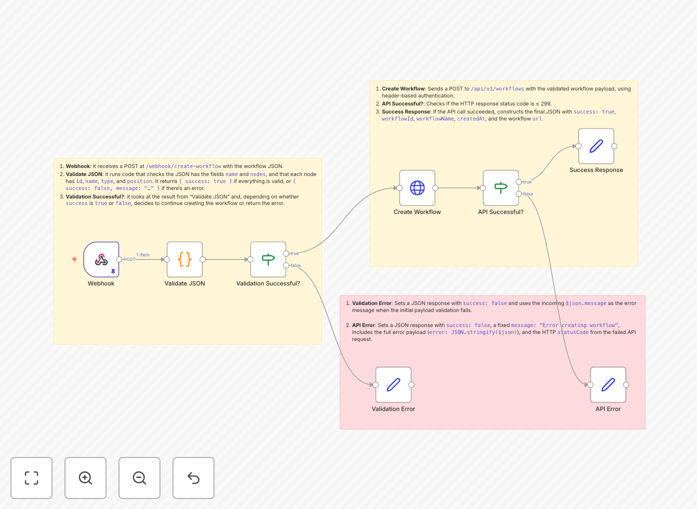
What This Workflow Does
This template solves the challenge of maintaining hundreds of similar but slightly different workflows by providing a programmatic way to generate them on-demand. Instead of manually creating each workflow variation, you can define workflow templates and let the system generate the specific instances based on incoming data.
The workflow exposes an HTTP endpoint that accepts a JSON definition of an n8n workflow. It validates the structure, processes the definition, and creates a new workflow in your n8n instance. This enables scenarios like generating customer-specific workflows in SaaS applications, creating department-specific automations in enterprises, or building adaptive workflow systems that respond to changing business needs.
How It Works
1. Webhook Endpoint Setup
The workflow begins with an HTTP trigger that acts as your API endpoint. This receives POST requests containing the workflow definition in JSON format. The endpoint includes basic authentication to prevent unauthorized access.
2. Input Validation
Each incoming request is validated against a schema to ensure it contains all required fields for workflow creation. The validation checks for proper node definitions, connection settings, and other essential workflow properties.
3. Workflow Generation
After validation, the system processes the JSON definition and constructs a complete n8n workflow object. This includes setting up all nodes, connections between them, and any necessary credentials or configuration.
4. Workflow Activation
The generated workflow is then created in your n8n instance via the n8n API. The template includes error handling to manage cases where workflow creation fails, providing appropriate feedback to the calling system.
Pro tip: Combine this with a workflow registry pattern where you maintain a library of reusable workflow components that can be mixed and matched in your JSON definitions.
Who This Is For
This template is ideal for:
- SaaS platforms needing to generate customer-specific automations
- Agencies managing workflows for multiple clients
- Enterprises with department-specific automation needs
- Developers building workflow-driven applications
- Teams implementing complex conditional automation logic
What You'll Need
- An n8n instance with API access enabled
- Basic understanding of n8n workflow structure
- A system capable of making HTTP requests with JSON payloads
- Optional: Authentication mechanism for your endpoint
Quick Setup Guide
- Download and import the template into your n8n instance
- Configure the HTTP trigger with your preferred authentication
- Set up API credentials for your n8n instance
- Test with sample JSON payloads
- Deploy the workflow and note your endpoint URL
Key Benefits
Reduce maintenance overhead by generating workflows on-demand instead of maintaining hundreds of static versions.
Enable self-service automation by allowing other systems to create workflows through your API.
Scale automation efforts by programmatically generating workflows based on business rules.
Increase flexibility with dynamic workflows that adapt to changing requirements.