Zapier eBay API AI Automation MCP Server

Create eBay Listing Drafts with AI Agents via MCP Server

Automate your eBay product listings with AI-powered efficiency using this ready-to-deploy workflow template

Download Template JSON · n8n compatible · Free
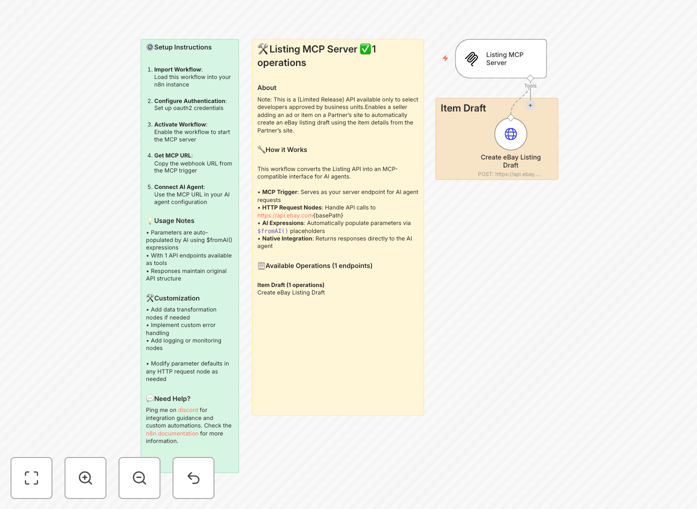
Screenshot of eBay listing automation workflow in n8n interface

What This Workflow Does

This workflow transforms how you create eBay listings by connecting AI agents directly to eBay's API through an MCP server interface. It eliminates manual data entry while maintaining full control over your product listings.

The template provides a complete solution for sellers who want to leverage AI capabilities while keeping their existing eBay workflow. It handles authentication, data formatting, and error checking automatically, allowing your AI agents to focus on optimizing product descriptions and pricing strategies.

How It Works

1. MCP Server Setup

The workflow begins with an MCP trigger that creates a secure endpoint for your AI agents to connect to eBay's API.

2. AI Agent Integration

AI agents send product data through the MCP interface, which automatically formats it according to eBay's API requirements.

3. Listing Creation

The workflow handles all API calls to eBay, creating draft listings with the provided product information and media.

4. Response Handling

After submission, the workflow returns eBay's response to your AI agents for analysis and optimization.

Who This Is For

This solution is ideal for:

  • eBay PowerSellers managing large inventories
  • Dropshipping businesses needing rapid listing creation
  • Brands maintaining consistent product listings across channels
  • AI developers building commerce automation tools
  • Ecommerce agencies managing multiple client accounts

What You'll Need

  1. Active eBay Developer Account with API credentials
  2. n8n instance (cloud or self-hosted)
  3. AI agent capable of HTTP requests (or our pre-built AI templates)
  4. Basic understanding of eBay's listing requirements

Quick Setup Guide

  1. Import the JSON file into your n8n instance
  2. Add your eBay API credentials in the HTTP Request nodes
  3. Activate the workflow to start your MCP server
  4. Connect your AI agent to the webhook URL from the MCP trigger
  5. Test with sample product data before going live

Pro tip: Use the $fromAI() expressions in the workflow to automatically map AI-generated content to eBay's API fields without manual configuration.

Key Benefits

Reduce listing time by 80%: What used to take hours now happens in minutes with AI handling descriptions and the workflow managing API integration.

Never miss a sales opportunity: List new inventory immediately as it becomes available, without waiting for manual processing.

Maintain brand consistency: AI agents follow your style guidelines while the workflow ensures all listings meet eBay's technical requirements.

Scale effortlessly: Handle hundreds of listings as easily as you handle ten, with no additional staff.

Future-proof your operation: Easily adapt to eBay API changes through the workflow rather than modifying multiple AI agents.

Frequently Asked Questions

Common questions about eBay automation and AI integration

Automating eBay listings with AI saves significant time by handling repetitive tasks, ensures consistency in product descriptions, and can optimize listings based on performance data. AI can also help with pricing strategies and inventory management.

For example, an AI agent can analyze similar successful listings and suggest optimal titles, descriptions, and pricing while the automation handles the technical aspects of creating the eBay listing through the API.

MCP server integration provides a standardized interface for AI agents to interact with eBay's API, simplifying the connection between AI logic and eBay's platform while maintaining security and reliability.

Instead of each AI agent needing to understand eBay's API specifications, they can communicate with the MCP server using a consistent format. The server handles authentication, rate limiting, and error recovery automatically.

High-volume sellers, drop shippers, and businesses with frequently changing inventory benefit most from eBay automation as it reduces manual work and speeds up listing processes.

We've seen clients who previously spent 20 hours/week on listings reduce that to 2 hours while increasing their total listings by 300%. The automation handles the repetitive work while humans focus on strategy and customer service.

The connection uses eBay's standard API security protocols with OAuth authentication. The MCP server acts as a secure intermediary, adding an extra layer of protection for your credentials.

Your API keys are stored only in n8n's credential system and never exposed to the AI agents. The workflow includes automatic token refresh and handles all encryption requirements.

Yes, the workflow can be configured to handle product variations by mapping different attributes and creating multiple listings from a single template.

For clothing sellers, this means one AI prompt can generate all size/color variations with appropriate inventory tracking. The workflow automatically creates the variation structure eBay requires.

Minimal maintenance is needed beyond occasional updates when eBay makes API changes. The workflow includes error handling to alert you if issues arise.

We recommend quarterly reviews of your listing templates and monthly checks of the error logs. Most clients find the system runs for months without intervention once properly configured.

Yes, GrowwStacks specializes in custom automation solutions for eBay sellers. We can tailor workflows to your specific business needs, inventory systems, and sales strategies.

Our team has built integrations with:

  • Custom inventory management systems
  • Supplier data feeds for dropshippers
  • AI-powered repricing strategies
  • Multi-channel listing synchronization

Need a Custom eBay Automation?

This free template is a starting point. Our team builds fully tailored automation systems for your specific business needs.