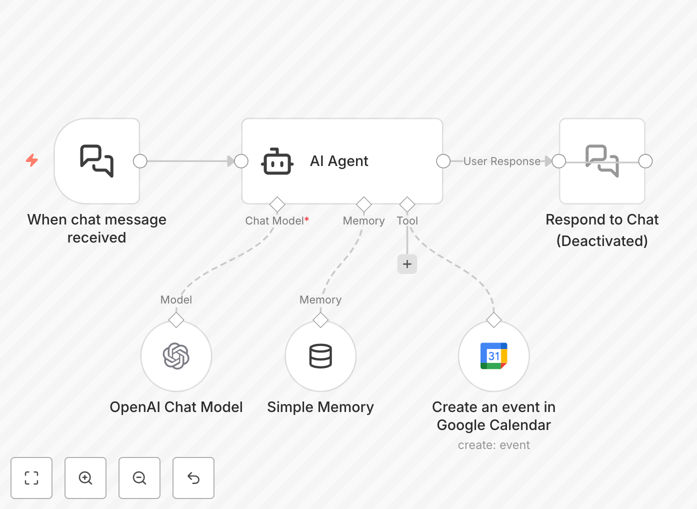
What This Workflow Does
This innovative automation solves the friction of traditional calendar scheduling by allowing users to create Google Calendar events through natural language chat messages. Instead of filling out complex forms or navigating multiple calendar interfaces, users can simply type or speak their scheduling needs in everyday language.
The workflow uses GPT AI to interpret the natural language input, extract key details like date, time, duration, attendees, and event title, then automatically creates a properly formatted Google Calendar event. This eliminates manual data entry errors and saves significant time for both the scheduler and participants.
How It Works
1. Natural Language Input
The workflow receives a chat message containing scheduling information in natural language. This could come from Slack, WhatsApp, email, or any messaging platform integrated with n8n.
2. AI Interpretation
GPT processes the message to identify and extract all relevant scheduling components: date, start/end times, event name, location, attendees, and any special instructions.
3. Data Validation
The system checks for conflicts, verifies attendee availability if connected to their calendars, and confirms the parsed details are accurate before proceeding.
4. Calendar Event Creation
The workflow creates a Google Calendar event with all extracted details, sends confirmation messages to all participants, and can optionally add reminders or follow-up tasks.
Pro tip: Train your team to use natural language phrases like "Team meeting next Tuesday 2-3pm in Conference Room B" for maximum efficiency.
Who This Is For
This automation is ideal for busy professionals, executive assistants, sales teams, and customer support agents who frequently schedule meetings. It's particularly valuable for:
- Remote teams coordinating across time zones
- Sales reps scheduling client calls
- HR professionals arranging interviews
- Project managers organizing team check-ins
- Anyone who spends more than 30 minutes daily scheduling meetings
What You'll Need
- An n8n instance (cloud or self-hosted)
- Google Calendar API access
- OpenAI API key for GPT processing
- A messaging platform connected to n8n (Slack, WhatsApp, etc.)
- Basic understanding of n8n workflows
Quick Setup Guide
- Download the template file
- Import into your n8n instance
- Connect your Google Calendar and OpenAI accounts
- Configure your preferred messaging platform trigger
- Test with sample messages to verify parsing accuracy
- Deploy to your team's workflow
Key Benefits
Save 5+ hours per week by eliminating manual calendar entry and back-and-forth scheduling messages.
Reduce scheduling errors with AI-powered interpretation that catches ambiguous time references and conflicting appointments.
Improve meeting attendance through automatic confirmation messages and calendar reminders for all participants.
Enhance professional image with instant, accurate scheduling that impresses clients and colleagues.
Scale scheduling operations without adding administrative staff as your meeting volume grows.