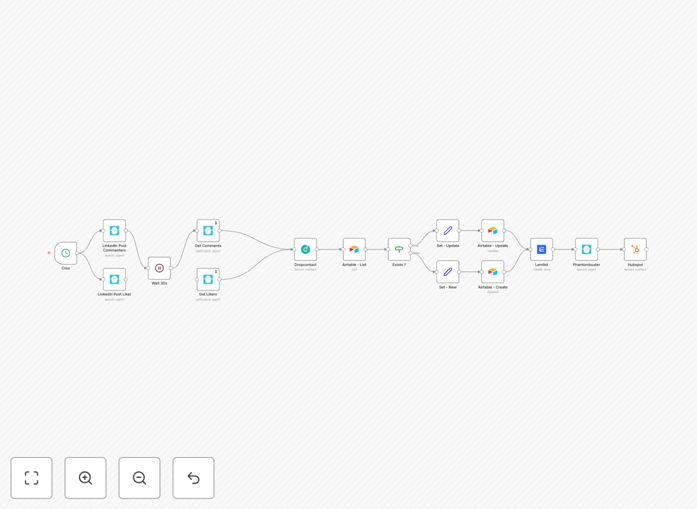
What This Workflow Does
Manually turning LinkedIn engagement into sales leads is a slow, error-prone process. This automation solves that by creating a complete, hands-off pipeline from social interaction to a sales-ready contact record.
The workflow identifies people who like or comment on your LinkedIn posts—a strong signal of interest—and transforms them into actionable leads. It automatically finds their professional contact information, adds them to a tracking database, initiates personalized outreach, and finally syncs the enriched data to your HubSpot CRM. This eliminates hours of manual research and data entry each week.
How It Works
Step 1: Trigger & Data Capture
A scheduled trigger (Cron node) runs the workflow hourly. It uses Phantombuster to launch agents that scrape the list of users who liked and commented on your specified LinkedIn post. This captures the raw engagement data.
Step 2: Contact Enrichment
Each captured LinkedIn profile is sent to Dropcontact. This service appends verified professional data: email address, full name, gender, company name, job title, and legal company information. This turns a username into a fully qualified lead.
Step 3: Database Management
The workflow checks your Airtable base to see if the contact already exists. If they do, it updates their record. If they are new, it creates a new entry. This ensures a single source of truth and prevents duplicates.
Step 4: Personalized Outreach
New leads are automatically added to a personalized cold email sequence in Lemlist. The email can reference their specific LinkedIn interaction, dramatically increasing open and reply rates. After the email is sent, a LinkedIn connection request is automatically sent via Phantombuster.
Step 5: CRM Sync
Finally, all contact data—both newly created and updated—is pushed to HubSpot. The contact record is created or updated with all the enriched fields, making the lead immediately visible and actionable for your sales team.
Who This Is For
This automation is ideal for B2B marketing teams, sales development representatives (SDRs), founders, and agencies who use LinkedIn for lead generation. If you post content to attract clients and want to systematically convert that engagement into pipeline, this workflow is for you. It's particularly valuable for companies selling high-consideration services or software where LinkedIn is a key channel.
What You'll Need
- n8n instance (Cloud or self-hosted).
- Phantombuster account with "LinkedIn Post Likers," "LinkedIn Post Commenters," and "LinkedIn Network Booster" phantoms configured.
- Lemlist account with an active cold email campaign.
- Dropcontact account for email finding and contact enrichment.
- HubSpot account with a connected private app for API access.
- Airtable base with a "Contacts" table.
Quick Setup Guide
- Download & Import: Click the download button above and import the JSON file into your n8n instance.
- Configure Credentials: In n8n, set up credentials for Phantombuster, Lemlist, Dropcontact, HubSpot, and Airtable.
- Set Your IDs: In the Phantombuster nodes, input the IDs for your specific LinkedIn post and configured phantoms.
- Map Your Fields: In the Airtable and HubSpot nodes, ensure the field names match your base and CRM property names.
- Test & Activate: Run the workflow once in test mode to verify data flows correctly, then activate it.
Pro tip: Start by targeting one high-performing LinkedIn post to test the workflow. Monitor the quality of enriched data and email reply rates before scaling to multiple posts.
Key Benefits
Save 10+ hours per week by eliminating manual LinkedIn lead research, data entry, and initial outreach.
Increase lead conversion rates by contacting engaged prospects within hours, not days, while their interest is highest.
Ensure data accuracy and completeness by automatically enriching profiles with verified emails and company data before they reach sales.
Build a scalable lead engine that works while you sleep, turning every piece of LinkedIn content into a consistent source of qualified leads.
Improve sales and marketing alignment by delivering fully enriched, CRM-ready contacts with a history of their initial engagement.