AI Content LinkedIn Marketing Automation Google Sheets n8n

Automate LinkedIn Content Creation with AI Research

Generate scroll-stopping LinkedIn posts using Perplexity AI research, GPT-4 writing, and Google Sheets storage. Save 5-8 hours weekly on content creation.

Download Template JSON · n8n compatible · Free
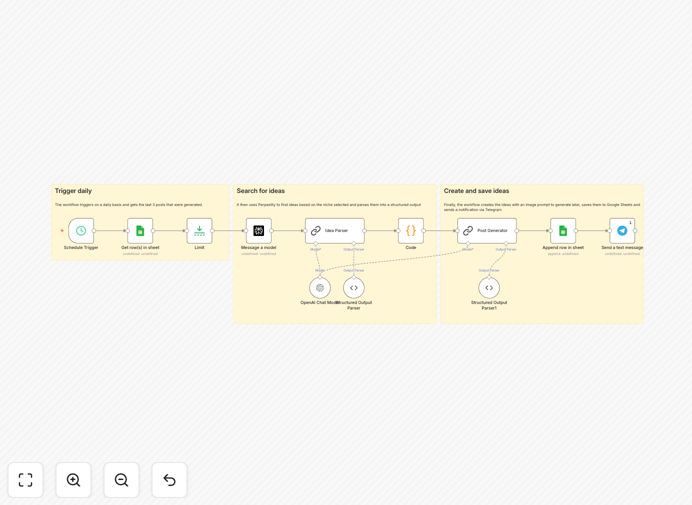
LinkedIn content automation workflow diagram showing AI research and content generation process

What This Workflow Does

Creating consistent, high-quality LinkedIn content is a major time drain for professionals, entrepreneurs, and marketing teams. Manual research, writing, and scheduling can consume 5-10 hours weekly, often resulting in inconsistent posting and generic content that fails to engage.

This n8n workflow automates the entire LinkedIn content creation pipeline. It combines real-time trend discovery via Perplexity AI, structured idea generation with GPT-4, organized storage in Google Sheets, and automated notifications. Instead of recycling tired AI tips, it produces original, research-backed content tailored to your brand voice.

The system ensures you never run out of post ideas while maintaining quality and relevance. It's designed for professionals who want to build authority without sacrificing hours each week to content creation.

How It Works

1. Scheduled Research Trigger

The workflow activates daily at your preferred time (default 6 AM). It first checks your Google Sheets history to avoid repeating previous topics, ensuring fresh content every time.

2. Perplexity AI Web Research

Perplexity scans current trends, news, and industry developments based on your specified topics. It returns real-time insights with citations, providing credible material for your posts.

3. Structured Idea Generation

The system creates 3 complete post concepts including: compelling hook, target audience angle, key insights, visual prompt for accompanying images, and suggested tone (professional, provocative, educational, etc.).

4. GPT-4 Content Refinement

Each idea is transformed into a polished LinkedIn post following detailed brand voice rules. The AI adds storytelling elements, actionable takeaways, and engagement prompts while maintaining your authentic voice.

5. Google Sheets Organization

Complete posts are saved to Google Sheets with metadata: publication date, status (draft/ready/published), image prompts, target hashtags, and performance tracking columns for future optimization.

6. Telegram Notification

You receive an instant Telegram alert with the new content ideas, allowing quick review and approval before scheduling or publishing.

Who This Is For

This automation is ideal for solopreneurs, startup founders, marketing professionals, consultants, and anyone building a professional brand on LinkedIn. It's particularly valuable for:

  • Content creators who need consistent posting but lack research time
  • Startup teams establishing thought leadership in competitive markets
  • Consultants & coaches who sell expertise through content marketing
  • Marketing agencies managing multiple client accounts efficiently
  • Tech professionals wanting to share insights without becoming full-time writers

What You'll Need

  1. Perplexity API access for real-time web research (free tier available)
  2. OpenAI API key with GPT-4 or GPT-4-mini access
  3. Google Sheets document with appropriate column headers (template included)
  4. Telegram bot token connected to your account (free, 5-minute setup)
  5. n8n instance (cloud or self-hosted) to run the workflow

Quick Setup Guide

Follow these steps to implement this automation in under 15 minutes:

  1. Download the template using the button above and import into your n8n instance
  2. Configure credentials for Perplexity, OpenAI, Google Sheets, and Telegram in n8n
  3. Duplicate the Google Sheet template and update the workflow with your new Sheet ID
  4. Adjust the schedule trigger to match your preferred content generation frequency
  5. Customize the research prompts with your specific industry keywords and topics
  6. Test the workflow with a manual trigger to verify all connections work
  7. Activate the schedule and start receiving daily content ideas automatically

Pro tip: Start with 2-3 posts per week rather than daily. This gives you time to engage with comments and build genuine connections, which matters more than posting frequency.

Key Benefits

Save 5-8 hours weekly on research, writing, and content planning. What previously took hours now happens automatically while you focus on high-value activities.

Improve content quality with research-backed insights rather than generic advice. Your posts will demonstrate deeper understanding and attract more qualified engagement.

Maintain consistent presence without the stress of last-minute writing. The system ensures you always have quality content ready to publish.

Scale thought leadership across multiple topics and formats. The organized Google Sheets repository becomes a valuable content asset you can repurpose.

Reduce creative burnout by eliminating the "blank page" problem. The AI provides starting points that you can quickly personalize and enhance.

Frequently Asked Questions

Common questions about LinkedIn content automation and AI integration

AI can research trending topics, generate unique insights, and draft engaging posts that sound human. It saves hours of manual research and writing while ensuring your content is fresh and relevant to your audience.

For example, instead of spending 2 hours researching industry trends, AI can scan dozens of sources in minutes and identify the most relevant developments for your niche. It then structures this information into compelling narratives that resonate with your specific followers.

  • AI identifies emerging trends before they become mainstream
  • Generates multiple angles on the same topic for testing
  • Maintains consistent posting during busy periods

Automating LinkedIn posts ensures consistent posting, saves 5-10 hours weekly on research and writing, improves content quality with AI insights, and helps build authority through regular, valuable content.

Businesses using automation report 3x more engagement within 90 days because they can maintain quality while increasing frequency. The system handles the heavy lifting of research and drafting, allowing you to focus on strategic engagement and relationship building.

  • Consistency builds audience trust and expectation
  • More time for genuine engagement in comments
  • Data-driven insights into what content performs best

Perplexity AI provides real-time web research with citations, while ChatGPT uses its training data. For LinkedIn content, Perplexity finds current trends and news, making your posts timely and credible with source references.

When discussing a new industry development, Perplexity can cite specific articles, reports, or data published in the last 24 hours. This timeliness is crucial for LinkedIn where relevance drives engagement. ChatGPT's knowledge cutoff means it might miss the latest developments.

  • Perplexity includes source citations for credibility
  • Real-time data versus static training information
  • Better for news-driven and trend-based content

Yes, with proper prompting and brand voice guidelines. AI can be trained to match your unique tone, add personal anecdotes, and structure posts that resonate authentically with your professional audience.

The key is providing the AI with examples of your best-performing content and specific instructions about your communication style. Successful users spend 1-2 hours initially training the system, then save that time back within the first week of automation.

  • Provide examples of your authentic voice for AI training
  • Include personal stories and experiences in prompts
  • Always review and lightly edit before publishing

Research tools like Perplexity, writing assistants like GPT-4, storage in Google Sheets, and automation platforms like n8n create a complete system. This combination handles research, writing, organization, and scheduling efficiently.

Each tool serves a specific purpose in the content pipeline. Perplexity finds information, GPT-4 structures it compellingly, Google Sheets organizes everything for easy access, and n8n connects them all without manual intervention.

  • Specialized tools outperform general-purpose solutions
  • Automation platforms connect everything seamlessly
  • Central storage enables repurposing across channels

Most professionals save 5-8 hours weekly. Research alone takes 2-3 hours, writing takes 1-2 hours per post, and organization takes additional time. Automation reduces this to minutes while improving quality.

For agencies managing multiple clients, the savings multiply significantly. One marketing firm reported saving 40 hours monthly across their team while increasing client content output by 300% using similar automation.

  • Initial setup takes 1-2 hours, pays back in first week
  • Scalable savings as you increase content frequency
  • Time reallocated to strategy and engagement

Over-automating without human review, using generic AI prompts, posting too frequently without value, and failing to engage with comments. The best approach blends automation with strategic human oversight.

Successful automation acts as a force multiplier for your efforts, not a replacement. The most effective users automate research and drafting but personally review, edit, and engage with each post's comments to maintain authenticity.

  • Always review AI-generated content before posting
  • Customize prompts for your specific audience
  • Schedule time for genuine comment engagement

Yes, GrowwStacks builds tailored LinkedIn automation systems for businesses. We customize research sources, brand voice, posting schedules, and integration with your CRM or marketing tools for maximum impact.

Our team analyzes your specific audience, competitive landscape, and business goals to create an automation system that aligns with your strategy. We handle the technical implementation while you focus on growing your professional presence.

  • Integration with your existing CRM and marketing stack
  • Custom AI training on your brand voice and content
  • Ongoing optimization based on performance analytics

Need a Custom LinkedIn Content Automation?

This free template is a starting point. Our team builds fully tailored automation systems for your specific business needs.