What This Workflow Does
This automation transforms written content—like training manuals, documentation, blog posts, or book chapters—into professionally narrated audiobooks using advanced AI text-to-speech technology. Instead of hiring voice actors or spending hours recording, you simply feed structured text into Google Sheets, and the system generates expressive, custom-voiced audio segments, merges them into a complete audiobook, and stores it directly in your Google Drive.
The workflow solves the time, cost, and scalability challenges of traditional audiobook production. It's perfect for businesses creating educational content, publishers adapting written works to audio formats, or teams producing regular audio updates from written reports. By automating the entire pipeline, you can produce hours of audio content in minutes rather than days.
Beyond basic narration, the system allows for sophisticated voice customization. You can specify different AI voices for different speakers or sections, adjust emotional tone and speaking style, and maintain perfect consistency across thousands of words—something nearly impossible with human narrators.
How It Works
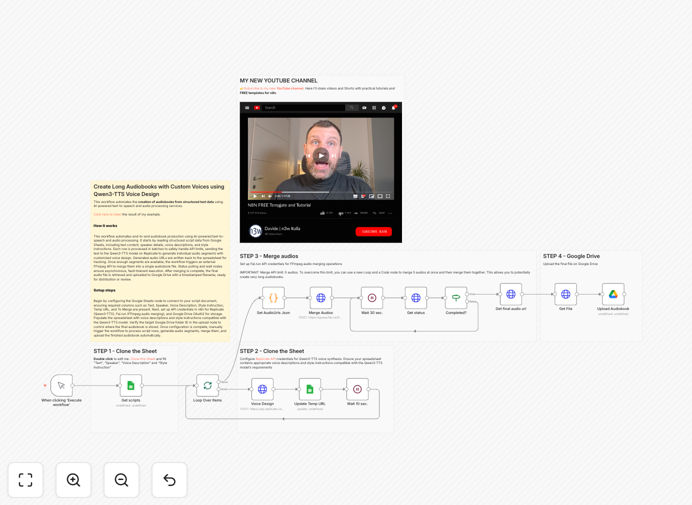
The automation follows a logical, step-by-step process that mimics professional audio production workflows but eliminates manual effort.
Step 1: Text Preparation & Organization
Your content is organized in a Google Sheets document with columns for text, speaker designation, voice description parameters, and processing status flags. This spreadsheet acts as your content management system, making it easy to edit, update, and track the conversion process.
Step 2: AI Voice Synthesis
The workflow sends each text segment to the Qwen3-TTS AI model via Replicate API. Using voice design prompts (like "warm female voice, professional tone, slight British accent"), it generates high-quality audio files for each section. The system handles API rate limits automatically and processes content in batches.
Step 3: Audio Processing & Merging
Once individual audio segments are generated, the workflow uses an external FFmpeg service to merge them into a single, seamless audiobook file. It handles proper sequencing, cross-fading between segments, and adds metadata like chapter markers if specified.
Step 4: Storage & Distribution
The final merged audiobook is automatically uploaded to your designated Google Drive folder with a timestamped filename. You can then distribute it through your preferred channels—embed it on your website, share via link, or integrate with podcast platforms.
Who This Is For
This automation is ideal for content creators, educators, publishers, and businesses who regularly produce audio content from written materials. Specifically:
- Training & Education Companies: Convert training manuals and course materials into audio for on-the-go learning.
- Content Publishers: Transform blog posts, articles, or newsletters into podcast-style audio content.
- Corporate Communications Teams: Create audio versions of company updates, policy documents, or internal announcements.
- Accessibility Services: Provide audio alternatives for visually impaired audiences or those who prefer listening over reading.
- Authors & Writers: Quickly produce audiobook versions of written works without studio recording costs.
What You'll Need
- n8n Instance: A self-hosted n8n setup or n8n.cloud account.
- Google Sheets: A spreadsheet containing your text content with specific columns (Text, Speaker, Voice Description, etc.).
- Replicate API Key: For accessing the Qwen3-TTS text-to-speech model.
- Fal.run Account: Or alternative FFmpeg service for audio merging operations.
- Google Drive Access: OAuth2 credentials to upload the final audiobook files.
- Structured Content: Text organized by chapter, section, or speaker for optimal processing.
Quick Setup Guide
Follow these steps to implement this audiobook automation in your n8n environment:
- Import the Template: Download the JSON file and import it into your n8n instance via the "Import from File" option.
- Configure Credentials: Set up credentials for Replicate API, Fal.run (or your FFmpeg service), and Google Drive in n8n's credentials management.
- Prepare Your Spreadsheet: Create a Google Sheet with columns for Text, Speaker, Voice Description, Style Instruction, Temp URL, and To Merge flag.
- Update Node Settings: In the Google Sheets node, paste your spreadsheet ID. In the Google Drive node, specify your target folder ID.
- Test with Sample Content: Run the workflow with a few rows of sample text to verify voice generation and merging work correctly.
- Schedule or Trigger: Set the workflow to run on a schedule (daily/weekly) or trigger it manually when you have new content ready.
Pro tip: Start with shorter texts (under 500 words) to test voice quality and settings before processing book-length content. Adjust voice description parameters in your spreadsheet to find the perfect tone for your brand.
Key Benefits
Reduce production time from weeks to hours. What traditionally takes days of studio recording and editing can now be accomplished in a fraction of the time, enabling rapid content iteration and updates.
Cut audio production costs by 90%+. Eliminate voice actor fees, studio rental costs, and editing expenses. The only ongoing costs are minimal API usage fees for processing.
Scale content production effortlessly. Process thousands of words simultaneously without additional human resources. Perfect for creating audio versions of entire documentation libraries or course catalogs.
Ensure perfect voice consistency. AI voices don't get tired, sick, or have bad recording days. Every piece of content maintains identical vocal quality and characteristics.
Enable easy content updates. When text changes, simply update your spreadsheet and regenerate—no need to re-record entire sections or match voice tones.