Upwork Claude AI Loom Video Outreach Automation

Create Personalized Loom Video Scripts from Upwork Jobs with Claude AI

Transform job postings into compelling video outreach assets in under 60 seconds. Free n8n template for freelancers and agencies.

Download Template JSON · n8n compatible · Free
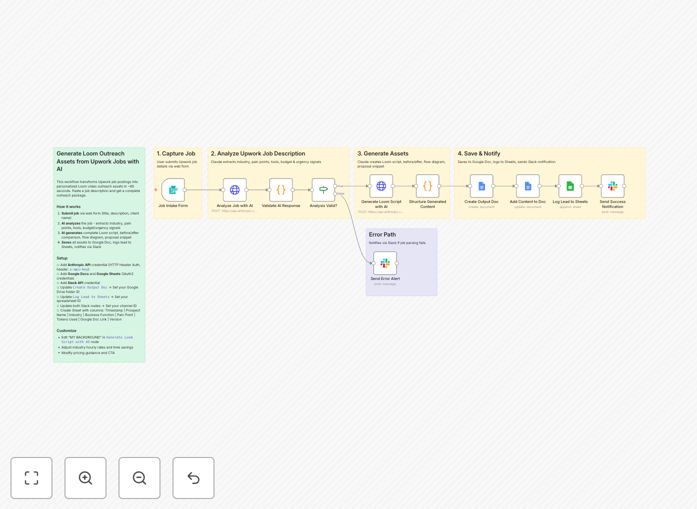
Automation workflow diagram showing Upwork job to Loom video script conversion process

What This Workflow Does

Standing out on Upwork is increasingly difficult. With hundreds of applicants for every quality job, generic text proposals get lost in the noise. This automation solves that problem by transforming Upwork job postings into personalized Loom video outreach packages in under 60 seconds.

The workflow uses Claude AI to analyze job descriptions, extract key pain points and industry signals, then generate complete video scripts with before/after comparisons, automation diagrams, and proposal snippets. Instead of spending 30-45 minutes manually researching and crafting personalized outreach for each job, you get a professional, tailored video script that demonstrates deep understanding and immediately captures client attention.

Pro tip: Video proposals typically receive 3-5x higher response rates than text-only applications. This automation lets you scale that advantage without the time investment.

How It Works

The automation follows a sophisticated three-stage process that mimics how top freelancers analyze and respond to opportunities, but at machine speed.

1. Job Analysis & Intelligence Extraction

When you submit an Upwork job via the built-in form, Claude AI performs deep analysis on the description. It identifies the industry classification, primary business function, specific pain points mentioned, tools referenced, budget/urgency signals, and competition level. This creates an intelligence profile that informs the personalized response.

2. Personalized Asset Generation

A second Claude call uses the intelligence profile to generate a complete outreach package: a 90-120 second Loom video script with hook, credibility statement, solution walkthrough, and call-to-action; a before/after process comparison with ROI calculations; an automation flow diagram structure; an Upwork proposal opening snippet; visual prompts for diagrams; and a quick reference card with pricing guidance.

3. Delivery & Tracking

All assets are saved to a Google Doc named by prospect for easy access. Lead data is logged to Google Sheets for tracking response rates and ROI. A Slack notification delivers the doc link and key insights to your team, ensuring immediate follow-up while the opportunity is hot.

Who This Is For

This template delivers maximum value for AI/automation agencies doing Upwork cold outreach, freelance developers and consultants who want to personalize proposals with video, marketing professionals seeking to stand out in competitive bids, and anyone wanting to scale personalized video prospecting without sacrificing quality. It's particularly effective for service providers in competitive niches where differentiation is critical.

What You'll Need

  1. Anthropic account for Claude API access (costs approximately $0.02-0.04 per job processed)
  2. Google account with Docs and Sheets enabled for asset storage and tracking
  3. Slack workspace for notifications (can be substituted for Discord, Teams, or email)
  4. n8n instance (cloud or self-hosted) to run the automation
  5. Loom account for recording and sharing the generated video scripts

Quick Setup Guide

Getting started takes about 15 minutes if you have your accounts ready. Follow these steps to deploy the automation.

  1. Import the template into your n8n instance using the downloaded JSON file
  2. Configure Anthropic credentials with HTTP Header Auth (header name: x-api-key)
  3. Connect Google OAuth2 credentials for both Docs and Sheets nodes
  4. Add Slack API credential with chat:write scope for notifications
  5. Update placeholder values in the Create Google Doc node (your Drive folder ID), Log to Google Sheets node (your spreadsheet ID), and both Slack nodes (your channel ID)
  6. Create tracking sheet with columns: Timestamp, Prospect Name, Industry, Business Function, Pain Point, Tokens Used, Google Doc Link, Version
  7. Test the workflow by submitting a sample Upwork job through the form trigger URL

Pro tip: The form trigger creates a URL at your-n8n-instance/form/upwork-loom-generator. Bookmark this for quick access when you find promising Upwork jobs.

Key Benefits

Save 5-15 hours weekly on proposal preparation. What previously took 30-45 minutes per job now happens in under 60 seconds, freeing up time for client work or finding better opportunities.

Increase response rates 3-5x compared to text-only proposals. Video creates personal connections that text cannot, demonstrating enthusiasm and building trust before the first conversation.

Demonstrate deeper understanding through AI-powered analysis that identifies subtle pain points and industry signals human reviewers might miss, making your proposals more relevant and compelling.

Scale personalized outreach without sacrificing quality. The automation maintains personalization at scale, allowing you to pursue more opportunities with consistent, high-quality responses.

Track and optimize performance with built-in logging to Google Sheets. Monitor which approaches work best and continuously refine your outreach strategy based on data.

Frequently Asked Questions

Common questions about video outreach automation and Upwork proposal strategies

AI can analyze job descriptions to identify key pain points, industry terminology, and budget signals that human reviewers might miss. By generating personalized video scripts that directly address these elements, you demonstrate deeper understanding and relevance, significantly increasing your chances of getting noticed and hired compared to generic text proposals.

This systematic approach ensures consistency in your outreach quality, even when applying to multiple jobs daily. The AI maintains your unique voice while optimizing structure and messaging based on what works best for specific industries and project types.

Loom videos create personal connections by showing your face and enthusiasm, which text cannot convey. They allow you to walk through your proposed solution visually, build trust faster, and stand out in crowded job feeds where most applicants use copy-pasted text. Video responses typically receive 3-5x higher response rates than text-only proposals.

Clients can hear your tone, see your professionalism, and gauge your genuine interest in their project. This human element is particularly valuable for remote work where initial impressions are crucial. Videos also demonstrate communication skills that clients value for collaborative projects.

Manually creating personalized video scripts for each Upwork job takes 30-45 minutes of research, writing, and planning. Automation reduces this to under 60 seconds while maintaining quality. For freelancers applying to 10-20 jobs weekly, this saves 5-15 hours that can be redirected to client work or finding better opportunities.

The time savings compound significantly over months and years. What previously limited your outreach capacity now becomes scalable, allowing you to pursue more qualified opportunities without increasing your workload or sacrificing proposal quality.

A strong script opens with a hook addressing the client's specific pain point, establishes your credibility with relevant experience, walks through a clear solution with visual examples, includes a before/after comparison showing value, and ends with a clear call-to-action. It should sound conversational, not robotic, and reference specific details from the job posting.

Effective scripts balance professionalism with personality, keep the video under two minutes, and provide visual cues for screen sharing. They should answer the client's implicit question: "Why should I hire you specifically for this project?" within the first 30 seconds.

Yes, the core workflow works for any platform where you need to personalize outreach based on job descriptions—including LinkedIn job posts, freelance marketplace listings, or direct client inquiries. The AI analyzes text inputs regardless of source, making it adaptable to Fiverr, Toptal, or even email outreach campaigns.

Simply adjust the input form to capture relevant details from different platforms. The intelligence extraction and script generation process remains equally effective for any text-based job description or project brief you encounter.

Track response rates, interview invitations, and conversion to hired projects. Compare these metrics against your previous text-only proposals. Also monitor watch time and engagement on your Loom videos—clients who watch most of your video are more likely to respond. A/B test different script structures to optimize performance over time.

The built-in Google Sheets logging helps track these metrics automatically. Over time, you'll identify which industries, project types, or script approaches yield the best results, allowing you to focus your efforts where they're most effective.

Yes, GrowwStacks specializes in building tailored automation systems for specific business needs. We can create custom workflows integrating your CRM, calendar, preferred AI models, and unique outreach sequences. Our team handles everything from strategy to implementation, ensuring the automation aligns perfectly with your sales process and brand voice.

Custom solutions might include multi-channel follow-up sequences, integration with your existing tech stack, industry-specific script templates, or advanced analytics dashboards. We work with you to understand your unique challenges and build automation that drives measurable business results.

Need a Custom Video Outreach Automation?

This free template is a starting point. Our team builds fully tailored automation systems for your specific business needs.