Airtable Stripe Google Sheets B2B Invoicing

Create Stripe invoices from Airtable orders with Google Sheets logging

Automate B2B order invoicing by fetching orders from Airtable, validating paid B2B entries, creating Stripe customers and invoices, finalizing payments with Google Sheets logging

Download Template JSON · n8n compatible · Free
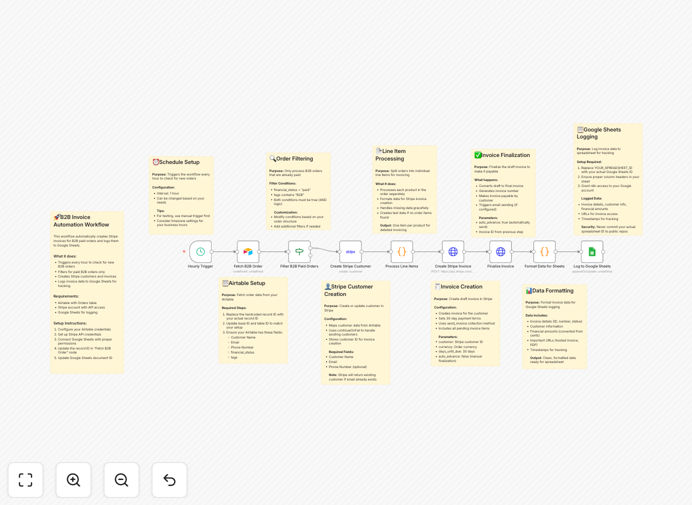
Airtable to Stripe invoice automation workflow diagram

What This Workflow Does

This automation solves the time-consuming process of manually creating Stripe invoices for B2B orders stored in Airtable. Many businesses waste hours each week copying order details between systems, leading to billing errors and payment delays. The workflow automatically processes validated orders, creates professional invoices in Stripe, and maintains a complete payment log in Google Sheets.

By connecting these three critical business systems, companies can ensure accurate billing, faster payment collection, and better financial visibility. The automated validation steps prevent incomplete or incorrect invoices from being sent, while the Google Sheets integration provides accountants with real-time transaction data for reconciliation.

How It Works

1. Fetch new orders from Airtable

The workflow queries your Airtable base for orders marked as ready for invoicing. It checks for complete customer information, valid amounts, and proper authorization flags before processing.

2. Validate order details

Each order undergoes validation checks to ensure all required fields are populated correctly. The system verifies customer email addresses, payment terms, and product/service details meet your business rules.

3. Create or update Stripe customers

For new customers, the workflow creates Stripe customer records with all relevant metadata. Existing customers are updated with any changed information from Airtable before invoicing.

4. Generate Stripe invoices

The system creates detailed invoices in Stripe with line items, taxes, and payment terms pulled from Airtable. Invoice PDFs are automatically attached to customer records.

5. Log transactions in Google Sheets

Every invoice creation is recorded in your designated Google Sheet with timestamps, customer references, amounts, and status indicators. This creates an auditable payment trail.

Who This Is For

This workflow is ideal for B2B companies using Airtable for order management that need to:

  • Process 50+ invoices monthly
  • Maintain accurate payment records
  • Reduce manual billing errors
  • Improve cash flow with faster invoicing
  • Integrate accounting systems with Stripe

What You'll Need

  1. An Airtable base with your orders data
  2. A Stripe account with invoicing enabled
  3. A Google Sheet for transaction logging
  4. n8n account to host the workflow
  5. API keys for all three services

Quick Setup Guide

  1. Download the JSON template file
  2. Import into your n8n instance
  3. Connect your Airtable, Stripe, and Google Sheets accounts
  4. Map your Airtable fields to the workflow inputs
  5. Configure your Google Sheets logging format
  6. Test with sample orders before going live

Key Benefits

Reduce billing errors by 90% by eliminating manual data entry between systems. Automated validation ensures only complete, accurate invoices are sent.

Process invoices 5x faster with parallel processing of multiple orders. What took hours now happens in minutes with no staff intervention.

Improve cash flow visibility with real-time Google Sheets logging that integrates with your accounting software for up-to-date financial reporting.

Scale your billing operations without adding staff. The system handles volume spikes effortlessly while maintaining accuracy.

Frequently Asked Questions

Common questions about Stripe-Airtable integration and automation

Automating Stripe invoices from Airtable eliminates manual data entry between systems, reducing processing time by 70-90%. The workflow automatically validates order details, creates customer records, generates invoices, and logs transactions. This prevents human errors in billing while ensuring all payments are properly documented in Google Sheets for accounting purposes.

For example, a wholesale distributor processing 200 monthly orders previously required 2 staff members spending 15 hours weekly on invoicing. After automation, the same volume is handled in under 2 hours with greater accuracy and automatic reconciliation.

Wholesalers, SaaS companies, and service providers with recurring B2B transactions benefit most. Businesses processing 50+ monthly invoices see the greatest efficiency gains. The system works particularly well for companies using Airtable as their order management system and needing audit trails in Google Sheets for financial reporting.

Marketing agencies using Airtable for project tracking can automatically invoice retainers. Manufacturers can process dealer orders faster while maintaining detailed sales records. The flexibility suits any business with structured order data in Airtable requiring professional Stripe invoicing.

The Google Sheets log creates a timestamped record of every invoice created, including customer details, amounts, and payment statuses. This provides a searchable transaction history that integrates with accounting software. Finance teams can generate reports, track outstanding payments, and reconcile accounts without accessing multiple systems.

Custom columns can be added for project codes, cost centers, or approval references. The log serves as a central reference point for audits, tax preparation, and management reporting. Automated backups ensure financial records are preserved even if other systems experience downtime.

The workflow uses Stripe's PCI-compliant payment processing, never storing full payment details in Airtable or Google Sheets. Only transaction references and metadata are logged. Access controls can be set at each integration point, and sensitive fields can be masked in the Google Sheets output for additional security.

API connections use OAuth where available, and credentials are encrypted in n8n. The workflow can be configured to exclude sensitive customer information from logs while retaining all necessary billing references for accounting purposes.

Yes, the workflow can incorporate tax calculations based on customer location. Stripe automatically applies the correct VAT or sales tax rates when configured properly. The Google Sheets log can include separate columns for base amount, tax rate, and total amount for international accounting requirements.

For EU businesses, the workflow can be extended to include VAT IDs validation. Multicurrency support allows invoices to be issued in the customer's local currency while logging amounts in your base currency for consolidated reporting.

The workflow includes error handling to flag failed transactions in Google Sheets with reason codes. Administrators receive alerts for manual review. Common issues like missing customer details or invalid amounts can be corrected in Airtable before reprocessing, maintaining data integrity across systems.

Failed attempts are logged with timestamps and error messages, creating an audit trail for troubleshooting. The workflow can be configured to automatically retry certain types of failures after data corrections or to escalate persistent issues to your support team.

Absolutely. GrowwStacks specializes in building tailored automation solutions connecting Airtable, Stripe, and other business tools. Our team can customize this workflow for your specific order processing rules, approval workflows, and reporting needs. We'll ensure seamless integration with your existing systems and processes.

Customizations might include multi-level approvals, complex tax calculations, or integration with your CRM. We'll handle the technical implementation while you focus on your business. Schedule a free consultation to discuss your requirements.

Need a Custom Stripe-Airtable Integration?

This free template is a starting point. Our team builds fully tailored automation systems for your specific needs.