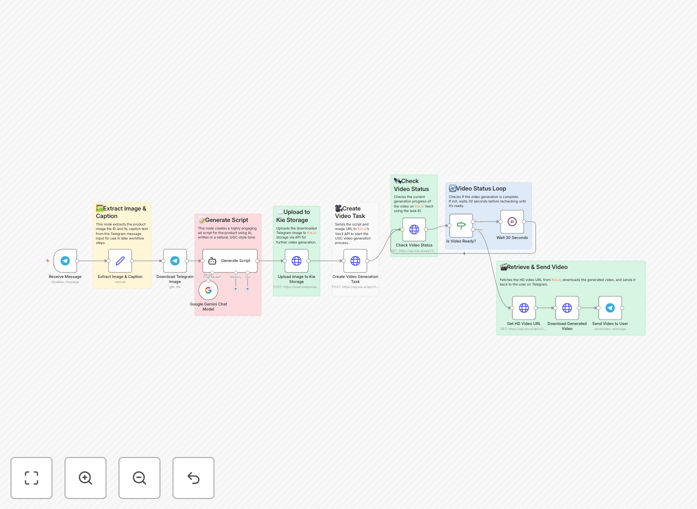
What This Workflow Does
For e-commerce brands, creators, and marketers, producing authentic-looking user-generated content (UGC) video ads is time-consuming and expensive. Hiring creators, filming, and editing can take days and cost hundreds per video. This creates a bottleneck in marketing campaigns, especially when you need to promote multiple products or test different ad angles quickly.
This n8n automation solves that by turning a simple Telegram message into a finished video ad. When a team member or creator sends a product photo and a brief caption to a Telegram bot, the workflow automatically generates a realistic UGC-style script using Gemini AI, then produces a high-quality vertical video using Kie.ai's Veo3.1 API. The finished ad is sent back to the chat, ready for publishing.
The entire process—from idea to deliverable—happens in under 5 minutes, eliminating the need for video editing software, scriptwriters, or complex production schedules. It's like having an on-demand video production team in your pocket.
How It Works
Step 1: Trigger via Telegram
A user sends a message to your connected Telegram bot containing a product image and a short description or caption. This triggers the workflow automatically.
Step 2: AI Script Generation with Gemini
The workflow sends the image and caption to Google's Gemini AI. Gemini analyzes the visual and textual context to generate a persuasive, natural-sounding UGC script. It includes an engaging hook, key product benefits, and a clear call-to-action, tailored to sound like a genuine customer review.
Step 3: Video Production with Kie.ai
The generated script and the original image are sent to Kie.ai's Veo3.1 API. This advanced video AI creates a short-form, vertical (9:16) video. It combines the visual, adds narration (via text-to-speech or on-screen text), and applies stylistic elements to match UGC aesthetics.
Step 4: Delivery & Notification
Once the video rendering is complete, the workflow downloads the video file and sends it back to the original Telegram chat. The user receives a notification with the ready-to-use video ad, which they can immediately review, share, or schedule for posting.
Who This Is For
This automation is ideal for e-commerce store owners, social media managers, digital marketing agencies, content creators, and product launch teams. If you need to produce a high volume of short-form video content for platforms like TikTok, Instagram Reels, YouTube Shorts, or Facebook Ads, this workflow dramatically reduces your production time and cost.
It's particularly valuable for DTC (Direct-to-Consumer) brands testing multiple ad creatives, affiliate marketers promoting various products, or any business that relies on authentic-looking video testimonials and reviews to drive conversions.
Pro tip: Use this workflow to run rapid A/B tests. Send slightly different captions for the same product image to generate multiple video variants. You can quickly identify which messaging resonates best with your audience without the overhead of traditional video production.
What You'll Need
- A Telegram Bot Token: Created via @BotFather on Telegram. This allows the workflow to receive messages.
- Google Gemini API Key: Obtainable from Google AI Studio. This powers the intelligent script generation.
- Kie.ai Veo3.1 API Key: Requires a Kie.ai account. This is the engine for high-quality video synthesis.
- An n8n Instance: You can use n8n.cloud (hosted) or self-host n8n on your own server.
- Basic n8n Knowledge: Understanding how to import a JSON workflow and add credentials is sufficient.
Quick Setup Guide
Follow these steps to get your automated video factory running in under 15 minutes:
- Download & Import: Click the "Download Template" button above to get the JSON file. In your n8n instance, go to Workflows > Import from File and select the downloaded file.
- Configure Telegram: In the "Telegram Trigger" node, click "Add Credential" and enter your Telegram Bot Token. Start a chat with your bot to activate it.
- Add Gemini API Key: Find the "Google Gemini" node, add a new credential, and paste your Gemini API key. Ensure the model is set to a vision-capable one like Gemini Pro Vision.
- Set Up Kie.ai: In the HTTP Request nodes calling the Kie.ai API, update the authorization headers with your Veo3.1 API key. You may need to adjust parameters like video duration or aspect ratio in the request body.
- Test & Activate: Activate the workflow. Send a test image and caption to your Telegram bot. You should receive a generated video ad back within a few minutes.
Key Benefits
Cut video production time from days to minutes. What traditionally required scheduling a shoot, editing, and rendering now happens automatically while you focus on other tasks.
Dramatically lower content creation costs. Eliminate fees for video editors, scriptwriters, and UGC creators. The marginal cost per video becomes just the API usage fees, which are fractions of a dollar.
Scale your video output effortlessly. Produce dozens of video ads per day without adding team members. Perfect for promoting large product catalogs or running extensive multivariate testing campaigns.
Maintain a consistent, authentic brand voice. By fine-tuning the Gemini prompt, you can ensure every generated script aligns with your brand's tone—be it friendly, expert, humorous, or inspirational.
Streamline team collaboration. Marketing, sales, and product teams can all request video ads directly via Telegram, centralizing requests and deliverables without complex briefing forms or project management tools.