n8n UptimeRobot Website Monitoring Automation

Create, update, and get a monitor using UptimeRobot

Automate your website monitoring setup with this n8n workflow template for UptimeRobot integration

Download Template JSON · n8n compatible · Free
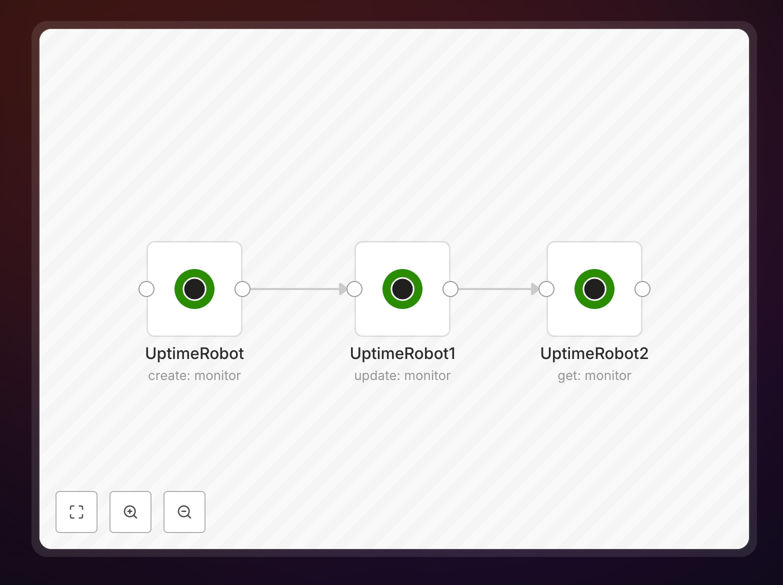
UptimeRobot monitor management workflow in n8n

What This Workflow Does

This n8n workflow automates the management of UptimeRobot monitors, allowing you to create new website monitors, update existing ones, and retrieve monitor status information programmatically. It eliminates the need for manual configuration in the UptimeRobot dashboard, saving time and reducing human error in your monitoring setup.

By connecting UptimeRobot with other apps through n8n, you can trigger monitor creation based on events in your workflow, automatically update monitoring parameters when your infrastructure changes, and pull status reports into your existing systems for centralized visibility.

How It Works

1. Monitor Creation

The workflow uses UptimeRobot's API to create new monitors with specified parameters like URL, friendly name, monitoring interval, and alert contacts. You can trigger this automatically when new websites or services are deployed.

2. Monitor Updates

Existing monitors can be updated to change their parameters without manual intervention. This is useful when URLs change, monitoring intervals need adjustment, or alert thresholds require modification.

3. Status Retrieval

The workflow can fetch current status information for any monitor, including uptime percentage, response times, and current status (up, down, or paused). This data can be sent to dashboards, alert systems, or incident management tools.

Who This Is For

This workflow is ideal for DevOps teams, website administrators, and IT operations professionals who manage multiple websites or services and want to automate their monitoring setup. It's particularly valuable for:

  • Agencies managing client websites
  • SaaS companies monitoring multiple endpoints
  • E-commerce businesses tracking storefront availability
  • Developers who frequently deploy new services

What You'll Need

  1. An n8n instance (cloud or self-hosted)
  2. UptimeRobot API key (available in account settings)
  3. The URLs you want to monitor
  4. Basic understanding of n8n workflows

Quick Setup Guide

  1. Download and import the JSON template into your n8n instance
  2. Add your UptimeRobot API key to the credentials
  3. Configure the monitor parameters (URLs, intervals, etc.)
  4. Set up triggers based on your needs (webhooks, schedules, etc.)
  5. Test the workflow with sample data
  6. Deploy the workflow for production use

Key Benefits

Save hours of manual configuration: Automating monitor setup eliminates repetitive dashboard work when adding new websites or services.

Ensure consistency across monitors: Automated workflows apply the same standards to all monitors, reducing configuration drift.

Integrate monitoring with other systems: Connect UptimeRobot data with your alerting, ticketing, or reporting tools.

Scale monitoring effortlessly: Manage hundreds of monitors as easily as managing one, with no additional manual effort.

Reduce human error: Automated configurations eliminate mistakes that can happen with manual monitor setup.

Frequently Asked Questions

Common questions about UptimeRobot integration and website monitoring automation

Automating website monitoring saves significant time while improving reliability. Manual monitoring setup becomes impractical at scale, while automation ensures consistent configurations across all monitored endpoints.

For businesses with dozens of websites or APIs, automation reduces setup time from hours to minutes. It also enables dynamic monitoring adjustments based on deployment pipelines or infrastructure changes.

  • Eliminates repetitive manual work
  • Ensures monitoring parity across environments
  • Enables monitoring as part of deployment workflows

UptimeRobot offers reliable monitoring with a generous free tier, making it popular for small to medium businesses. Its API allows deep integration with automation workflows unlike some competitors.

Compared to alternatives, UptimeRobot provides excellent uptime monitoring basics without unnecessary complexity. The 5-minute check interval in the free plan suits most business needs, while paid plans offer 1-minute intervals.

  • 50 monitors free forever
  • Simple, focused feature set
  • Well-documented API for automation

This workflow can monitor any publicly accessible website, web application, or API endpoint. UptimeRobot supports HTTP/HTTPS, ping, port, and keyword monitoring.

E-commerce stores, marketing sites, SaaS applications, and internal tools all benefit from automated monitoring. The workflow can even monitor staging environments temporarily during development cycles.

  • Works with any HTTP/HTTPS endpoint
  • Supports custom ports and protocols
  • Can verify specific page content

UptimeRobot offers webhook notifications that can connect to most modern alerting systems. This workflow enhances that by allowing you to transform and route alerts through n8n.

Common integrations include Slack for team alerts, PagerDuty for on-call rotations, and ticketing systems like Jira for automatic incident creation. You can also store historical data in databases for reporting.

  • Route alerts to communication tools
  • Create tickets automatically
  • Enrich alerts with additional context

UptimeRobot requires public internet access to monitor endpoints, but you can monitor internal systems by creating a lightweight public proxy that checks internal status.

Many businesses create simple status endpoints that internal systems update, which UptimeRobot can then monitor. This provides visibility without exposing sensitive internal infrastructure.

  • Use status proxy endpoints
  • Monitor heartbeat signals
  • Combine with internal monitoring

For most business websites, 5-minute checks provide sufficient monitoring without unnecessary load. Critical applications may benefit from 1-minute checks available in paid plans.

The optimal interval balances responsiveness with resource usage. High-frequency checks catch issues faster but increase false positives from temporary network blips. This workflow lets you easily adjust intervals as needs change.

  • 5 minutes for most sites
  • 1 minute for critical apps
  • Adjust based on traffic patterns

Absolutely! GrowwStacks specializes in building tailored monitoring automation solutions that connect UptimeRobot with your unique tech stack and business processes.

Our automation engineers can create custom workflows that integrate monitoring with your deployment pipelines, alerting systems, and operational dashboards. We'll design a solution that fits your specific infrastructure and team workflows.

  • Custom alert routing logic
  • Integration with internal tools
  • Tailored reporting and dashboards

Need a Custom UptimeRobot Integration?

This free template is a starting point. Our team builds fully tailored automation systems for your specific needs.