YouTube RSS Redis Content Aggregation n8n

Create YouTube Video RSS Feed with Redis Caching

Automatically build a personal RSS feed of your favorite YouTube channels. Watch videos directly in your RSS reader without YouTube distractions.

Download Template JSON · n8n compatible · Free
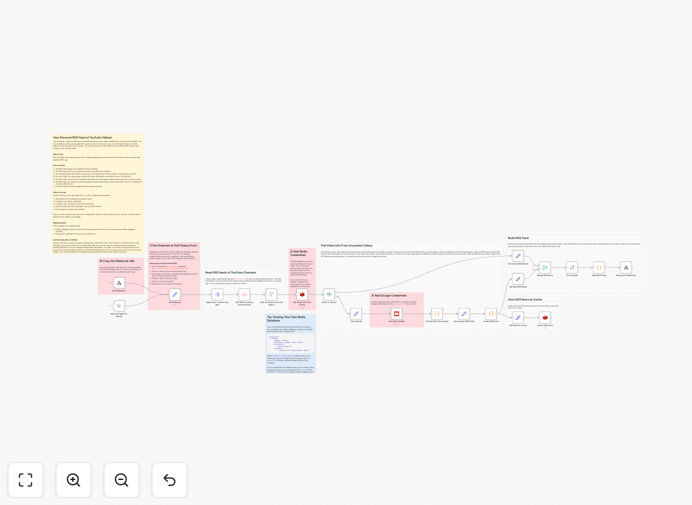
YouTube RSS feed automation workflow diagram showing integration between YouTube, Redis, and RSS output

What This Workflow Does

This automation solves a common problem for content consumers: YouTube's algorithm-driven interface filled with distractions, recommendations, and ads. Instead of visiting YouTube directly, this workflow creates a clean, personalized RSS feed containing only the latest videos from channels you actually care about.

The system pulls video data from YouTube's API, filters out shorts and older content, embeds video players directly in the RSS items, and caches everything in Redis for performance. You get a distraction-free reading experience where you can watch videos directly in your preferred RSS reader without ever visiting YouTube.com.

For businesses, this provides a powerful content monitoring tool. Track competitor channels, industry thought leaders, or compile training materials—all delivered automatically to your team's RSS feeds without manual checking.

How It Works

1. RSS Client Trigger

Your RSS reader pings the workflow's webhook URL, triggering the automation to generate fresh content. This happens automatically based on your reader's refresh schedule.

2. YouTube Channel Data Collection

The workflow fetches the latest videos from your configured YouTube channels using the YouTube Data API. You can add any channel by simply entering its ID.

3. Content Filtering & Processing

Videos are filtered to exclude shorts and content older than your specified timeframe (default: one week). Only regular uploads from your selected time window proceed.

4. Video Metadata Enhancement

For each video, the workflow retrieves the embedded player code and full description from YouTube's API, preparing rich content for the RSS feed.

5. Redis Caching Layer

Processed video data is stored in Redis, preventing duplicate API calls on subsequent requests. This reduces YouTube API usage and dramatically speeds up feed generation.

6. RSS Feed Generation

The system builds a complete RSS 2.0 feed with embedded video players, descriptions, and proper metadata, returning it to your RSS reader as valid XML.

Who This Is For

This workflow is ideal for content creators, marketers, researchers, and anyone who follows multiple YouTube channels but wants to avoid YouTube's distracting interface. It's perfect for professionals who need to monitor industry content without getting sucked into unrelated videos.

Business teams can use it to aggregate competitor content, track industry trends, or compile training materials. Developers appreciate the clean, automated approach to content consumption. Even casual viewers benefit from ad-free, algorithm-free viewing of their subscribed channels.

What You'll Need

  1. n8n instance (cloud or self-hosted) to run the workflow
  2. YouTube Data API credentials from Google Cloud Console
  3. Redis database (cloud service like Redis Cloud, Upstash, or self-hosted)
  4. RSS reader that supports embedded video (Feedly, Inoreader, etc.)
  5. Channel IDs for the YouTube channels you want to follow

Pro tip: Use Upstash for Redis—they offer a generous free tier perfect for this workflow, with automatic backups and easy scaling.

Quick Setup Guide

  1. Download and import the template into your n8n instance
  2. Configure YouTube API credentials in the Google node with your OAuth tokens
  3. Set up Redis connection with your database host, port, and password
  4. Add channel IDs to the "Set Channels" node for the YouTube channels you follow
  5. Copy the webhook URL from the Webhook node
  6. Add URL to your RSS reader as a new feed subscription
  7. Activate the workflow and test with your RSS reader

Key Benefits

Save 2-3 hours weekly by eliminating manual checking of multiple YouTube channels. The automation delivers everything to one place automatically.

100% distraction-free viewing without YouTube's algorithm pushing unrelated content, ads, or suggested videos that derail your focus.

Redis caching reduces API costs by up to 90% compared to fetching fresh data on every request, especially important with YouTube API quotas.

Centralized content monitoring for teams—every member gets the same curated feed without individual subscriptions or missed updates.

Future-proof content access that works even if YouTube changes their interface or subscription system, since you control the feed generation.

Frequently Asked Questions

Common questions about YouTube automation and RSS integration

Using an RSS feed for YouTube gives you a distraction-free experience without algorithm-driven recommendations, ads, or suggested videos. You get only the content from channels you choose, delivered directly to your RSS reader where you can watch embedded videos without visiting YouTube's interface.

This approach eliminates "YouTube rabbit holes" where you start watching one video and end up spending hours on unrelated content. It's particularly valuable for professionals who need to stay informed without losing productivity to platform distractions.

  • No algorithm pushing unrelated content
  • Watch videos directly in your RSS reader
  • Combine multiple channels in one feed

Automating YouTube content aggregation saves hours of manual checking, ensures you never miss an upload from favorite creators, centralizes content from multiple channels in one place, and provides a clean, ad-free viewing experience directly in your preferred RSS reader.

For businesses, automation enables consistent competitor monitoring and industry trend tracking without assigning someone to manually check channels daily. The system works 24/7, delivering updates immediately when new content publishes.

  • Eliminates daily manual checking
  • Instant notifications of new uploads
  • Historical tracking of channel activity

Redis caching dramatically improves performance by storing video data between requests, reducing API calls to YouTube, preventing rate limiting, and ensuring faster feed generation. It also reduces costs if you're using paid API services and provides more reliable delivery during YouTube API outages.

Without caching, each RSS reader request would trigger fresh API calls to YouTube, quickly exhausting quotas and slowing response times. Redis serves cached content instantly while background processes update the cache periodically.

  • Reduces YouTube API calls by 80-90%
  • Feed loads in milliseconds instead of seconds
  • Protects against YouTube API rate limits

Absolutely. Businesses use similar workflows to monitor competitor YouTube channels, track industry thought leaders, aggregate training content for teams, or compile customer testimonial videos. The automation ensures timely updates without manual monitoring.

Marketing teams can track competitor campaign launches. Product teams can monitor tutorial content about their products. Executive teams can stay informed on industry trends—all delivered automatically to their preferred reading tools.

  • Competitor channel monitoring
  • Industry trend aggregation
  • Team training content compilation

Most modern RSS readers support embedded YouTube players, including Feedly, Inoreader, NewsBlur, and self-hosted options like FreshRSS or Miniflux. The workflow generates standard RSS with embedded iframe players that work across most platforms.

Mobile RSS apps like Reeder (iOS) and Read You (Android) also handle embedded videos well. For team use, consider readers with sharing and annotation features like Inoreader's business plans or self-hosted solutions with multi-user support.

  • Feedly and Inoreader have excellent embedded video support
  • Test with your preferred reader before committing
  • Self-hosted readers offer complete control

Setting up Redis is straightforward with cloud services like Redis Cloud, Upstash, or AWS ElastiCache offering free tiers. For local development, Docker makes installation simple. The workflow includes clear configuration steps for Redis connection.

Most users can have Redis running in under 10 minutes using a cloud service. The free tiers typically provide enough capacity for personal use, while business plans scale easily for team deployments.

  • Cloud services: 5-10 minute setup
  • Docker local install: 15 minutes
  • Free tiers available for testing

Yes, GrowwStacks specializes in custom YouTube automation solutions for businesses. We can build systems for competitor monitoring, content aggregation, video analytics, automated clipping, or integration with your internal tools and databases.

Our team designs workflows tailored to your specific use case—whether you need to track 50 competitor channels, automatically clip highlights for social media, or integrate YouTube data with your CRM. We handle the technical complexity so you get reliable automation.

  • Custom competitor monitoring dashboards
  • Automated video clipping and sharing
  • Integration with your existing tools

Need a Custom YouTube Automation?

This free template is a starting point. Our team builds fully tailored automation systems for your specific business needs.