Zapier CRM PDF Generation Gmail Slack

CRM to professional PDF Proposals with Gmail, Drive & Slack notifications

Transform proposal creation from hours to minutes - automatically generate beautifully designed PDF proposals from CRM data or form submissions

Download Template JSON · Zapier compatible · Free
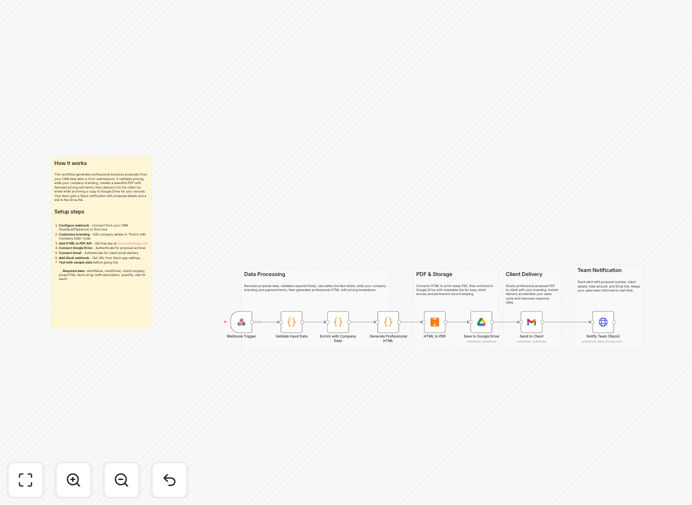
Automated PDF proposal generation workflow

What This Workflow Does

This automation transforms your proposal creation process from a manual, time-consuming task into an efficient, automated system. It pulls client and project details from your CRM (like HubSpot, Salesforce, or Pipedrive) and automatically generates professional PDF proposals complete with your branding, pricing, and terms.

The workflow then delivers these proposals via email (with Gmail), stores them in Google Drive for record-keeping, and sends Slack notifications to your sales team - all without manual intervention. What typically takes hours of copying/pasting, formatting, and emailing now happens automatically in minutes.

How It Works

1. CRM Data Extraction

The workflow begins by pulling client information, project details, pricing, and terms from your CRM system. This data serves as the foundation for your proposal content.

2. Dynamic Proposal Generation

Using the extracted CRM data, the workflow assembles a professional proposal document with your company branding, client-specific details, and personalized pricing. The template maintains consistent formatting while dynamically inserting client-specific information.

3. PDF Conversion & Branding

The completed proposal document is converted to PDF format with your company logo, colors, and professional layout. This creates a polished, client-ready document that maintains your brand standards.

4. Automated Delivery System

The workflow then emails the PDF proposal directly to your client through Gmail, stores a copy in your Google Drive for records, and notifies your sales team via Slack - completing the entire process without manual steps.

Who This Is For

This workflow is ideal for service businesses, agencies, consultants, and sales teams that regularly send proposals. It's particularly valuable for:

  • Digital marketing agencies sending campaign proposals
  • IT consultants pitching project scopes
  • Freelancers who need to streamline client onboarding
  • Sales teams managing high proposal volumes
  • Businesses wanting to maintain brand consistency across proposals

What You'll Need

  1. A CRM system (HubSpot, Salesforce, Pipedrive, etc.)
  2. Google Workspace account (for Gmail and Drive)
  3. Slack workspace for notifications
  4. A proposal template document (Google Docs or PDF)
  5. Zapier account to run the automation

Quick Setup Guide

  1. Download the template file and import it into your Zapier account
  2. Connect your CRM as the trigger source
  3. Configure your proposal template with merge fields
  4. Set up your Gmail, Google Drive, and Slack connections
  5. Test with sample data to verify formatting
  6. Activate the workflow for live use

Key Benefits

Save 3-5 hours per proposal by eliminating manual document creation, formatting, and emailing. The automation handles all repetitive tasks.

Ensure brand consistency across all client communications with standardized templates that automatically apply your branding.

Reduce errors by pulling data directly from your CRM instead of manual copy/paste which often leads to mistakes.

Improve response times by sending proposals immediately after CRM updates rather than waiting for manual processing.

Centralize documentation with automatic Google Drive storage that keeps all proposals organized and searchable.

Frequently Asked Questions

Common questions about CRM proposal automation

Automated proposals dramatically accelerate your sales cycle by eliminating delays in proposal creation. When a lead shows interest, you can respond with a professional proposal immediately rather than waiting hours or days to manually prepare one.

For example, a marketing agency using this automation saw their average proposal turnaround time drop from 48 hours to under 15 minutes. This speed advantage helps you close deals faster before competitors can respond.

  • Faster responses increase conversion rates
  • Consistent formatting builds trust
  • Automated tracking improves follow-up

This workflow integrates with most major CRMs including HubSpot, Salesforce, Pipedrive, Zoho CRM, and Freshsales. The template uses standard CRM fields that exist across platforms, making it adaptable to your specific system.

For specialized CRMs, minor adjustments may be needed to map your custom fields. Many businesses start with their basic contact and opportunity data, then expand to include custom fields as they refine the process.

  • Works with cloud-based CRMs
  • Can adapt to custom fields
  • No coding required for setup

Yes, the proposal template is fully customizable to match your brand identity. You can modify fonts, colors, logos, and layout to create a professional document that reflects your company's style.

A financial services firm using this automation created different templates for various service lines while maintaining consistent branding. The system automatically selects the appropriate template based on the CRM opportunity type.

  • Upload your company logo
  • Set brand colors and fonts
  • Create multiple template variations

The workflow maintains the same security standards as your existing systems. Data flows directly between your CRM, Google Workspace, and Slack using their native security protocols without intermediate storage.

Sensitive pricing information remains protected because the automation uses the same access controls as your manual processes. For additional security, you can implement two-factor authentication on all connected platforms.

  • Uses existing platform security
  • No data stored externally
  • Optional encryption available

The system allows for manual review and edits before sending. You can configure the workflow to pause after PDF generation, enabling your team to review and approve each proposal or make custom adjustments when needed.

A legal services provider uses this approach for complex cases - the automation prepares 90% of the proposal, then attorneys add case-specific details before final delivery. This balances efficiency with necessary customization.

  • Optional approval steps
  • Edit generated PDFs manually
  • Maintain human oversight

Yes, you can integrate proposal tracking by adding a link to a tracked document instead of attaching the PDF directly. Services like DocSend or Google Drive can provide analytics on when the client opens the proposal and how much time they spend reviewing it.

This tracking data can be fed back into your CRM, helping your sales team prioritize follow-ups based on client engagement. Knowing which sections clients spend the most time on also helps refine future proposals.

  • Track opens and view duration
  • Identify engaged prospects
  • Improve proposal content

Absolutely! GrowwStacks specializes in building custom automation solutions tailored to your specific CRM, proposal templates, and business processes. Our team can create a system that matches your exact requirements.

We'll analyze your current proposal workflow, identify automation opportunities, and build a solution that integrates seamlessly with your existing tools. Custom automations typically pay for themselves within weeks through time savings and increased conversion rates.

  • Tailored to your CRM and templates
  • Seamless integration with your tools
  • Ongoing support available

Need a Custom CRM Proposal Automation?

This free template is a starting point. Our team builds fully tailored automation systems for your specific needs.