Zapier API Integration Financial Automation Webhook Exchange Rates

Currency Converter via Webhook Using ExchangeRate.host

Automate real-time currency conversions for e-commerce, international business, and financial tracking with this free n8n workflow template.

Download Template JSON · n8n compatible · Free
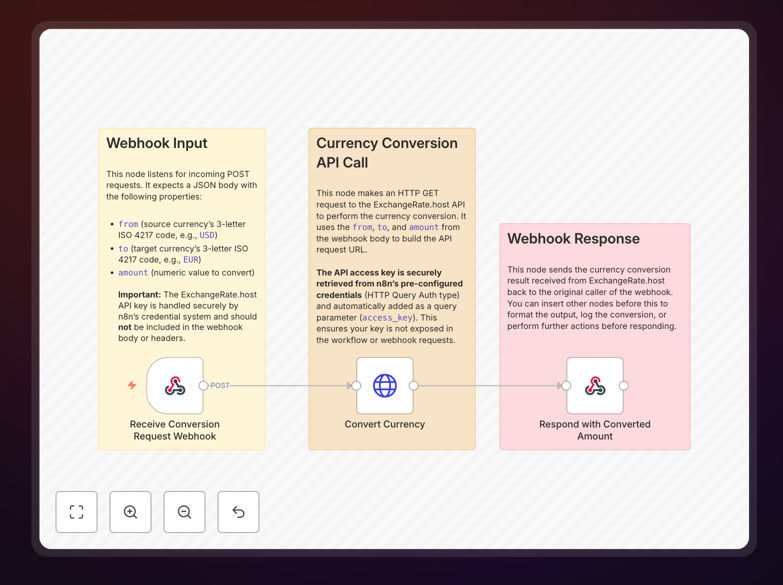
Currency converter workflow diagram showing webhook trigger, API call, and response flow

What This Workflow Does

This automation solves a common pain point for businesses operating internationally: manually converting currencies for pricing, invoicing, and financial reporting. Instead of checking exchange rates daily or using spreadsheets, this workflow lets you trigger a real-time currency conversion simply by sending a webhook request.

By integrating with the ExchangeRate.host API, it fetches live rates for over 170 currencies and returns the converted amount instantly. This is perfect for e‑commerce platforms displaying local prices, freelancers billing clients in different currencies, companies reconciling international payments, or anyone needing up‑to‑date financial data.

The workflow acts as a central conversion engine that you can call from any system—your website, internal tools, CRM, or accounting software—ensuring accuracy and saving hours of manual work each month.

How It Works

Step 1: Receive Conversion Request via Webhook

A webhook node listens for incoming POST requests containing three key parameters: the source currency (e.g., USD), target currency (e.g., EUR), and the amount to convert. This webhook can be triggered from any application that needs a conversion.

Step 2: Fetch Live Exchange Rate from API

The workflow securely calls the ExchangeRate.host API using your stored credentials. It constructs the API URL dynamically based on the webhook input and retrieves the current exchange rate. The API key is handled safely within n8n’s credential system.

Step 3: Perform Calculation and Return Result

The node multiplies the amount by the fetched rate, calculates the converted value, and formats the response. The result is sent back to the originating system via the webhook response, completing the conversion in seconds.

Who This Is For

This template is ideal for businesses and individuals dealing with multi‑currency operations:

  • E‑commerce stores selling globally that need dynamic price displays.
  • Freelancers & consultants billing international clients in their local currency.
  • Financial teams tracking expenses, revenues, or investments across currencies.
  • Travel companies estimating costs and converting travel budgets.
  • Accounting departments automating ledger entries for foreign transactions.
  • Developers building apps or dashboards that require real‑time currency data.

What You'll Need

  1. A running n8n instance (cloud or self‑hosted).
  2. A free API key from ExchangeRate.host (sign up at exchangerate.host).
  3. A system that can send HTTP POST requests (webhook triggers) – this could be your website backend, a CRM, an internal tool, or even a simple script.
  4. Basic understanding of JSON payloads (the webhook expects a simple JSON object with from, to, and amount fields).

Quick Setup Guide

  1. Import the downloaded JSON template into your n8n editor.
  2. Create an “HTTP Query Auth” credential in n8n, entering your ExchangeRate.host API key with parameter name access_key.
  3. Assign that credential to the “Convert Currency” HTTP Request node.
  4. Set a unique path for the Webhook node (e.g., /convert-currency) and activate the workflow.
  5. Test by sending a POST request to your webhook URL with a JSON body like { "from": "USD", "to": "EUR", "amount": 100 }.
  6. Integrate the webhook endpoint into your applications to automate conversions on‑demand.

Pro tip: Add a Cache node after the API call to store recent rates for common currency pairs. This reduces API calls and speeds up repeated conversions, especially if you handle high‑volume requests.

Key Benefits

Real‑time accuracy: Eliminates guesswork and outdated manual rates by pulling live exchange data directly from a reliable API.

Time savings: Automates a repetitive task that can consume hours each month, freeing your team for higher‑value work.

Scalability: Handles thousands of conversion requests effortlessly, perfect for growing e‑commerce or financial operations.

Error reduction: Removes human miscalculation risks, ensuring financial reports and invoices are always correct.

Flexible integration: Works with any system that can send a webhook—CRMs, accounting software, custom apps, or even chat bots.

Frequently Asked Questions

Common questions about currency conversion automation and integration

Automation streamlines international business by eliminating manual currency conversion tasks, ensuring accurate real-time exchange rates for invoicing, payment reconciliation, and financial reporting. It reduces human error, saves administrative time, and provides consistent data across systems, improving decision-making and customer experience.

For example, a company receiving payments in multiple currencies can automatically convert each transaction to their base currency for accounting, generate invoices in the client's local currency, and update financial dashboards instantly without manual intervention.

Integrating real-time currency data allows e-commerce stores to display accurate local prices instantly, reducing cart abandonment from price confusion. It automates payment conversion for multi-currency transactions, simplifies accounting, and creates a seamless shopping experience for international customers, boosting global sales and trust.

When a customer from Japan views your store, the price can be converted to JPY dynamically, and when they pay in their local currency, the settlement is automatically converted to your base currency for record-keeping, eliminating manual calculation and reconciliation delays.

Automating financial tracking with live exchange rates provides up-to-date valuation of international assets, expenses, and revenues. It ensures budget reports reflect true current values, aids in forecasting, and automates portfolio rebalancing alerts. This reduces manual data entry, improves accuracy, and enables proactive financial management.

Businesses holding investments in foreign markets can see their portfolio value in their home currency daily, track overseas operational costs accurately, and generate consolidated financial statements without manual conversion spreadsheets.

Manual multi-currency handling is time-consuming, prone to errors from outdated rates, and creates reconciliation delays. It leads to inconsistent pricing, invoice discrepancies, and complex accounting entries. Without automation, businesses risk financial loss from rate fluctuations and waste resources on repetitive conversion tasks.

Teams often spend hours each week updating spreadsheets, verifying rates, and correcting mistakes—all of which can be eliminated with an automated workflow that pulls live data and integrates directly into your financial systems.

Yes, this workflow is ideal for personal finance and travel budgeting. You can automate conversion of expenses incurred abroad into your home currency, track investment values in foreign markets, and create dashboards showing net worth in a single currency. It simplifies tracking and provides real-time insights for better financial planning.

For travelers, you can build a simple app that converts hotel, flight, and meal costs from local currency to your home currency as you spend, giving you an accurate real-time travel budget without manual calculations.

Automating via webhook is secure when implemented correctly. The workflow uses API keys stored securely in n8n's credential system, not exposed in requests. Webhook endpoints can be authenticated, and conversion data is processed internally without exposing sensitive financial details. Proper logging and error handling further enhance security.

You can add IP filtering, request validation, and encrypted payloads to ensure only authorized systems trigger conversions, keeping your financial data protected throughout the automation process.

You can connect currency conversion to accounting software like QuickBooks or Xero for automated ledger entries, CRM systems like Salesforce for client invoice generation, payment gateways like Stripe for real-time settlement conversion, and internal dashboards for financial reporting. It acts as a central conversion engine for any financial data flow.

By adding nodes for Google Sheets, Airtable, or databases, you can log every conversion for auditing, create alerts for rate thresholds, and even trigger follow-up actions like sending notifications or updating records.

Yes, GrowwStacks specializes in building custom currency automation solutions tailored to your specific business needs. We can integrate conversion workflows with your existing accounting, e-commerce, or CRM systems, add multi-currency alerts, logging, and advanced error handling, and ensure compliance with your financial processes.

Whether you need high-volume conversion for an online store, real-time portfolio tracking, or automated invoice generation in multiple currencies, we design workflows that fit your exact requirements and scale with your growth.

  • Integration with your current software stack
  • Custom reporting and alerting based on rate changes
  • Enhanced security and audit logging

Need a Custom Currency Conversion Automation?

This free template is a starting point. Our team builds fully tailored automation systems for your specific business needs.