What This Workflow Does
Manual customer onboarding creates inconsistent experiences, delays critical communications, and overwhelms your team with repetitive tasks. This automation solves those problems by creating a seamless, automated journey from the moment a customer signs up.
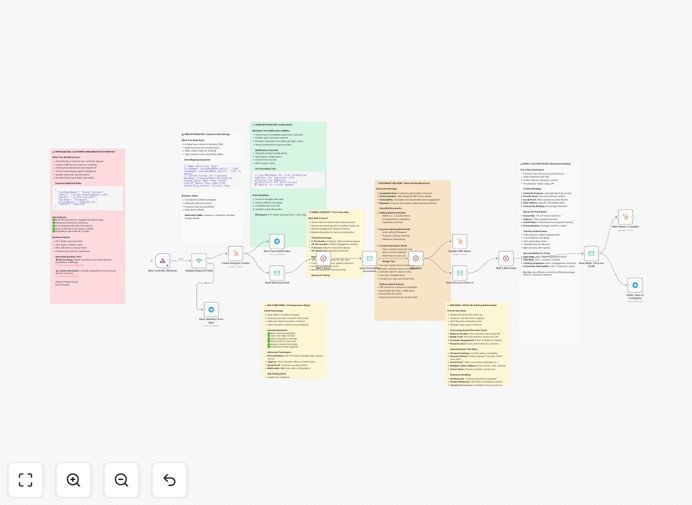
The workflow automatically handles new customer onboarding by receiving signup data, validating information, creating CRM records, sending timed email sequences, and notifying your team at each milestone. It transforms what was once a manual, error-prone process into a reliable system that works 24/7 while providing complete visibility into each customer's progress.
By automating onboarding, you ensure every customer receives the same high-quality experience regardless of when they sign up or which team member is available. This consistency builds trust, accelerates time-to-value, and significantly improves retention during the critical first 90 days.
How It Works
1. Trigger & Data Validation
The workflow starts when a new customer signs up via your website, app, or payment system. A webhook receives the customer data (name, email, company, plan) and immediately validates that all required information is present. Invalid or incomplete submissions are flagged for manual review, ensuring only qualified leads enter your automated system.
2. CRM Contact Creation
Valid customer data is automatically sent to HubSpot where a new contact is created. The workflow maps fields appropriately (splitting full names into first/last), adds relevant tags, assigns the contact to the correct team member, and updates the deal stage to "Onboarding Started." This happens instantly, eliminating the manual data entry that often delays follow-up.
3. Welcome & Initial Communication
Immediately after CRM creation, the customer receives a personalized welcome email that confirms their signup, sets expectations, and provides immediate next steps. Simultaneously, your customer success team receives a notification via Slack, Teams, or Telegram with the customer's details and a direct link to their HubSpot record.
4. Timed Educational Sequence
The automation then enters a carefully timed educational phase. After 2 hours (avoiding immediate overwhelm), onboarding documents or tutorial videos are automatically sent. At 24 hours, a personal check-in email goes out. At 72 hours, a "Week 1 Success Guide" delivers advanced tips. Each email is personalized with the customer's name and company for maximum relevance.
5. Progress Tracking & Team Updates
Throughout the sequence, the workflow updates the customer's status in HubSpot and sends progress notifications to your team. When the customer completes key actions (like watching a tutorial or setting up their account), these events trigger additional personalized guidance while keeping everyone informed without manual status meetings.
Who This Is For
This automation is ideal for SaaS companies, subscription businesses, agencies, and any service-based business that needs to onboard new customers consistently. If you're spending more than 2 hours per week manually sending welcome emails, updating spreadsheets, or coordinating onboarding tasks between team members, this workflow will save you significant time.
Customer success teams, solo founders, and growth marketers will benefit most. The system scales from 10 to 10,000 customers without additional effort, making it perfect for growing businesses that want to maintain quality as they expand. It's particularly valuable for companies with complex products requiring educational content or those with high customer acquisition costs where retention is critical.
What You'll Need
- n8n instance (cloud or self-hosted) with workflow execution capabilities
- HubSpot account with API access for contact creation and updates
- Email service configured in n8n (SMTP, SendGrid, Mailgun, etc.)
- Team notification channel (Slack, Microsoft Teams, or Telegram webhook)
- Customer signup source that can trigger webhooks (website form, payment processor, or app)
- Onboarding content prepared (welcome email templates, PDF guides, video links)
Pro tip: Before automating, map out your ideal customer journey manually. Identify exactly what should happen at each stage, who needs to be notified, and what content should be delivered. This clarity makes configuration much faster and ensures your automation aligns with business goals.
Quick Setup Guide
1. Download and import the template JSON file into your n8n instance using the import workflow feature.
2. Configure connections by setting up credentials for HubSpot, your email service, and team notification channel in n8n's credentials management.
3. Customize webhook URL by copying the webhook URL from the first node and adding it to your signup form, payment processor, or application.
4. Personalize email content by editing the email nodes with your brand voice, company information, and actual links to your onboarding materials.
5. Adjust timing if needed by modifying the wait nodes (2 hours, 1 day, 3 days) to match your ideal onboarding sequence pace.
6. Test thoroughly by activating the workflow and simulating a customer signup. Verify all emails send correctly, CRM records create properly, and team notifications arrive as expected.
7. Go live once testing is complete. Monitor the first few real customers through the system and make minor adjustments based on actual behavior.
Key Benefits
Reduce onboarding time from days to minutes. What previously required manual data entry, email drafting, and coordination now happens automatically. Your team gains back hours each week while customers get started faster.
Improve customer retention by 20-40%. Consistent, timely onboarding dramatically increases the likelihood customers will achieve their "aha moment" and continue using your product. Automated check-ins catch at-risk customers before they churn.
Eliminate human error and oversight. No more forgotten welcome emails, incorrect CRM data, or missed team notifications. The system executes perfectly every time, regardless of weekends, holidays, or team availability.
Scale without adding headcount. Onboard 10x more customers without hiring additional customer success staff. The automation handles the repetitive work while your team focuses on high-touch relationships and strategic initiatives.
Gain complete visibility into onboarding metrics. Track exactly how many customers complete each stage, which emails perform best, and where drop-offs occur. Use these insights to continuously improve your onboarding process.