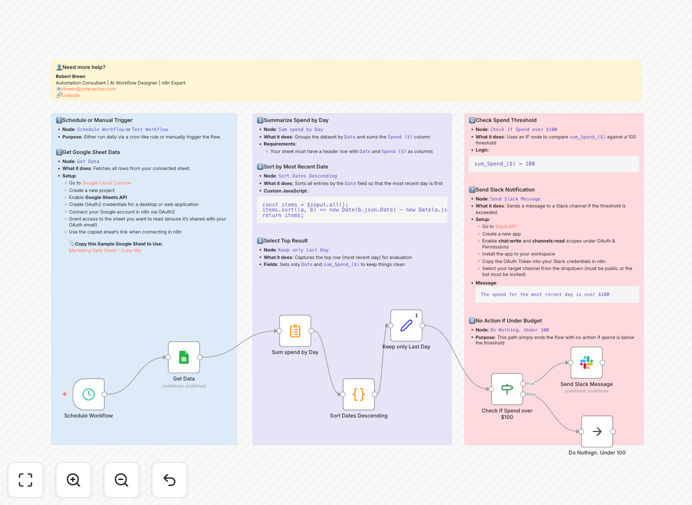
What This Workflow Does
This n8n automation solution solves the critical problem of advertising budget overspending by providing real-time monitoring and instant alerts. Marketing teams often struggle to track daily expenditures across multiple platforms, risking budget overruns that can impact financial planning.
The workflow automatically checks your Google Sheets ad spend tracker each day, compares the totals against your predefined threshold ($100 by default), and sends an immediate Slack notification to your team if spending exceeds the limit. This creates a financial safety net for your marketing operations.
How It Works
1. Data retrieval from Google Sheets
The workflow connects to your designated Google Sheet where daily ad spend is recorded, either manually or through other integrations. It reads the latest values from specified columns or cells containing your daily expenditure totals.
2. Threshold comparison
The system compares the retrieved values against your configured spending threshold. You can set different thresholds for various campaigns, platforms, or time periods by modifying the workflow logic.
3. Conditional Slack notification
Only when the spending exceeds your set limit does the workflow trigger a Slack message to your designated channel. The alert includes details about which budget was exceeded and by how much, enabling quick response.
4. Scheduled execution
The entire process runs on a daily schedule you configure, ensuring consistent monitoring without manual intervention. You can adjust the timing to match your financial review cycles.
Pro tip: Combine this with our ad platform integrations to automatically populate your Google Sheet with daily spend data from Facebook Ads, Google Ads, and other platforms.
Who This Is For
This solution is ideal for marketing teams, agencies, and small businesses running paid advertising campaigns. It's particularly valuable for:
- Teams managing multiple campaigns across different platforms
- Businesses with tight advertising budgets that can't afford overspending
- Marketing managers who need to monitor spend but lack time for daily manual checks
- Agencies tracking client ad spend across multiple accounts
- Startups needing basic financial controls for their growth marketing
What You'll Need
- An n8n instance (cloud or self-hosted)
- A Google Sheet with your ad spend data (or connected to your ad platforms)
- Slack workspace with appropriate channel access
- Google service account credentials for Sheets API access
- Slack webhook URL for your notification channel
Quick Setup Guide
- Download the template JSON file
- Import it into your n8n instance
- Configure your Google Sheets connection with your spreadsheet ID and range
- Set your desired spending threshold in the workflow
- Add your Slack webhook URL and channel information
- Test the workflow with sample data
- Schedule it to run daily at your preferred time
Key Benefits
Prevent budget overruns: Get notified immediately when spending crosses your safety threshold, allowing you to pause or adjust campaigns before significant overspending occurs.
Save 3-5 hours weekly: Eliminate manual spreadsheet checking and calculation time, freeing up marketing staff for higher-value activities.
Improve financial visibility: Maintain better control over marketing expenditures with systematic, automated tracking rather than sporadic manual reviews.
Enable faster decisions: Real-time alerts mean your team can respond to spending issues within hours rather than discovering them days later.
Scalable monitoring: Easily adapt the workflow to monitor additional campaigns or platforms by simply adding more rows to your Google Sheet.