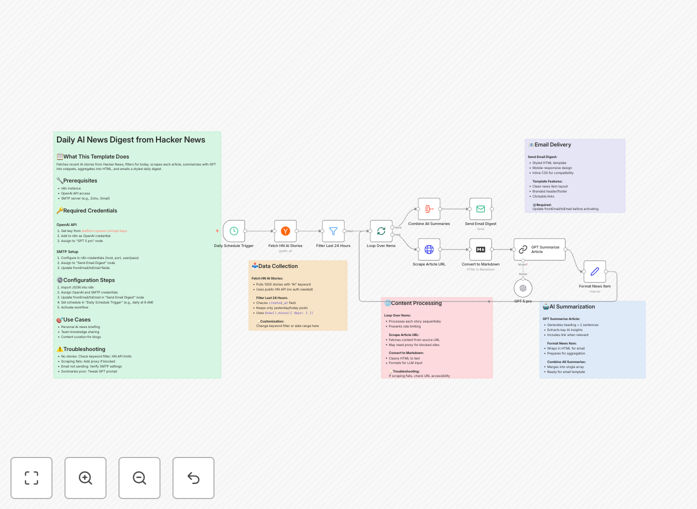
What This Workflow Does
Staying ahead in the fast-moving field of artificial intelligence requires constant learning, but manually scouring news sites is incredibly time-consuming. This automation solves that problem by creating a personalized, AI-powered news briefing delivered to your inbox every morning.
The workflow connects to the Hacker News API, fetches the top stories tagged with "AI," filters for the most recent 24 hours, visits each source link to scrape the full content, uses OpenAI's GPT to generate concise summaries, and compiles everything into a professionally formatted HTML email. It transforms hours of reading into a 2-minute skim, keeping you informed without the overwhelm.
Beyond personal use, this system is perfect for teams, agencies, or content creators who need to monitor AI trends for competitive analysis, content ideas, or client reporting. It ensures you never miss a major development while reclaiming valuable time for strategic work.
How It Works
The process is a seamless pipeline that runs on a schedule you set (daily is recommended).
Step 1: Fetch & Filter Stories
The workflow starts by querying the Hacker News API for up to 1000 stories. It applies a filter to isolate only those containing "AI" in their title or keywords, then uses a date expression node to select items from the last 24 hours, ensuring your digest is always fresh.
Step 2: Scrape & Extract Content
For each qualifying story, an HTTP Request node visits the original source URL. The HTML is converted to clean markdown, stripping away ads, navigation, and other noise to isolate the article's core content for optimal AI processing.
Step 3: Generate AI Summaries
The cleaned text is sent to OpenAI's GPT model with a custom prompt instructing it to create a headline and a two-sentence summary highlighting the key insight or development. This happens in a loop, processing each story sequentially.
Step 4: Format & Deliver
All summaries are aggregated into a single HTML document with a clean, mobile-responsive design. The workflow then connects to your configured SMTP server (Gmail, SendGrid, etc.) and sends the polished digest to your specified email address.
Who This Is For
This template is designed for professionals who need to stay informed but are short on time. AI researchers, developers, tech founders, marketers tracking trends, venture capitalists scouting innovations, and content teams looking for inspiration will find immediate value. It's also ideal for agencies that provide competitive intelligence reports to clients or internal teams that need a shared knowledge base.
What You'll Need
- An n8n instance (cloud or self-hosted) to run the workflow.
- OpenAI API key for the GPT summarization step.
- SMTP email credentials (from Gmail, Outlook, Zoho, SendGrid, etc.) to send the final digest.
- A destination email address where you want the digest delivered.
Pro tip: For more reliable scraping, consider using a rotating proxy service if you plan to process a high volume of stories, as some news sites may block frequent requests from the same IP.
Quick Setup Guide
Import and configure this workflow in under 10 minutes.
- Import the JSON: Download the template file and import it into your n8n workspace.
- Add Credentials: Create an "OpenAI" credential with your API key and an "SMTP" credential with your email server details.
- Configure Nodes: Assign the credentials to the "GPT 5 pro" and "Send email" nodes. Update the `fromEmail` and `toEmail` fields in the email node.
- Set the Schedule: Adjust the "Start" trigger node to run at your preferred time (e.g., daily at 8 AM).
- Activate & Test: Turn the workflow on and run it once manually to verify everything works and your first digest arrives.
Key Benefits
Saves 5-10 hours per week. Eliminate the daily ritual of visiting multiple news sites and reading lengthy articles. Get all the signal without the noise.
Ensures you never miss a breakthrough. Automated systems don't get distracted. Every top AI story from Hacker News is captured, summarized, and delivered, guaranteeing comprehensive coverage.
Improves team alignment. Share the same curated digest with your team or clients to ensure everyone is discussing the same developments with the same context.
Highly customizable. Easily change the keyword filter from "AI" to any topic (e.g., "machine learning," "LLM," "robotics"). Adjust the GPT prompt to focus on business impact, technical details, or sentiment.
Scalable and reliable. Built on n8n's robust engine, the workflow handles errors gracefully, retries failed steps, and runs unattended, providing a set-and-forget solution.