Zapier AI Summarization Multimodal AI RSS Telegram

Automated Daily AI News Digest with Local LLM & Telegram

A privacy-focused, self-hosted automation that collects, summarizes, and delivers AI news—no paid APIs, no data leaks.

Download Template JSON · n8n compatible · Free
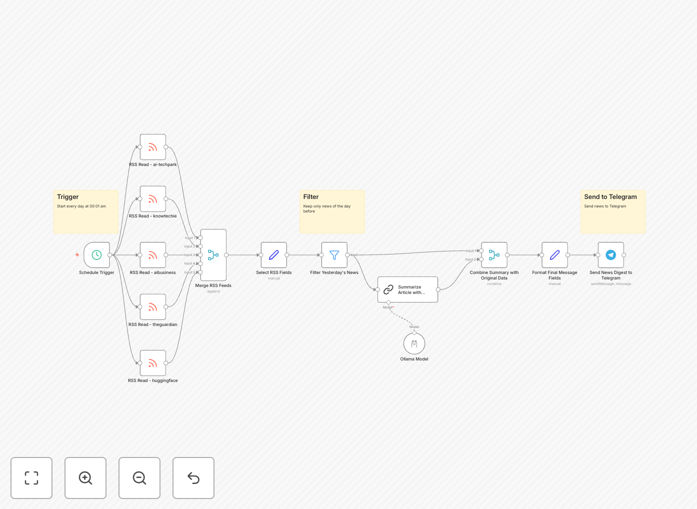
Visual diagram of the AI news digest automation workflow showing RSS feeds flowing into a summarization engine and output to Telegram

What This Workflow Does

Staying updated on AI breakthroughs is time-consuming. Scrolling through dozens of articles, blogs, and research papers daily distracts from deep work. This automation solves that by building your personal AI news curator.

The workflow acts as an intelligent, privacy-focused agent. It automatically collects the latest articles from your chosen RSS feeds, uses a local large language model (like Llama 3.2) to generate concise summaries, and delivers a formatted digest directly to your Telegram chat. It runs entirely on your own hardware, ensuring no data leaves your environment and incurring zero API costs.

Think of it as a research assistant that works overnight. You wake up to a clean, summarized briefing of everything important that happened in AI while you slept, ready to inform your day.

How It Works

The process is elegantly simple but powerful, combining scheduled triggers, data aggregation, and local AI processing.

Step 1: Scheduled Trigger & RSS Collection

A schedule trigger (set for daily morning) kicks off the workflow. It then fetches the latest articles from multiple pre-configured RSS feeds from leading AI blogs, research hubs, and news sites.

Step 2: Date Filtering & Deduplication

The workflow filters articles to include only those published "yesterday," ensuring you get a true daily digest without old news. It also checks for and removes duplicate entries from overlapping feeds.

Step 3: Local AI Summarization

Each article's content is sent to your locally running Ollama server hosting a model like Llama 3.2. The LLM reads the full text and generates a bullet-point summary, extracting key claims, methodologies, and implications. This happens offline on your Raspberry Pi 5 or server.

Step 4: Formatting & Telegram Delivery

The summarized points, along with the original article title, author, and link, are compiled into a clean, readable message. This message is then sent via the Telegram Bot API to your specified private chat or group channel, providing an instant, mobile-friendly briefing.

Who This Is For

This template is ideal for AI researchers, developers, tech leaders, and content creators who need to stay informed efficiently. It's perfect for individuals who value privacy and want to avoid vendor lock-in with cloud AI services. Teams can also adapt it to create a shared knowledge feed, keeping everyone aligned on industry movements without scheduling a meeting.

If you're tired of information overload but don't want to miss critical updates, this automation gives you control back. It's also a great project for hobbyists interested in practical applications of local LLMs and self-hosted automation.

What You'll Need

  1. A running n8n instance (cloud or self-hosted).
  2. Ollama installed locally on a machine (Raspberry Pi 5, home server, or cloud VM) with a downloaded language model (e.g., llama3.2:1b).
  3. A Telegram Bot Token created via BotFather.
  4. Your Telegram Chat ID (numeric ID of your user or group).
  5. RSS feed URLs for your preferred AI news sources (the template includes examples).

Pro tip: For the best experience, run Ollama on a device with at least 8GB RAM. The 1B parameter models are surprisingly capable for summarization and run well on modest hardware.

Quick Setup Guide

Import the template and follow these steps to get your daily digest running in under 30 minutes.

  1. Import the Template: Download the JSON file above and import it into your n8n instance.
  2. Configure RSS Feeds: In the "RSS Read" nodes, replace the example feed URLs with your own. You can add or remove nodes to control the number of sources.
  3. Set Up Ollama Credentials: Create an Ollama credential in n8n pointing to your local Ollama server (typically http://localhost:11434). Ensure your chosen model (e.g., llama3.2:1b) is pulled and ready.
  4. Configure Telegram: Create a Telegram bot via @BotFather to get your token. Use a bot like @userinfobot to find your numeric Chat ID. Enter both in the "Send News Digest to Telegram" node.
  5. Adjust Schedule: The trigger is set for daily at 8 AM. Modify the Schedule Trigger node to your preferred time.
  6. Activate & Test: Turn the workflow on. Manually trigger it once to receive a test digest and verify everything works.

Key Benefits

Save 5+ Hours Per Week: Eliminate manual browsing and reading. Get the signal without the noise, delivered on your schedule.

Zero Ongoing Costs: Uses open-source tools (n8n, Ollama) and local processing. No paid API subscriptions for GPT-4 or Claude.

Complete Data Privacy: Your reading habits and article content never leave your infrastructure. Ideal for sensitive or proprietary research topics.

Fully Customizable: Control the sources, summary style, output format, and delivery channel. It adapts to your needs, not the other way around.

Always-On Intelligence: Runs reliably in the background. You get consistent, high-quality updates without any daily effort.

Frequently Asked Questions

Common questions about AI news automation and integration

Automating a daily AI news digest saves you hours of manual reading each week, ensures you never miss important updates, and delivers curated, summarized content directly to your preferred platform like Telegram. It filters out noise, focuses on your specific interests, and provides a consistent, private briefing without relying on third-party algorithms or paid APIs.

Beyond time savings, it transforms passive consumption into active knowledge management. You get a searchable archive of summaries and can spot trends over time, making you more informed and efficient in your work or research.

Using a local LLM like Llama 3.2 means your news articles are processed entirely on your own hardware, such as a Raspberry Pi or home server. No article content is sent to external cloud services like OpenAI or Google, eliminating data privacy concerns and API costs. You maintain full control over the data and the summarization process.

This is crucial for professionals handling sensitive topics, proprietary research, or anyone who wants to avoid their reading habits being logged by a third party. The summaries are generated in your own trusted environment.

Yes, absolutely. The workflow is designed to be fully customizable. You can add, remove, or modify the RSS feed URLs within the n8n canvas to pull news from any blog, news site, or platform that offers an RSS feed. This lets you tailor the digest to your exact industry, hobbies, or research interests.

You can mix general tech news with niche academic journals or specific company blogs. The system will aggregate them all into a single, coherent daily summary.

It's excellent for both. An individual can use it for personal learning. For teams, you can configure the Telegram output to a group channel, providing the entire team with a shared, curated knowledge base. This fosters alignment and ensures everyone is updated on the latest AI developments relevant to your projects.

Teams can also modify the workflow to add a step that saves summaries to a shared Notion page or Confluence, creating a living knowledge repository.

The primary cost is the electricity for running a small device like a Raspberry Pi 5. There are no ongoing subscription fees for AI APIs, as it uses a local, open-source model. n8n itself is open-source and can be self-hosted for free. The only potential cost is if you choose to host n8n on a cloud server instead of local hardware.

Compared to using commercial AI summarization services that charge per article or per token, this setup has a near-zero marginal cost per digest after the initial setup.

Setup involves a few clear steps: deploying n8n, installing Ollama with a model like Llama 3.2, and configuring a Telegram bot. Once running, the workflow is largely hands-off. Maintenance is minimal—occasionally updating the RSS feed list or the LLM model. The template provides clear instructions, making it accessible even for those new to automation.

Most of the complexity is handled by the pre-built nodes. You're essentially connecting proven services together, not writing code from scratch.

While this template uses Telegram for its excellent bot support and formatting, n8n can easily be modified to deliver summaries via email, Slack, Discord, Microsoft Teams, or even save them to a Google Doc or Notion page. The core logic of fetching and summarizing remains the same; only the final output node needs to be changed.

You could even set up multiple outputs to cross-post to several channels, ensuring stakeholders in different departments or platforms all receive the update.

Yes, GrowwStacks specializes in building tailored automation solutions. We can create a custom system that aggregates news from industry-specific sources, applies your brand's tone in summaries, integrates with your internal knowledge base (like SharePoint or Confluence), and includes sentiment analysis or competitive intelligence alerts. Book a free consultation to discuss your needs.

We can scale this concept to monitor not just news, but also social sentiment, competitor product updates, regulatory changes, or academic preprint releases—delivering actionable intelligence directly to your team's workflow.

Need a Custom AI News Automation?

This free template is a starting point. Our team builds fully tailored automation systems for your specific business needs.