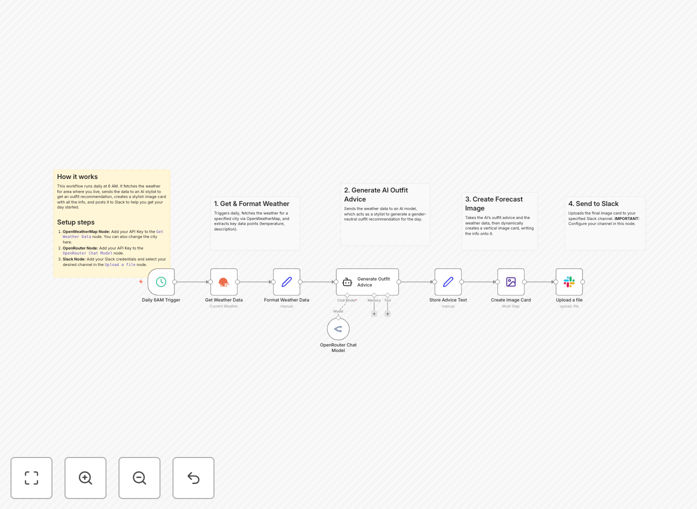
What This Workflow Does
Starting your day with the perfect outfit can be a time-consuming guessing game. This automation solves that by combining real-time weather data with AI intelligence to deliver personalized, practical clothing recommendations directly to your team's Slack channel every morning.
The workflow acts as a virtual stylist and weather reporter. It automatically fetches the forecast for your location, analyzes conditions like temperature, precipitation, and wind, then generates a gender-neutral outfit suggestion that's both stylish and functional. The result is a clean, visual card posted to Slack, complete with date, detailed weather info, and the AI's full recommendation—eliminating morning wardrobe stress for everyone.
Beyond personal convenience, this automation fosters team cohesion and adds a fun, engaging element to daily communication. It demonstrates how AI can transform raw data into actionable, human-friendly advice, saving time and improving daily preparedness.
How It Works
Step 1: Scheduled Trigger
The workflow is set to run automatically at 6 AM daily (configurable). This ensures your team receives the outfit advice before they start their day, providing a consistent, reliable morning briefing.
Step 2: Weather Data Fetch
Using the OpenWeatherMap integration, the system pulls the current forecast for your specified city (default is Tokyo). It captures key metrics like temperature, humidity, precipitation probability, and wind speed—the essential inputs for intelligent outfit planning.
Step 3: AI Stylist Consultation
The weather data is sent to an AI model (via OpenRouter or similar) configured as a "stylist." The AI processes the conditions and returns a practical, gender-neutral outfit suggestion, considering factors like layering for cold days, breathable materials for heat, or waterproof options for rain.
Step 4: Dynamic Image Creation
The workflow dynamically creates a vertical image card. It writes the current date, detailed weather information, and the AI's full outfit recommendation onto a designed background, producing a visually appealing summary that's easy to read and share.
Step 5: Slack Delivery
The completed image card is uploaded to your designated Slack channel with a friendly morning greeting. This turns a private automation into a team-wide benefit, encouraging interaction and ensuring everyone starts the day appropriately dressed.
Who This Is For
This workflow is ideal for teams working in a shared office location who want a fun, automated daily update. It’s perfect for community managers looking to add engaging, automated content to their Slack workspace. Individuals seeking to streamline their morning routine and eliminate outfit guesswork will find immense value.
It also serves as a practical example for anyone interested in combining weather data, AI analysis, and dynamic image generation—a powerful template for learning automation integration. Businesses that rely on weather-sensitive operations (like event planners, outdoor services, or retail) can adapt this pattern for operational alerts.
What You'll Need
- An n8n or Zapier instance (cloud or self-hosted).
- An OpenWeatherMap API Key (free tier available).
- An OpenRouter API Key (or credentials for another compatible AI model like OpenAI).
- A Slack workspace with permissions to connect an app and post to channels.
- Basic understanding of API credential setup (keys are entered in the workflow nodes).
Quick Setup Guide
Import this template into your automation platform and follow these steps to configure it for your use:
- Set Weather Location: In the "Get Weather Data" node, add your OpenWeatherMap API Key and update the city name to your location.
- Configure AI Model: In the "OpenRouter Chat Model" node, enter your API Key. You can adjust the AI's "personality" by editing the system message if desired.
- Connect Slack: In the "Upload a file" node, add your Slack credentials and select the channel where you want the forecast posted.
- Adjust Schedule: Modify the trigger time in the "Daily 6AM Trigger" node if you prefer a different delivery time.
- Test and Activate: Run a manual test to verify the flow, then activate the schedule to start receiving daily automated recommendations.
Pro tip: Customize the AI's personality by editing the system message. Ask it to act as a "pirate stylist," "90s fashion icon," or "formal business advisor" for varied, entertaining recommendations.
Key Benefits
Save 10–15 minutes daily: Eliminate morning wardrobe decisions and weather checks, freeing mental energy for more important tasks.
Improve team cohesion: Deliver a shared, fun daily update that fosters interaction and a positive team culture.
Ensure weather-appropriate dressing: Leverage accurate forecast data and AI analysis to avoid underdressing or overdressing mistakes.
Demonstrate AI integration power: Show how automation can turn raw data into actionable, human-friendly advice—a model for other business processes.
Scalable and adaptable: The pattern can be extended to other platforms (Discord, Telegram, email) or adapted for different data-driven alerts.