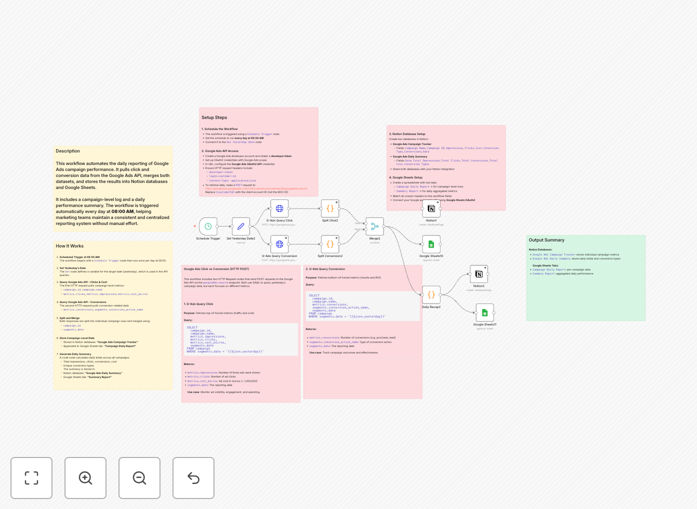
What This Workflow Does
Manual Google Ads reporting is a time-consuming, error-prone task that pulls marketing teams away from strategic work. This automation solves that by creating a fully automated daily reporting pipeline.
The workflow connects to the Google Ads API, extracts campaign performance metrics (clicks, impressions, cost, conversions), merges separate datasets, and pushes the cleaned results into both Notion databases and Google Sheets spreadsheets. It runs automatically every morning at 8 AM, ensuring your team starts the day with yesterday's complete performance data already organized and accessible.
Beyond simple data transfer, it generates a daily summary aggregating totals across all campaigns, providing both granular campaign-level tracking and high-level performance overviews—all without a single manual click.
How It Works
The automation follows a logical sequence to transform raw API data into structured reports.
1. Scheduled Trigger & Date Setup
A schedule trigger initiates the workflow daily at 8:00 AM. The first step sets a variable for "yesterday's date," ensuring the API queries always pull the correct day's data, even over weekends or holidays.
2. Dual API Data Extraction
Two separate HTTP requests query the Google Ads API. The first fetches core campaign metrics: campaign ID, name, clicks, impressions, and cost. The second request specifically pulls conversion data, including conversion type and count. This separation handles the API's structure efficiently.
3. Data Merging & Transformation
The workflow splits the API responses into individual campaign rows, then merges the clicks/cost dataset with the conversions dataset using campaign ID and date as matching keys. This creates a complete record for each campaign with all metrics in one place.
4. Storage in Notion & Google Sheets
The merged campaign-level data is appended to a designated Notion database ("Google Ads Campaign Tracker") and a Google Sheets tab ("Campaign Daily Report"). The structure matches your pre-defined columns, maintaining consistency.
5. Daily Summary Generation
A code node calculates daily totals: sum of impressions, clicks, conversions, and cost across all campaigns. It also lists unique conversion types observed. This summary is stored in a separate Notion database ("Google Ads Daily Summary") and a "Summary Report" tab in Sheets.
Who This Is For
This automation is designed for marketing teams, agencies, and business owners who run Google Ads campaigns and need consistent, accurate reporting.
Digital Marketing Agencies: Manage multiple client accounts with standardized reporting into centralized Notion workspaces or client-facing Sheets.
In-House Marketing Teams: Eliminate the weekly reporting grind and provide real-time performance dashboards for stakeholders in Notion.
E-commerce & SaaS Businesses: Correlate ad spend with conversion data daily to make swift budget adjustments and optimize ROAS.
Freelancers & Consultants: Demonstrate value to clients with professional, automated reports without spending billable hours on manual data entry.
What You'll Need
- A Google Ads Account with active campaigns and access to the Google Ads API (requires a developer token).
- Google Cloud Project with the Google Ads API enabled and OAuth 2.0 credentials set up.
- Notion Account with two created databases: one for campaign-level data and one for daily summaries. You'll need the database IDs and integration access.
- Google Sheets spreadsheet with two prepared tabs matching the expected column headers.
- n8n Instance (cloud or self-hosted) to import and run the workflow.
- Basic Understanding of how to set up API credentials in n8n (OAuth for Google Ads and Google Sheets).
Pro tip: Before connecting the live workflow, test the API calls and data mapping using a single day's historical data. This ensures your Notion and Sheets columns align perfectly before automating daily runs.
Quick Setup Guide
Follow these steps to get your automated reporting live in under 30 minutes.
- Download & Import: Click the download button above to get the JSON file. In your n8n dashboard, go to Workflows → Import from file and select the downloaded template.
- Configure Google Ads Credentials: In n8n, create a new credential of type "Google Ads OAuth2 API." Authenticate with your Google account that has access to the Ads account and paste your developer token.
- Set Up Notion Integration: In Notion, create your two databases. Share them with your Notion integration (from the integration settings). Copy the database IDs into the corresponding Notion nodes in the workflow.
- Connect Google Sheets: Create your spreadsheet with the two tabs. In n8n, create a "Google Sheets OAuth2 API" credential and authenticate. Update the workflow nodes with your spreadsheet ID and tab names.
- Test the Schedule: Temporarily change the Schedule Trigger node to run "Every Minute" for testing. Execute the workflow once to verify data flows correctly into Notion and Sheets.
- Go Live: Once tested, set the Schedule Trigger back to "Every Day at 8:00 AM." Activate the workflow. Your automated daily reporting is now live.
Key Benefits
Save 5-10 Hours Per Week on Manual Reporting. This automation completely eliminates the tedious process of logging into Google Ads, exporting CSVs, formatting data, and copying it into reports. That time is reclaimed for campaign strategy and optimization.
Eliminate Human Error in Data Entry. Manual copying inevitably leads to mistakes—misplaced decimal points, incorrect campaign names, or missed days. Automated API pulls guarantee 100% data accuracy and consistency in your reports.
Create a Single Source of Truth for Your Team. By syncing data to both Notion and Sheets, you provide a unified performance hub. Marketing, sales, and leadership can all access the same real-time numbers, improving alignment and decision-making.
Enable Faster, Data-Driven Decisions. With fresh data available by 8:05 AM daily, you can spot underperforming campaigns immediately, adjust budgets before noon, and capitalize on winning ads faster than competitors relying on weekly reports.
Scale Reporting Effortlessly Across Multiple Accounts. The workflow structure can be duplicated or looped to handle multiple Google Ads accounts (for agencies). The reporting framework remains consistent, scaling your operations without adding overhead.