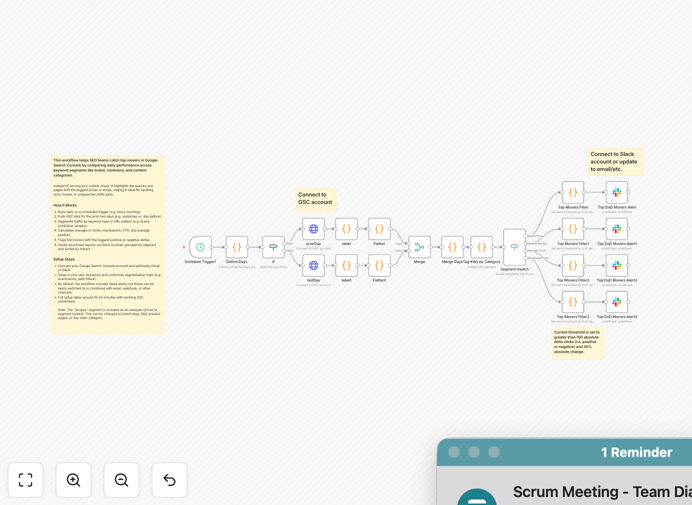
What This Workflow Does
SEO teams often waste hours manually checking Google Search Console, trying to spot meaningful changes in a sea of data. This workflow automates that process, delivering a daily "SEO pulse" that highlights the most significant movements across your keyword segments.
Instead of showing everything, it filters noise to reveal what matters: keywords with the biggest jumps in clicks or impressions, pages losing positions, and opportunities in specific content categories. It transforms raw data into actionable insights your team can use immediately.
The automation compares yesterday's performance against the previous day, segments traffic by type (brand, non-brand, product, blog), calculates changes, and flags top movers. It then delivers structured reports via Slack, email, or your preferred channel, ensuring your SEO strategy responds to real-time signals.
How It Works
1. Daily Scheduled Trigger
The workflow runs automatically each morning, pulling fresh data from Google Search Console for the previous two days. This scheduled execution ensures consistent monitoring without manual intervention.
2. Data Retrieval & Segmentation
It connects to your Google Search Console property and retrieves performance data for queries and pages. The workflow then segments this data using rules you define—like identifying brand terms, non-brand commercial keywords, or content categories based on URL patterns.
3. Change Calculation & Analysis
For each segment, the system calculates day-over-day changes in clicks, impressions, CTR, and average position. It identifies which items moved significantly (both positively and negatively) beyond your defined thresholds.
4. Ranking & Prioritization
Top movers are ranked by impact—the biggest gains in clicks get highlighted as wins, while significant drops trigger alerts. This prioritization helps your team focus on what will move the needle.
5. Report Generation & Delivery
A clean, structured report is generated with segmented insights. By default, it sends to Slack, but can be configured for email, Microsoft Teams, or webhook integration with your project management tools.
Who This Is For
This template is ideal for SEO managers, digital marketing agencies, content teams, and business owners who rely on organic search traffic. If you manage websites with substantial search visibility across multiple content categories or product lines, this automation provides the daily intelligence you need.
Marketing teams running content campaigns will appreciate seeing which articles are gaining traction. E-commerce businesses can monitor product category performance. Agencies can standardize reporting across multiple client accounts. Anyone tired of manual GSC checks will save hours weekly.
Pro tip: Start with broad segments (brand vs. non-brand) then add granular categories as you refine. The "recipes" segment in the template is just an example—replace it with your actual content taxonomy.
What You'll Need
- Google Search Console access with at least "Viewer" permissions for the property you want to monitor.
- An n8n instance (cloud or self-hosted) where you can import and run the workflow.
- Destination for alerts like a Slack workspace, email address, or webhook endpoint.
- Your domain and segmentation logic ready to customize (brand terms, URL patterns for categories).
- About 15-20 minutes for initial setup and testing.
Quick Setup Guide
- Download and import the JSON template into your n8n instance.
- Configure the Google Search Console node with your property URL and authentication.
- Customize the segmentation logic in the "If" and "Switch" nodes to match your keyword categories.
- Set up your alert destination—connect the Slack node to your workspace or switch to your preferred channel.
- Test with a manual trigger to verify data flow and alert formatting.
- Activate the schedule to run daily at your preferred time (e.g., 8 AM weekdays).
- Review and refine thresholds after a few days based on your traffic patterns.
Key Benefits
Save 5-10 hours weekly on manual data collection and analysis. What used to be a tedious morning ritual becomes an automated briefing.
Catch problems before they escalate with immediate alerts on significant traffic drops, enabling rapid response to algorithm updates or technical issues.
Standardize reporting across your team or agency with consistent metrics and formats, eliminating interpretation variations.
Focus on strategy, not spreadsheets by automating the repetitive work, freeing your SEO experts for higher-value tasks.
Scale monitoring effortlessly across multiple domains or properties by duplicating and adjusting the workflow for each.