n8n Google Calendar Slack Weather API News Aggregation

Daily morning briefing with Google Calendar, weather, and news to Slack

Automate your perfect morning routine. This n8n workflow combines your daily calendar events, local weather forecast, and top news headlines into a single Slack message delivered right when you need it.

<
Download Template JSON · n8n compatible · Free
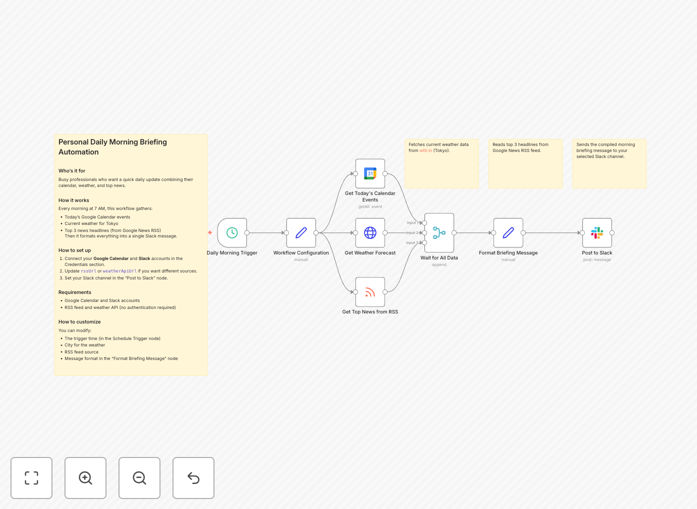
Screenshot of morning briefing automation workflow

What This Workflow Does

This automation creates a personalized morning briefing that combines three essential information streams: your Google Calendar events, local weather conditions, and curated news headlines. It delivers this consolidated update directly to your Slack channel at a scheduled time each morning, giving you a comprehensive overview of your day before you even open your laptop.

The system eliminates the need to manually check multiple apps and websites each morning. Instead of spending 10-15 minutes gathering this information yourself, the automation delivers it instantly in an easy-to-digest format. This workflow is particularly valuable for busy professionals, executives, and remote workers who want to optimize their morning routine.

How It Works

1. Scheduled Trigger

The workflow runs automatically at a set time each morning (typically 7-8 AM). The scheduling component ensures reliable daily execution without manual intervention.

2. Calendar Data Fetch

The system connects to your Google Calendar API to retrieve all events scheduled for the current day. It processes this data to highlight meetings, deadlines, and important time blocks.

3. Weather Check

Using a weather API, the automation fetches current conditions and forecasts for your specified location. This includes temperature, precipitation chances, and any severe weather alerts that might affect your plans.

4. News Aggregation

The workflow pulls headlines from configured news sources or RSS feeds. You can customize this to include industry-specific publications, general news, or topics of personal interest.

5. Message Compilation

All collected data is formatted into a clean, readable message with clear sections for each information type. The system applies business logic to prioritize the most relevant items.

6. Slack Delivery

The final briefing is sent to your specified Slack channel via webhook. The message appears as a neatly formatted card with emoji indicators for quick scanning.

Who This Is For

This automation is ideal for:

  • Executives and managers who need daily overviews
  • Remote workers across time zones
  • Sales professionals with packed schedules
  • Consultants and freelancers managing multiple clients
  • Anyone who wants to optimize their morning routine

What You'll Need

  1. An n8n instance (or compatible automation platform) account
  2. Google Calendar with events
  3. Slack workspace with webhook permissions
  4. Weather API key (free tier available)
  5. News API or RSS feed sources

Quick Setup Guide

  1. Download and import the JSON template
  2. Connect your Google Calendar account
  3. Configure your Slack webhook URL
  4. Set your preferred weather location for weather
  5. Add your news sources or RSS feeds
  6. Test and schedule your preferred delivery time

Key Benefits

Saves 10-15 minutes daily by eliminating manual information gathering. That's 40-60 hours saved per year.

Reduces context switching between calendar, weather and news apps first thing in the morning.

Improves preparedness by surfacing critical schedule conflicts and weather impacts before they affect your day.

Customizable content lets you focus on what matters most to your specific role and responsibilities.

Pro tip: Add a second briefing archive channel in Slack to maintain a searchable history of your daily updates.

Frequently Asked Questions

Common questions about daily briefing automation

Automated morning briefings save time by consolidating key information into one place. They ensure you never miss important calendar events while keeping you informed about weather conditions that might affect your day. The news summary helps busy professionals stay updated without manually checking multiple sources.

For example, a sales director might use the briefing to quickly identify client meetings while seeing weather alerts that could affect travel plans. The system surfaces information most relevant to your role and priorities.

  • Saves 5-7 minutes per day on average
  • Reduces morning decision fatigue
  • Creates consistent information consistency

Google Calendar integration surfaces your daily agenda automatically, eliminating the need to manually check your schedule. This ensures you start each day aware of meetings, deadlines and important events. The automation can highlight time-sensitive items and prioritize your day's activities.

Integration allows for smart filtering - for example, detecting back-to-back meetings that might require preparation time, or flagging days with particularly heavy meeting loads. The system can even pull location data from calendar events to provide commute-specific weather updates.

This workflow can integrate with various news APIs including Google News, RSS feeds, or specific publications. You can customize it to pull industry-specific news, general headlines, or topics of personal interest. The system filters and summarizes content based on your preferences.

For financial professionals, you might configure Bloomberg and WSJ feeds. Marketing teams could track industry blogs and social media trends. The system supports multiple news streams consolidated into your briefing.

Yes, weather integrations typically allow location-specific customization. You can set your home location, office location, or even multiple locations if you travel frequently. The briefing can include current conditions, forecasts, precipitation chances, and severe weather alerts.

Frequent travelers might configure weather checks for both home, office, and current travel destination. The system can automatically adjust based on calendar event locations or manual overrides.

  • Set multiple locations
  • Configure alert thresholds
  • Include pollen or air quality data

Modern automation platforms like n8n offer reliable scheduling and error handling. The system includes fail-safes to ensure delivery even if one data source temporarily fails. You can configure backup data sources and receive alerts if any component requires attention.

Enterprise implementations often include monitoring dashboards and fallback mechanisms. For example, if the primary news API fails, the system might pull from cached results or alternative sources until service is restored.

The ideal time depends on your routine - typically 30-60 minutes before your workday starts. Many professionals schedule briefings for 7-8 AM. Consider your commute time and morning rituals. The automation can adjust timing based on your calendar events or time zone changes.

Some users configure multiple briefings - a light version at 6:30 AM for planning, and another at 8: AM with updated information. The system can intelligently adjust timing based on your sleep patterns.

Yes, GrowwStacks specializes in building custom automation solutions. We can create tailored morning briefings that integrate with your specific apps, include company news, team updates, and prioritize information based on your role. Our solutions scale for entire teams with personalized delivery preferences.

For organizations, we build department-specific briefings that combine individual schedules with team priorities. Our systems can integrate with internal tools like CRMs, project management platforms, and BI dashboards to create truly personalized intelligence.

  • Enterprise-grade reliability
  • Team customization
  • Team collaboration features

Need a Custom Morning Briefing Automation?

This free template is a starting point. Our team builds fully tailored automation systems for your specific needs.