HighLevel CRM ClickUp Slack Sales Automation n8n

Deal Stage Tracking Automation with HighLevel CRM, ClickUp, and Slack

Automatically sync deal updates to tasks and alerts. Keep your sales pipeline visible and actionable across your entire team.

Download Template JSON · n8n compatible · Free
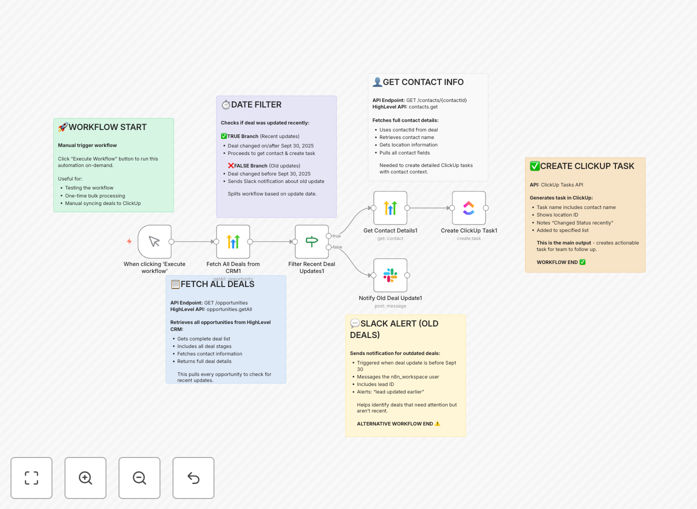
Visual diagram of the deal stage tracking automation workflow connecting HighLevel CRM, ClickUp, and Slack

What This Workflow Does

Sales teams often struggle with visibility. When a deal moves in your CRM, project managers might not know, and stale deals can go unnoticed for weeks. This manual gap creates missed follow-ups, lost revenue, and frustrated teams.

This automation solves that by creating a real-time bridge between your CRM (HighLevel), your task management system (ClickUp), and your team communication (Slack). It automatically detects when a deal is updated, creates a corresponding task for the sales team, and sends alerts for deals that haven't moved, ensuring your entire pipeline is transparent and actionable.

How It Works

The workflow acts as an intelligent router for your deal data, ensuring the right information reaches the right place at the right time.

Step 1: Fetch All Opportunities from HighLevel

The workflow starts by pulling a complete list of deals from your HighLevel CRM. It retrieves key details like contact information, deal value, current stage, and most importantly, the last update timestamp.

Step 2: Filter Based on Recent Activity

An "If" node acts as the decision-maker. It compares each deal's last update date against a configurable threshold (e.g., "updated in the last 7 days"). This simple logic splits your pipeline into two streams: recent activity requiring action, and older activity requiring attention.

Step 3: Route Recent Deals to ClickUp

For deals marked as recently updated, the workflow enriches the data by fetching full contact details from HighLevel. It then creates a new, specific task in your designated ClickUp list. This task contains all relevant deal context, turning a CRM update into an immediate, assigned to-do item for your sales or ops team.

Step 4: Alert on Stale Deals via Slack

For deals that haven't been updated beyond your threshold, the workflow sends a targeted notification to a Slack channel or user. This alert highlights potentially stuck deals, prompting managers or reps to re-engage before the opportunity goes cold.

Who This Is For

This template is ideal for sales-driven organizations that use HighLevel for CRM and ClickUp for managing sales operations or client projects. It's perfect for sales managers who need visibility, operations teams that handle deal implementation, and companies where communication between sales and other departments is critical. If you have more than 20 active deals at any time, this automation will save you hours of manual tracking each week.

What You'll Need

  1. HighLevel CRM Account: With API access enabled to fetch deals and contact data.
  2. ClickUp Account: With a specific List or Space ready to receive the automated tasks.
  3. Slack Workspace: With permissions to create a webhook for sending notifications to your desired channel.
  4. n8n Instance: Either a cloud account (n8n.cloud) or a self-hosted installation to run the workflow.
  5. Defined Process: A clear understanding of what constitutes a "recent" deal update in your business (e.g., 3 days, 7 days).

Quick Setup Guide

You can have this automation running in under 30 minutes.

  1. Download & Import: Click the "Download Template" button and import the JSON file into your n8n instance.
  2. Connect HighLevel: Create a HighLevel credential in n8n and test the connection by fetching a sample deal.
  3. Configure ClickUp: Add your ClickUp API key and specify the exact List ID where new tasks should be created.
  4. Set Up Slack: Create an incoming webhook in your Slack workspace and paste the URL into the Slack node in the workflow.
  5. Adjust the Date Filter: Modify the "If" node's condition to match your definition of a "recent" deal (e.g., `$now - 7 days`).
  6. Test & Activate: Run the workflow once in test mode to verify tasks are created and alerts are sent, then activate the schedule (e.g., run every 6 hours).

Pro tip: Start by setting a wider date filter (e.g., 30 days) to see the volume of tasks created. Once confirmed, tighten it to your actual operational window (e.g., 5 days) to avoid overwhelming your ClickUp.

Key Benefits

Eliminate Manual Syncs: No more copying deal info from HighLevel to ClickUp. The workflow does it instantly, saving 2–3 hours per salesperson per week.

Prevent Deal Stagnation: Automated Slack alerts for stale deals mean nothing slips through the cracks. Catch at-risk opportunities 80% faster than manual review.

Improve Team Alignment: Sales, operations, and management all see the same real-time data. This reduces miscommunication and ensures everyone is working from a single source of truth.

Scale Your Process: As your deal volume grows, the automation handles the increased load effortlessly. You can manage 100 deals as easily as 10 without adding administrative staff.

Gain Actionable Insights: By turning CRM updates into ClickUp tasks, you create a clear audit trail of follow-ups and can measure the time between deal stages, identifying bottlenecks in your sales process.

Frequently Asked Questions

Common questions about sales pipeline automation and integration

Automating deal stage tracking eliminates manual data entry and ensures your CRM, project management, and communication tools are instantly synchronized. This gives sales managers real-time visibility into pipeline changes, reduces the risk of deals slipping through the cracks, and allows reps to focus on selling instead of administrative updates.

For example, a salesperson can update a deal in HighLevel after a client call, and within minutes, the ops team has a task in ClickUp to prepare a proposal, while the manager gets a Slack summary—all without a single email or manual entry.

Integrating HighLevel CRM with ClickUp turns deal updates into actionable tasks. When a deal moves to a new stage, a corresponding task is automatically created in ClickUp for follow-up, ensuring nothing is missed. This creates a seamless handoff between sales activity and operational execution, improving accountability and closing rates.

This connection bridges the gap between the "what" (the deal status) and the "how" (the work needed). It ensures the promise made in the CRM is executed upon in the project management tool, creating a closed-loop system for your sales process.

Slack notifications provide instant, team-wide awareness of critical pipeline events, like stale deals or significant stage advancements. This fosters collaboration, prompts timely interventions from managers, and keeps the entire sales team aligned without requiring them to constantly check multiple software dashboards.

Instead of a weekly pipeline review meeting where surprises are uncovered, the team gets proactive nudges. A deal stuck in "Proposal Sent" for 10 days triggers an alert, allowing the sales manager to jump in and coach the rep or reassign the opportunity while it's still salvageable.

This automation solves data silos, manual task creation, lack of visibility, and delayed follow-ups. It ensures that information flows automatically from the CRM where deals are tracked to the project tool where work happens, eliminating duplicate entry and ensuring tasks are created the moment they're needed.

The three biggest problems it addresses are: 1) Deals getting stuck because no one is assigned the next action, 2) Sales and operations teams working from different information, and 3) Managers wasting time compiling pipeline reports instead of coaching their team.

  • Eliminates duplicate data entry across systems
  • Reduces the sales cycle by triggering immediate follow-ups
  • Provides auditable tracking of deal progression and associated tasks

Off-the-shelf integrations are quick but often limited. Custom automation built with tools like n8n allows you to tailor the logic exactly to your sales process, filter specific deal types, add conditional alerts, and connect any other tools in your stack, providing a perfect fit for your unique business workflow.

For instance, a pre-built connector might sync all deals, but a custom workflow can be programmed to only create ClickUp tasks for deals over $10,000, or to send different Slack alerts based on which sales rep owns the deal. This level of specificity drives much higher efficiency.

Before automating, map your current sales process end-to-end, identify the key stages and handoff points, and clean your CRM data. Define clear rules for what constitutes a 'recent' vs. 'stale' update. Ensure your team is bought into the new process, as automation amplifies both good processes and existing inefficiencies.

Start by automating one clear, high-value handoff—like "Proposal Accepted" to "Onboarding Task Creation." Prove the value with a small pilot before scaling to the entire pipeline. This builds confidence and allows you to refine the logic based on real usage.

Yes, GrowwStacks specializes in building custom sales automation systems tailored to your specific CRM, project tools, and sales process. We can design workflows that match your unique deal stages, approval processes, and team structure, ensuring maximum efficiency and ROI from your tech stack.

We go beyond simple syncs to build intelligent systems. This could include automating commission calculations, triggering personalized email sequences based on deal stage, or integrating with your accounting software to create invoices upon deal closure. Our goal is to make your entire sales engine run autonomously.

  • Connect any combination of CRM, ERP, communication, and project tools
  • Implement complex logic like tiered approvals or conditional alerts
  • Provide ongoing support and optimization as your process evolves

Need a Custom Sales Pipeline Automation?

This free template is a starting point. Our team builds fully tailored automation systems for your specific business needs.