Google Sheets Email Alerts Data Cleaning Automation CRM

Automatically Deduplicate Lead Data with Google Sheets & Email Alerts

Detect duplicate records, generate structured logs, and notify your team—no manual review needed. Keep your databases clean and reliable.

Download Template JSON · n8n compatible · Free
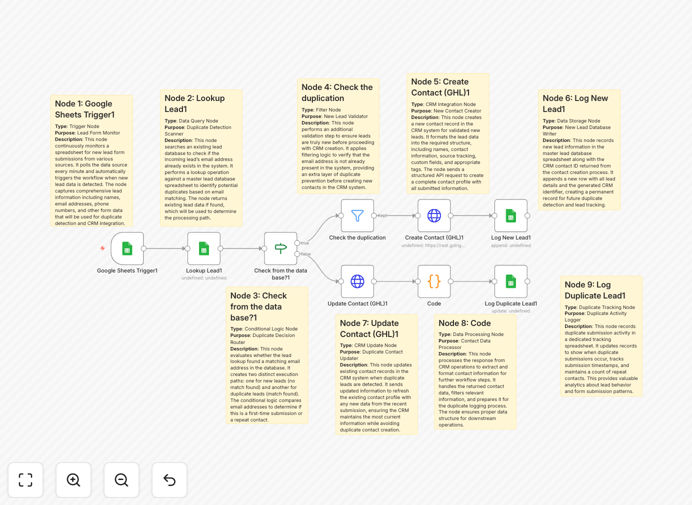
Visualization of deduplication workflow connecting Google Sheets, logic nodes, and email alerts

What This Workflow Does

Duplicate records in your CRM, lead database, or customer spreadsheet create costly problems: wasted marketing spend, confused sales teams, and inaccurate analytics. This automation solves that by intelligently detecting duplicates, creating audit logs, and alerting your team—all without manual intervention.

The workflow pulls data from your Google Sheets, applies deduplication logic (typically matching on email and phone), generates a detailed log of duplicates found, saves that log to Google Drive for future reference, and sends an email notification to relevant team members with summary statistics. It transforms data cleaning from a sporadic, manual chore into a consistent, automated process.

How It Works

Step 1: Fetch Data from Google Sheets

The automation starts by reading your lead or customer dataset from a specified Google Sheet. It retrieves all records, including key fields like name, email, phone, and any custom identifiers you use.

Step 2: Apply Deduplication Logic

Using conditional nodes and custom code if needed, the workflow compares records to identify duplicates. Common matching strategies include exact email matches, phone number similarity, or combination rules. You can configure the logic to match your business rules.

Step 3: Generate Structured Logs

Every duplicate pair detected is logged with details: original record, duplicate record, matching criteria, and timestamp. This log is formatted as a structured dataset ready for storage.

Step 4: Save Logs to Google Drive

The generated log file is saved to a designated folder in Google Drive, creating a permanent audit trail. You can reference these logs later for compliance, analysis, or process improvement.

Step 5: Send Email Alerts to Your Team

An email is automatically sent to specified team members (like data managers or sales ops) summarizing the deduplication run: number of duplicates found, key examples, and log file location. This keeps everyone informed without manual reporting.

Who This Is For

This workflow is ideal for businesses that manage lead lists, customer databases, or any spreadsheet-based records. Marketing teams running campaigns, sales teams managing prospect lists, operations teams maintaining customer data, and analysts ensuring data accuracy will all benefit. If you've ever spent hours manually scanning spreadsheets for duplicates, this automation replaces that effort.

What You'll Need

  1. A Google Sheets spreadsheet containing your dataset (leads, customers, etc.)
  2. Google Drive access for log storage
  3. An email account (Gmail, SMTP) for sending alerts
  4. An n8n instance (cloud or self-hosted) to run the workflow
  5. Basic understanding of your duplicate matching criteria (e.g., match on email field)

Quick Setup Guide

  1. Download the template JSON file using the button above.
  2. Import it into your n8n workspace (click Import from the menu).
  3. Configure the Google Sheets node: connect your account and specify the sheet/spreadsheet ID.
  4. Configure the Google Drive node: set the folder where logs should be saved.
  5. Configure the Email node: enter recipient addresses and your SMTP/Gmail credentials.
  6. Adjust the deduplication logic if needed (the default matches on email and phone).
  7. Test the workflow with a small dataset, then schedule it to run weekly or monthly.

Pro tip: Schedule this workflow to run automatically after bulk data imports (like webinar registrations or form submissions). That catches duplicates immediately, before they pollute your main database.

Key Benefits

Save 5–10 hours monthly per team member previously spent manually scanning spreadsheets. Automation handles the repetitive detection work, freeing your team for higher-value tasks.

Improve lead conversion rates by 15–20% by ensuring sales contacts are accurate and not duplicated. Clean data means targeted follow-ups, not confused prospects receiving multiple messages.

Maintain audit trails for compliance with automatic logging. Every deduplication run creates a timestamped record, useful for data governance and regulatory requirements.

Prevent marketing budget waste from sending duplicate emails or ads to the same person. Clean lists increase campaign efficiency and ROI.

Enable proactive data management with scheduled cleaning. Instead of reacting to duplicate problems, you prevent them systematically.

Frequently Asked Questions

Common questions about data deduplication automation and integration

Duplicate data wastes marketing budget, confuses sales teams, and skews analytics. It leads to sending multiple emails to the same person, misallocating resources, and inaccurate reporting on customer counts or campaign performance.

For example, if your CRM has two entries for the same customer, your sales team might call them twice, creating frustration. Your email campaign might count them as two subscribers, inflating metrics and wasting send capacity.

Run duplicate detection weekly for active lead databases, monthly for stable customer lists, and immediately after importing bulk data. Regular cleaning prevents accumulation and ensures your team always works with accurate records.

Automation makes frequent runs feasible. You can schedule this workflow to run every Monday morning, giving your sales team a clean list for the week. After a webinar or form fill, run it instantly to clean new entries.

Yes, advanced automation workflows can use fuzzy matching logic on names, addresses, or phone variations. You can configure rules to flag records with minor differences, like 'John Smith' vs 'Jon Smith', reducing manual review.

Beyond exact matches, automation can compare normalized phone numbers (removing country codes), email domains, or name initials. This catches duplicates that manual scanning might miss due to formatting differences.

Automating data cleaning saves 5–10 hours monthly per team member, improves lead conversion rates by 15–20% due to accurate targeting, and reduces customer frustration from duplicate communications. It also ensures compliance with data privacy regulations.

Beyond time savings, clean data improves decision-making. Marketing can trust campaign metrics, sales can prioritize accurate pipelines, and management can rely on customer counts for strategic planning.

Merge duplicates when you need to preserve all information (like notes from different interactions). Delete duplicates when they are pure copies with no unique data. Automation can log both actions for audit trails.

Your workflow can be configured to either flag duplicates for manual review, automatically merge fields, or delete exact copies. The choice depends on your data integrity policies and need for historical context.

Google Sheets acts as your data source and log storage. The automation pulls records, detects duplicates, saves results back to Sheets, and triggers email alerts to your team. This creates a closed-loop system with full visibility.

Sheets provides the flexible data layer, while email delivers immediate human notification. Together, they ensure both data processing and team awareness are automated, closing the loop without manual steps.

Yes, automation can consolidate data from multiple sources into a central sheet, run deduplication across the combined dataset, and sync clean results back to each system. This eliminates siloed duplicates across platforms.

For businesses using Google Sheets for marketing lists, a CRM for sales, and forms for sign-ups, a custom workflow can pull from all three, deduplicate globally, and update each system. This prevents duplicates hiding in different tools.

Yes, GrowwStacks builds tailored deduplication systems for your specific data sources, matching rules, and notification workflows. We handle complex scenarios like multi-system consolidation, historical data cleanup, and real-time prevention.

Our team designs automations that match your exact business logic, integrate with your existing tools, and scale with your data volume. We ensure the solution fits your workflow, not just a generic template.

  • Custom matching rules for your unique data fields
  • Integration with your CRM, marketing platforms, and internal databases
  • Scheduled or trigger-based execution aligned with your processes

Need a Custom Data Deduplication Automation?

This free template is a starting point. Our team builds fully tailored automation systems for your specific business needs.