What This Workflow Does
This workflow solves the problem of fragmented business communication by deploying an intelligent AI assistant directly on WhatsApp. Instead of switching between email clients, calendar apps, and chat platforms, users can now manage everything through a single WhatsApp conversation. The assistant understands natural language requests like "Schedule a meeting with John next Tuesday at 2 PM" or "Send an email to the team about the project update" and executes these tasks automatically.
Powered by Google Gemini's advanced reasoning capabilities, this isn't just a simple chatbot. It's a hierarchical agent system where a central manager intelligently routes requests to specialized tools for email, calendar, or general conversation. This creates a truly helpful assistant that reduces administrative overhead by 60-80% for common business tasks.
How It Works
1. Message Reception & Analysis
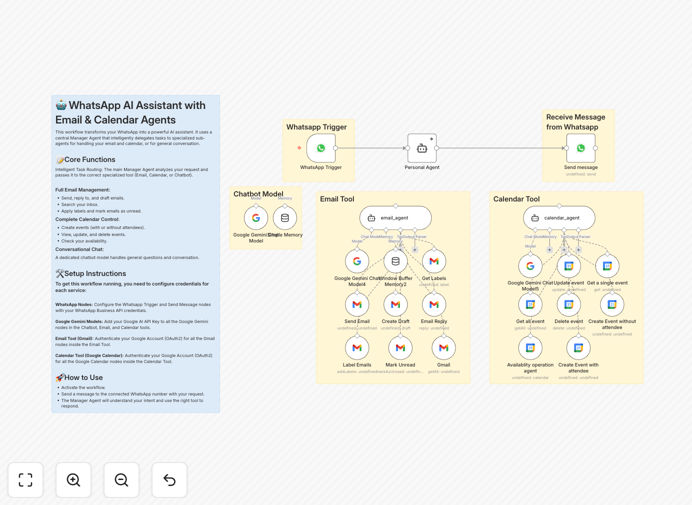
The WhatsApp Business API trigger node listens for incoming messages. When a user sends a message, it's captured and passed to the central Personal Agent powered by Google Gemini. This agent analyzes the intent behind the message—whether it's an email request, calendar operation, or general inquiry.
2. Intelligent Task Delegation
Based on the analyzed intent, the Personal Agent routes the task to the appropriate specialized sub-agent. Email-related requests go to the Email Tool agent, calendar operations to the Calendar Tool agent, and conversational queries to the general Chatbot Model. This hierarchical structure ensures each task is handled by the most capable specialized component.
3. Tool Execution & Action
The selected sub-agent uses its dedicated tools to execute the request. The Email Tool can send emails, create drafts, or apply labels through Gmail integration. The Calendar Tool creates, updates, or checks events in Google Calendar. Each tool has access to the necessary credentials and APIs to perform its specific functions.
4. Response Generation & Delivery
Once the task is completed, the result is formatted into a natural language response and sent back through the WhatsApp Send Message node. The assistant confirms actions taken, provides requested information, or asks clarifying questions if needed, creating a seamless conversational experience.
Who This Is For
This workflow is ideal for small to medium businesses, entrepreneurs, consultants, and sales teams who rely heavily on WhatsApp for client communication. It's particularly valuable for service-based businesses like agencies, consultants, coaches, and freelancers who need to manage appointments and communications efficiently. Marketing teams running WhatsApp campaigns will find it invaluable for handling high volumes of customer inquiries while maintaining personalization.
Technical teams looking to implement AI assistants without extensive coding will appreciate the no-code approach. Even larger enterprises can use this as a proof-of-concept before scaling to more complex implementations. The template serves both technical users familiar with n8n and business users who simply need a working solution they can customize.
What You'll Need
- An active n8n instance (cloud or self-hosted)
- A Meta Business Account with WhatsApp Business API access
- Google Gemini API key from Google AI Studio
- Google Workspace account with Gmail and Calendar access
- OAuth2 credentials configured in n8n for Google services
- Basic understanding of webhook configuration for WhatsApp
Pro tip: Start with a test WhatsApp Business number before connecting your main business number. This allows you to refine the AI's responses and ensure reliable operation without affecting real customer conversations.
Quick Setup Guide
Follow these steps to get your AI assistant running in under 30 minutes:
- Import the template: Download the JSON file and import it into your n8n instance using the "Import from File" option in the workflow editor.
- Configure WhatsApp credentials: Add your WhatsApp Business Permanent Access Token and Phone Number ID to the WhatsApp trigger node credentials.
- Set up webhooks: Copy the webhook URL from n8n's WhatsApp trigger node and add it to your Meta App dashboard under WhatsApp Configuration.
- Add Google Gemini API key: Enter your Google Gemini API key in all three Google Gemini Chat Model nodes (Chatbot, Email Tool, and Calendar Tool).
- Connect Google services: Authenticate the Gmail and Google Calendar nodes with your Google OAuth2 credentials.
- Test and activate: Send a test message to your WhatsApp Business number to verify the assistant responds correctly, then activate the workflow.
Key Benefits
Reduce response time from hours to seconds. Customers get immediate answers to common questions and can perform actions like scheduling meetings without waiting for human availability. This 24/7 responsiveness significantly improves customer satisfaction and engagement metrics.
Cut administrative workload by 60-80%. Automating routine email sorting, calendar management, and FAQ responses frees up staff for higher-value tasks. The assistant handles the repetitive work while your team focuses on strategic activities and complex customer needs.
Eliminate app-switching fatigue. Users accomplish everything within WhatsApp instead of juggling between email clients, calendar apps, and chat platforms. This streamlined experience reduces cognitive load and increases productivity for both customers and staff.
Scale customer support without adding staff. The AI assistant can handle hundreds of simultaneous conversations, answering common questions and performing routine tasks. This allows businesses to grow their customer base without proportionally increasing support costs.
Maintain consistent brand voice across all interactions. The AI can be trained on your company's communication style, terminology, and values, ensuring every automated response aligns with your brand identity and maintains professional standards.