What This Workflow Does
Recruitment teams waste countless hours manually checking if a candidate has already applied. This workflow solves that problem by automatically detecting duplicate job applicants as they arrive in your Gmail inbox.
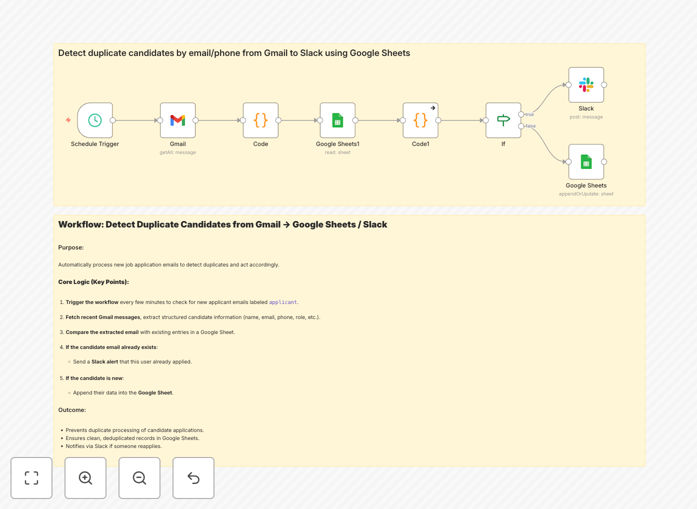
When a candidate emails their resume, the system extracts their contact details, checks against your existing Google Sheets candidate database, and instantly alerts your team in Slack if it's a duplicate. If the candidate is new, they're automatically added to your tracking sheet—creating a seamless, hands-off recruitment pipeline.
How It Works
1. Trigger: Scheduled Email Check
The workflow runs automatically every 15 minutes (configurable) to check your Gmail for new candidate emails labeled as "applicant" or similar.
2. Extract: Candidate Information
Using pattern matching, the system pulls the candidate's name, email, phone number, role applied for, and experience from the email body and attachments.
3. Compare: Duplicate Detection
The workflow reads your existing Google Sheets candidate database and compares the new applicant's email against all previous entries.
4. Decide: New vs. Duplicate
If the email already exists in your sheet, the workflow proceeds to alert your team. If it's a new candidate, it adds them to the database.
5. Notify: Slack Alert
For duplicates, an immediate Slack message is sent to your recruitment channel with candidate details and a link to the original application.
6. Record: Database Update
New candidates are appended to your Google Sheets with all extracted information, creating a complete audit trail.
Who This Is For
This automation is ideal for small to medium businesses, startups, recruitment agencies, and HR teams that receive applications via email but don't have a full-featured ATS. It's perfect for teams using Google Workspace and Slack who want to implement smart automation without complex software.
If you're processing more than 10 applications per week manually, this workflow will save you significant time and prevent embarrassing duplicate communications with candidates.
What You'll Need
- n8n instance (cloud or self-hosted)
- Gmail account with candidate applications
- Google Sheets for candidate tracking
- Slack workspace with appropriate channel access
- Basic understanding of email labeling in Gmail
Quick Setup Guide
Follow these steps to implement this automation in under 30 minutes:
- Download the template using the button above
- Import into n8n through the workflow import feature
- Connect your accounts by setting up credentials for Gmail, Google Sheets, and Slack
- Configure Gmail label to match where candidate emails arrive
- Update Google Sheet ID with your candidate tracking sheet
- Set Slack channel for duplicate alerts
- Test with a sample email to verify the flow works correctly
- Activate the workflow and let it run automatically
Pro tip: Create a separate Gmail label like "Processed-Candidates" to move emails after they've been handled by the automation, preventing reprocessing.
Key Benefits
Save 5+ hours per week on manual candidate checking and data entry. Recruiters can focus on interviewing rather than administrative work.
Eliminate duplicate processing entirely. The system catches repeat applications before they enter your workflow, preventing wasted effort.
Improve candidate experience by avoiding multiple communications for the same application, which can appear unprofessional.
Create a centralized database automatically. Every new candidate is captured in Google Sheets with consistent formatting.
Enable real-time team awareness through Slack alerts. Your entire recruitment team knows immediately about duplicate applications.