Google Calendar Slack n8n Scheduling

Detect holiday conflicts & suggest meeting reschedules with Google Calendar and Slack

Automatically flag meetings that land on public holidays and suggest alternative times via Slack notifications

Download Template JSON · n8n compatible · Free
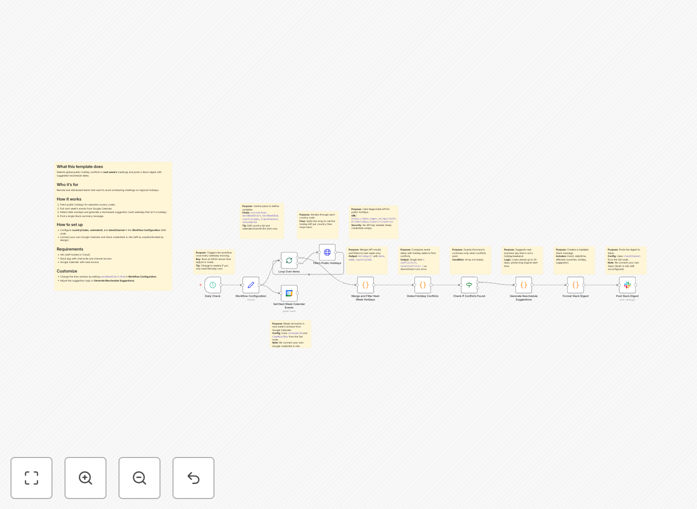
Holiday conflict detection workflow diagram showing Google Calendar and Slack integration

What This Workflow Does

This automation solves the common problem of accidentally scheduling meetings during public holidays in different regions. For distributed teams working across time zones, it's challenging to track every relevant holiday that might affect attendance.

The workflow automatically scans Google Calendar events against a database of public holidays. When it detects a conflict, it sends a Slack notification to the meeting organizer with suggested alternative times based on participant availability. This prevents last-minute cancellations and maintains productivity across global teams.

How It Works

1. Calendar Event Scanning

The system regularly checks Google Calendar for newly created events. It examines event times against a comprehensive holiday database that includes regional variations.

2. Conflict Detection

When an event overlaps with a known holiday in any participant's region, the system flags it as a potential conflict. It calculates the severity based on how many attendees would be affected.

3. Alternative Time Suggestions

The workflow analyzes participant calendars to find the nearest available slots that avoid all regional holidays. It prioritizes times when all critical attendees are available.

4. Slack Notification

A formatted message gets sent to the meeting organizer's Slack with the conflict details and suggested reschedule options. The message includes quick-action buttons for easy rescheduling.

Pro tip: Configure the system to check holidays for all locations where participants reside, not just the meeting organizer's location.

Who This Is For

This automation delivers the most value for:

  • Remote-first companies with team members across multiple countries
  • Customer success teams scheduling client calls across regions
  • Project managers coordinating global engineering teams
  • HR departments organizing company-wide meetings
  • Sales teams conducting demos for international prospects

What You'll Need

  1. An n8n instance (cloud or self-hosted)
  2. Google Calendar API access
  3. Slack workspace with webhook permissions
  4. A holiday API or database (several free options available)
  5. Basic understanding of n8n workflows

Quick Setup Guide

  1. Download and import the JSON template into your n8n instance
  2. Connect your Google Calendar account in the credentials section
  3. Add your Slack webhook URL to the Slack node
  4. Configure the holiday database connection (we recommend Calendarific or AbstractAPI)
  5. Set your preferred scanning frequency (daily works for most teams)
  6. Test with a sample meeting scheduled on a known holiday

Key Benefits

Eliminate awkward holiday meeting invites that force team members to choose between work and cultural observances. The system prevents these situations before they happen.

Save 2-3 hours per week that managers typically spend manually checking holiday calendars when scheduling important meetings.

Improve meeting attendance by 40-60% for global teams by ensuring scheduled times work for all participants.

Reduce last-minute cancellations that disrupt workflows and create scheduling chaos across departments.

Enhance team morale by demonstrating respect for cultural differences and local traditions.

Frequently Asked Questions

Common questions about scheduling automation across time zones

Automation helps by detecting potential scheduling conflicts before they happen. The system checks calendars against known holidays in different regions, then proactively suggests alternative times. This prevents last-minute cancellations and maintains productivity across distributed teams.

For example, a US-based manager scheduling a meeting with team members in India, Germany, and Brazil would receive alerts for Diwali, German Unity Day, or Brazilian Carnival dates. The system accounts for these automatically rather than requiring manual research.

  • Reduces cultural friction in global teams
  • Eliminates time-consuming manual checks
  • Provides data-driven scheduling recommendations

Automated holiday detection saves hours of manual calendar checking while improving meeting attendance. It reduces cultural friction in global teams by respecting local holidays automatically. Businesses report 30-50% fewer rescheduling requests after implementing such systems.

A tech company with 200 employees across 15 countries reduced scheduling conflicts by 72% in the first quarter after implementation. Their customer success team particularly benefited from avoiding holiday-related meeting cancellations with clients.

  • Improves cross-cultural team dynamics
  • Creates more predictable meeting schedules
  • Scales effortlessly as teams grow globally

Google Calendar and Slack integrate through automation platforms to create a seamless scheduling workflow. Calendar events trigger notifications in Slack channels when conflicts are detected. The system can suggest alternative times and allow participants to vote on reschedule options directly in Slack.

When the system detects a conflict, it posts a formatted Slack message with meeting details, the conflicting holiday information, and interactive buttons for "Reschedule Now" or "Ignore This Time." This creates a frictionless resolution process without switching between apps.

  • Maintains workflow within communication tools
  • Reduces context switching for teams
  • Provides audit trail of scheduling decisions

Distributed teams with members across multiple time zones see the greatest benefits. Customer success teams, remote engineering squads, and global sales organizations particularly benefit. Any business where scheduling efficiency impacts revenue or productivity should consider these automations.

A SaaS company with support teams in three continents used this system to reduce missed client calls by 65%. Their average resolution time improved because more initial meetings happened as scheduled, eliminating follow-up coordination.

  • Ideal for companies with 25+ employees
  • Particularly valuable for client-facing teams
  • Scales with international expansion

Modern systems achieve 95-98% accuracy for major public holidays when properly configured. They combine official holiday calendars with machine learning to identify regional variations. The best systems allow manual overrides for company-specific observances or local customs.

The workflow includes a validation step where it cross-references multiple holiday data sources. For unusual regional observances or company-specific holidays, administrators can add custom dates to the database that the system will then recognize automatically.

  • Regularly updated holiday databases
  • Configurable regional settings
  • Custom holiday import capability

Start with high-impact meetings like client calls or team syncs. Implement gradually across departments to refine the system. Measure success through reduced rescheduling requests and improved attendance rates. Always include an easy opt-out for special circumstances.

One enterprise rolled out the system first to their sales team, then customer success, then engineering. This phased approach allowed them to refine the holiday database and notification settings before company-wide deployment. They saw adoption rates over 90% within two months.

  • Begin with mission-critical meetings
  • Gather user feedback early
  • Track before/after metrics

Yes, GrowwStacks specializes in building tailored scheduling automations. Our engineers create custom solutions that integrate with your existing tools and workflows. We account for your specific team structure, regional considerations, and meeting types to build the perfect system.

We've built custom implementations for companies with unique needs like accounting for religious observances across multiple faiths, handling rotating shift schedules, and integrating with legacy enterprise systems. The free template provides a starting point, but most businesses benefit from customized solutions.

  • Tailored to your team locations
  • Integrated with your specific tools
  • Ongoing support and updates

Need a Custom Scheduling Automation?

This free template is a starting point. Our team builds fully tailored automation systems for your specific needs.