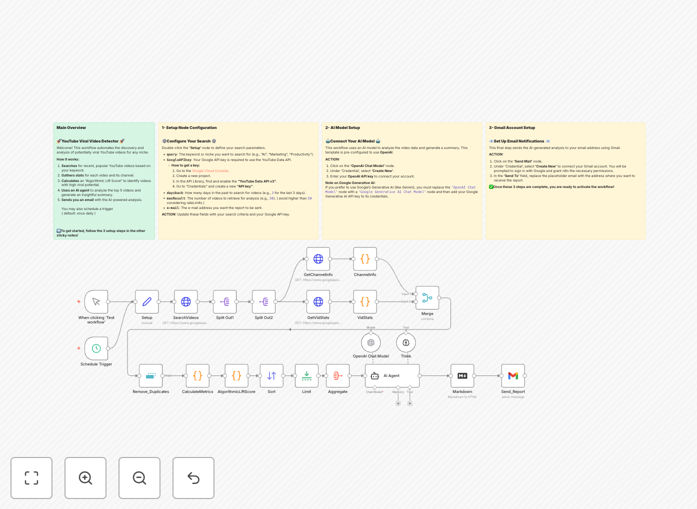
What This Workflow Does
Manual YouTube trend research is time-consuming and inconsistent. Content creators, marketers, and analysts spend hours each week scrolling through videos, trying to spot what's gaining traction. This workflow automates that entire process.
It systematically discovers recently published videos in your niche, analyzes their performance against their channel's historical data, calculates a proprietary "Algorithmic Lift Score" to measure true virality potential, and delivers a concise AI-powered report straight to your email. You get data-driven insights without the manual work.
How It Works
1. Keyword-Based YouTube Search
The workflow starts by querying the YouTube Data API using your specified keywords. It filters results by recency (configurable from 1-30 days) and retrieves the top-performing videos based on YouTube's ranking.
2. Data Enrichment & Metric Collection
For each video found, it fetches detailed statistics: view count, likes, comments, and publication date. Crucially, it also retrieves the channel's subscriber count and total views to establish a performance baseline.
3. Virality Score Calculation
A custom "Algorithmic Lift Score" is calculated for each video. This metric emphasizes videos achieving high engagement relative to their channel's subscriber base, helping identify true breakout content rather than just popular channels posting.
4. AI Analysis & Summarization
The top 5 videos by score are sent to an AI model (like OpenAI). The AI analyzes patterns, identifies common themes in successful content, and generates a concise summary highlighting key trends and opportunities.
5. Automated Email Reporting
The final AI analysis is formatted into a clean HTML report and emailed directly to you. You receive a ready-to-read digest of what's trending in your market, delivered on your preferred schedule.
Who This Is For
This automation delivers value to several key roles:
Content Creators & YouTubers: Discover trending topics and content formats that resonate with audiences in your niche. Identify gaps in the market before they become saturated.
Digital Marketing Agencies: Conduct competitive analysis and market research for clients across multiple industries. Provide data-backed content strategy recommendations.
Social Media Managers: Understand what content performs best on YouTube to inform cross-platform strategy. Stay ahead of trends to keep brand content relevant.
Market Researchers & Analysts: Automate data collection for longitudinal studies of platform trends. Generate consistent reports without manual data gathering.
What You'll Need
- Google API Key with YouTube Data API v3 enabled (free tier available).
- OpenAI API Key or credentials for another compatible AI/LLM service.
- Gmail account connected to n8n for sending reports (or another email service).
- n8n instance (cloud or self-hosted) to import and run the workflow.
- Target keywords for your niche or area of interest.
Pro tip: Start with broad keywords in your industry, then refine based on what the AI report identifies as trending sub-topics. This creates a feedback loop that continuously improves your research focus.
Quick Setup Guide
- Download & Import: Click the download button above to get the JSON file. In your n8n instance, go to Workflows → Import from file and select the downloaded template.
- Configure the Setup Node: Open the "Setup" node. Enter your search keyword, Google API key, how many days back to search (e.g., 7), number of videos to analyze (e.g., 20), and your recipient email address.
- Connect AI Service: Click the "OpenAI Chat Model" node and add your API credentials. You can adjust the AI instructions to focus on specific aspects of analysis.
- Connect Email Service: Click the "Send_Report" node and authenticate your Gmail account (or configure another email node like SMTP).
- Test & Schedule: Click "Execute Workflow" to test. Once confirmed, set the Schedule Trigger node to run daily or weekly based on your needs.
Key Benefits
Save 10-15 hours weekly on manual research. Automating the discovery and analysis process eliminates endless scrolling through YouTube, freeing up significant time for content creation or strategy.
Data-driven decision making. Move beyond gut feelings about what might be trending. Base your content strategy on actual performance metrics and AI-identified patterns.
Never miss an emerging trend. Scheduled automation runs consistently, ensuring you're alerted to viral content early, when there's still opportunity to participate in the trend.
Scalable across multiple niches. Duplicate and modify the workflow to monitor different keywords, competitors, or market segments simultaneously.
Actionable reporting format. The AI-generated email summary provides immediately usable insights, not just raw data, accelerating your response time.