Discord AI Chatbot Redis Automation

Discord AI Chatbot with GPT-4o-mini & Redis Memory

Automate community conversations with AI-powered responses that maintain context

Download Template JSON · n8n compatible · Free
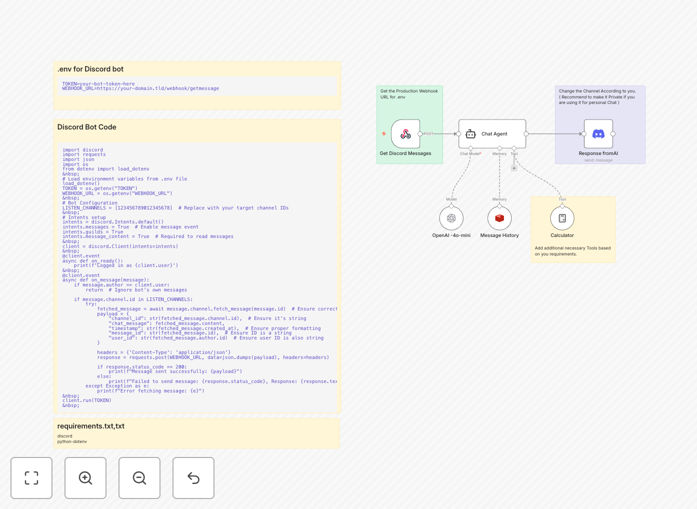
Discord AI chatbot workflow diagram showing message processing flow

What This Workflow Does

This automation transforms your Discord server into an AI-powered assistant that can handle conversations autonomously. The workflow listens for messages in specified channels, processes them through GPT-4o-mini AI, and posts contextual responses in threads.

Redis memory persistence ensures the AI remembers conversation history, creating natural multi-turn dialogues. This is ideal for community support, FAQ handling, or creating interactive experiences without constant human moderation.

How It Works

1. Message Capture

The Discord bot monitors designated channels for new messages, capturing content and user context while ignoring its own responses.

2. AI Processing

Messages are sent to GPT-4o-mini which generates human-like responses while considering conversation history stored in Redis.

3. Context Preservation

Redis maintains conversation threads, allowing the AI to reference previous interactions for coherent, continuous dialogues.

4. Response Delivery

The AI's generated reply is posted as a threaded response, keeping conversations organized and contextual.

Who This Is For

Community managers, support teams, and Discord server owners who want to:

  • Provide instant answers to common questions
  • Reduce repetitive moderation workload
  • Offer 24/7 automated support
  • Create interactive experiences for community members

What You'll Need

  1. Discord developer account and bot token
  2. OpenAI API access for GPT-4o-mini
  3. Redis instance (cloud or self-hosted)
  4. Basic understanding of n8n workflows

Quick Setup Guide

  1. Import the JSON template into your n8n instance
  2. Configure Discord bot credentials
  3. Set up Redis connection details
  4. Specify which channels to monitor
  5. Adjust AI response parameters as needed

Key Benefits

24/7 Availability: Your community gets instant responses at any time, reducing wait times for common questions.

Context-Aware: Redis memory ensures conversations flow naturally by remembering previous interactions.

Scalable Support: Handle hundreds of simultaneous conversations without additional human resources.

Customizable: Easily adjust the AI's tone, knowledge base, and response style to match your community's needs.

Frequently Asked Questions

Common questions about Discord AI automation and integration

AI automation for Discord provides 24/7 availability, consistent responses, and the ability to handle common queries without human intervention. It reduces response times and can integrate with knowledge bases to provide accurate information instantly.

For community managers, it means less repetitive work answering the same questions, while members get faster responses anytime. The AI can also handle multiple conversations simultaneously without delays.

Redis provides fast memory-based storage for conversation history, allowing the AI to maintain context across multiple interactions. This creates more natural, continuous conversations by remembering previous messages in the thread.

Without Redis, each message would be treated as a new conversation. With Redis, the AI can reference earlier parts of the discussion, making responses more relevant and coherent over time.

Support communities, educational servers, gaming groups, and any Discord server with repetitive questions benefit from AI automation. They handle FAQs while human moderators focus on complex issues.

Large communities with hundreds of daily messages see the most immediate benefits, but even smaller groups can use AI to provide instant responses during offline hours.

When properly configured with limited permissions, AI Discord bots are secure. The workflow template includes best practices for data handling and can be customized with additional security measures as needed.

For sensitive communities, you can implement message filtering, user verification, and limit the bot's access to specific channels only.

Yes, the workflow is designed to work with various AI models. You can easily swap the OpenAI node for other language model integrations while maintaining the same conversation handling structure.

Popular alternatives include Anthropic's Claude, open-source models like Llama 2, or specialized domain-specific models for technical or creative communities.

Regular monitoring of conversations, occasional training data updates, and performance reviews are recommended. The Redis memory persistence minimizes maintenance by preserving context through restarts.

Plan to review logs weekly, update response templates monthly, and retrain the AI with new community knowledge quarterly for optimal performance.

Yes, our team specializes in custom Discord automation solutions tailored to your specific community needs, including specialized AI training, multi-channel integration, and advanced moderation features.

We can develop custom workflows that integrate with your existing systems, train AI models on your documentation, and implement sophisticated conversation flows that match your brand voice.

  • Custom-trained AI models
  • Multi-channel coordination
  • Enterprise-grade security
  • Detailed analytics dashboards

Need a Custom Discord Automation?

This free template is a starting point. Our team builds fully tailored automation systems for your specific business needs.