Discord n8n Community Management Automation Free Template

Discord Setup & Channel Discovery Automation

Test your Discord bot connection and automatically fetch all channels & categories from your server. Perfect starting point for Discord automation.

Download Template JSON · n8n compatible · Free
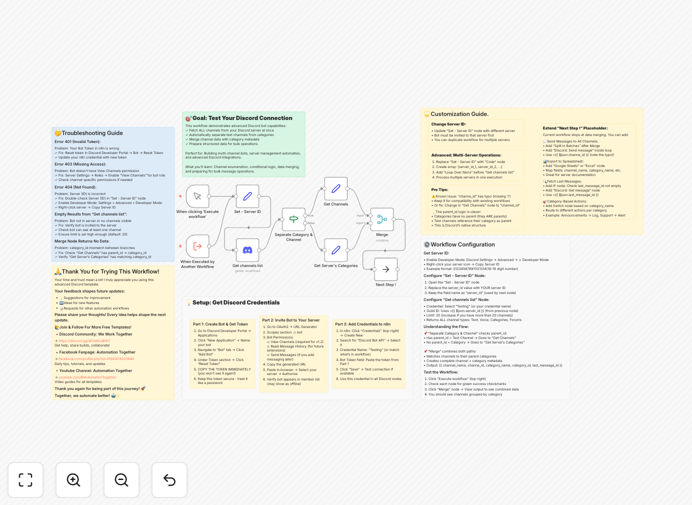
Discord automation workflow interface showing channel discovery and categorization

What This Workflow Does

Connecting n8n to Discord can be confusing for first-time users. Setting up Discord bot credentials, understanding permissions, and verifying the connection often stops community managers and developers before they even start building automations. This workflow solves that exact problem by providing a clear, working starting point.

The template guides you through establishing your first Discord connection in n8n and proves it works by fetching a complete list of all channels and categories from your server. It's not just a connection test—it's a foundation you can immediately build upon for more complex Discord automations like member onboarding, content moderation, or activity tracking.

By automating channel discovery, you save hours of manual inventory work, especially in large communities with dozens of channels. The workflow separates channels from categories, cleans the data, and presents it in an organized format ready for further processing or integration with other business tools.

How It Works

1. Manual Trigger & Server Configuration

The workflow begins with a manual trigger, allowing you to test on demand. A Set node holds your Discord Server ID, which you obtain by enabling Developer Mode in Discord and right-clicking your server icon.

2. Discord API Connection

The Discord node uses your bot credentials (created through Discord's Developer Portal) to establish a secure connection to your server. It requests permission to view channels—the minimal permission needed for this workflow.

3. Intelligent Data Separation

An IF node automatically sorts the retrieved data, sending regular channels down one path and category containers down another. This logical separation is crucial for understanding your server's structure.

4. Data Processing & Merging

Two Set nodes clean and format the data from each path, removing unnecessary metadata while preserving essential information like channel names, IDs, types, and positions. A Merge node then combines both datasets into a single, organized output.

5. Ready for Next Steps

The workflow concludes at a No Operation node, but the real value is in the merged output. You can immediately use this structured channel data as input for more advanced automations or export it to other systems.

Who This Is For

This template is ideal for Discord community managers, server administrators, developers building Discord integrations, and businesses using Discord for team communication or customer communities. If you manage a Discord server with multiple channels and categories, or if you're planning to build Discord-powered automations but don't know where to start, this workflow provides the perfect foundation.

Marketing teams running Discord communities for products, gaming communities with complex channel structures, educational servers with organized course materials, and businesses using Discord for internal team coordination will all benefit from automating channel discovery and management.

What You'll Need

  1. A Discord account with administrative access to the target server
  2. Discord bot token created through the Discord Developer Portal
  3. Your Discord Server ID (obtained with Developer Mode enabled)
  4. n8n instance (cloud or self-hosted) with Discord node available
  5. Basic understanding of Discord server structure (channels vs categories)

Pro tip: Create a dedicated "automation bot" account in Discord rather than using your personal account. This separates automation activities from human interactions and makes permission management much clearer.

Quick Setup Guide

  1. Create Discord Bot: Go to Discord Developer Portal → New Application → Bot tab → Add Bot → Copy Token
  2. Invite Bot to Server: Use OAuth2 URL Generator with "bot" scope and "View Channels" permission
  3. Get Server ID: Enable Developer Mode in Discord settings, right-click server icon, select "Copy Server ID"
  4. Import Workflow: Download the template and import into your n8n instance
  5. Configure Credentials: Add Discord bot token to n8n credentials, select in Discord node
  6. Set Server ID: Replace placeholder in "Set - Server ID" node with your actual Server ID
  7. Execute & Verify: Run workflow, check Merge node output for complete channel list

Key Benefits

Eliminates connection uncertainty by providing a proven, working Discord-n8n integration that you can immediately build upon for more complex automations.

Saves hours of manual work in large communities where manually inventorying channels and categories could take days, especially when documentation is outdated.

Creates structured data foundation that can feed into other systems like CRMs, analytics dashboards, or content management tools for comprehensive community insights.

Reduces technical barrier to entry for non-developers who want to automate Discord management but find the initial setup overwhelming.

Provides immediate value while serving as an educational tool that demonstrates how Discord automation works in practice.

Frequently Asked Questions

Common questions about Discord automation and integration

Automating Discord server management saves community managers and moderators hours of manual work each week. Instead of manually checking channels, tracking activity, or organizing categories, automation can handle these tasks instantly.

This frees up time for actual community engagement, content creation, and strategic planning while ensuring consistent server organization. For businesses, it means better member experiences at scale without proportional increases in staffing costs.

Common business Discord automations include welcome messages and role assignments for new members, content moderation and filtering, and activity tracking with reporting to analytics tools.

Businesses also automate syncing Discord discussions with project management tools like Trello or Notion, scheduled announcements across multiple channels, and member onboarding sequences with resources and guidelines. These automations improve efficiency while maintaining personalized community experiences.

  • Welcome sequences with role assignments
  • Content moderation and spam filtering
  • Activity analytics to business intelligence tools

Discord automation directly impacts community growth by creating consistent, personalized experiences at scale. Automated welcome sequences ensure new members feel valued immediately, while activity-based role assignments keep members engaged.

Automated content sharing from blogs, social media, or YouTube maintains active discussions without manual posting. Analytics automation helps identify trending topics and inactive channels, allowing data-driven community strategy adjustments that improve retention and engagement over time.

From Discord, you can extract channel activity metrics, member participation rates, message volume trends, popular discussion topics, peak activity times, role distribution, and member growth patterns.

This data can be automated to flow into analytics platforms like Google Sheets, Airtable, or business intelligence tools, providing insights for community strategy, content planning, and resource allocation. For example, you might discover that technical support questions peak on Tuesday afternoons, allowing you to schedule staff accordingly.

Discord automation through reputable platforms like n8n is secure when properly configured. The Discord bot operates with specific, limited permissions you define—typically only accessing channels and data necessary for its function.

Credentials are encrypted, and automation runs on your infrastructure or secure cloud servers. Best practices include using dedicated bot accounts (not personal accounts), regularly auditing permissions, and monitoring automation logs for unusual activity. Most business automations require only "read" permissions for data extraction.

Yes, Discord automation can efficiently manage multiple servers simultaneously. A single workflow can connect to multiple Discord servers using different bot credentials, performing consistent actions across all of them.

This is particularly valuable for agencies managing client communities, franchises with location-based servers, or businesses with separate servers for different departments, products, or customer segments. You can standardize reporting, moderation, and member management processes across your entire Discord ecosystem.

Discord bots are applications that live within Discord and respond to commands or events. Automation workflows (like n8n) connect Discord to other business tools and handle complex, multi-step processes.

While a bot might post a welcome message, an automation workflow could: detect a new Discord member, add them to a CRM, send a personalized email, create a task in a project management tool, and post analytics to a dashboard—all automatically. Workflows create business value by connecting Discord to your entire tech stack.

Yes, GrowwStacks specializes in building custom Discord automations tailored to specific business needs. We analyze your community management workflows, identify automation opportunities, and build integrated systems that connect Discord with your CRM, marketing tools, analytics platforms, and internal systems.

Custom solutions handle unique requirements like member segmentation based on activity patterns, complex content moderation rules, cross-platform notification systems, and detailed analytics reporting. We ensure the automation aligns with your business goals while maintaining security and scalability.

  • Integration with your existing CRM and marketing tools
  • Custom analytics and reporting dashboards
  • Scalable architecture for growing communities

Need a Custom Discord Automation?

This free template is a starting point. Our team builds fully tailored automation systems for your specific business needs.