What This Workflow Does
This automation solves the chaos of scattered task management. Instead of juggling notes across Discord messages, sticky notes, and to-do apps, this workflow centralizes everything into a single, intelligent system. It automatically captures tasks posted in a designated Discord channel, enriches them with AI-powered priority scoring, logs them in Google Sheets, and delivers a daily prioritized digest back to your team.
The system is built for focus. It applies productivity frameworks like the Eisenhower Matrix and energy-based scheduling automatically. The AI analyzes each task against your strategic goals, assigning an impact score and categorizing it as high-energy (deep work) or low-energy (administrative). This means you start each day with a clear, ranked list of what actually moves the needle, not just what's loudest.
Beyond organization, it creates accountability and historical insight. Completed tasks are archived with timestamps, providing a searchable record of accomplishments. For teams, it eliminates the "I thought you were handling that" problem by making task ownership and status transparent to everyone in the shared sheet.
How It Works
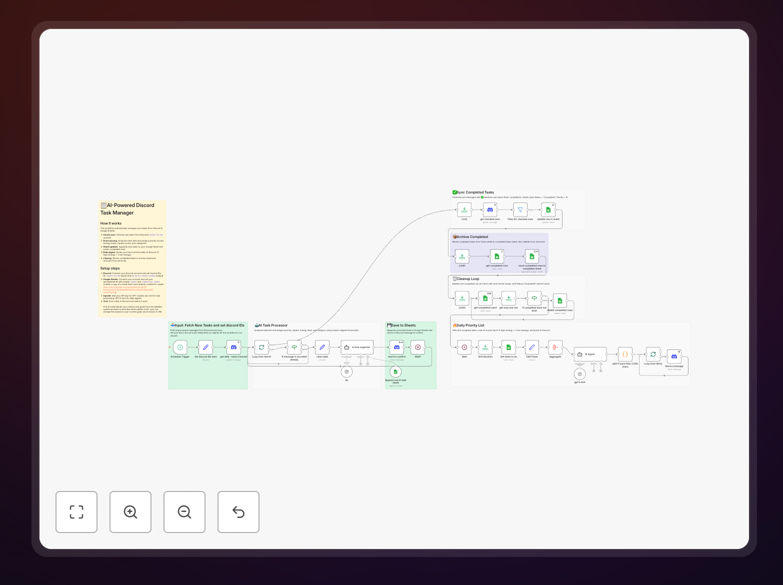
The workflow operates on a scheduled heartbeat, ensuring your task list is always current and intelligently sorted.
Step 1: Capture & Enrich
A scheduled trigger checks your Discord channel for new messages. Each task message is cleaned, structured, and sent to an AI model (like GPT-4) which analyzes the text against your predefined mission criteria. The AI outputs a priority score, impact rating, estimated energy requirement, and suggested category.
Step 2: Log & Confirm
The enriched task data—including the original message link, author, timestamp, and AI metadata—is appended as a new row in a Google Sheets "Tasks" tab. Once logged, the workflow reacts to the original Discord message with a ✍️ emoji, providing visual confirmation that the task has been captured and processed.
Step 3: Prioritize & Deliver
Once per day, the workflow fetches all active tasks from the sheet and sends the list to another AI agent. This agent selects the top 6 tasks—3 for high-energy focus blocks and 3 for lower-energy periods—and formats them into a clear, motivational daily digest. This digest is posted to a separate Discord channel, giving your team a single source of truth for the day's priorities.
Step 4: Track Completion
When a team member completes a task, they react to the original Discord message with a ✅. The workflow detects this reaction, updates the task's status to "Completed" in Google Sheets, moves the row to an archive tab, and removes it from the active list. This closes the loop without manual spreadsheet editing.
Who This Is For
This template is ideal for founders, solopreneurs, remote teams, and community managers who use Discord for daily communication and need to convert conversations into actionable outcomes. It's perfect for agencies tracking client requests, software teams managing feature bugs, content creators planning their editorial calendar, or any group that currently uses a Discord channel as an informal "to-do" list.
If you find yourself copying tasks from chat into a separate spreadsheet or project tool, or if prioritization feels subjective and stressful, this automation will save you hours and mental bandwidth each week. It's especially valuable for distributed teams where task visibility is critical and for individuals practicing deep work who need to protect their focus time.
What You'll Need
- A Discord server where you can create a dedicated channel for task input.
- A Discord bot/app with OAuth2 credentials and permissions to read messages, add reactions, and send messages.
- A Google account with a Google Sheets spreadsheet (template provided).
- Google Sheets API access enabled via OAuth2 in n8n.
- An OpenAI API key with access to GPT-4 or similar models for the AI analysis steps.
- A running n8n instance (cloud or self-hosted) to execute the workflow.
Pro tip: Start with a personal Discord server and a test sheet to understand the flow before rolling it out to a team. This lets you fine-tune the AI prompts to match your specific language and goals.
Quick Setup Guide
- Download the template using the button above and import it into your n8n instance.
- Configure Discord credentials in the "Discord" nodes with your bot token, server ID, and channel IDs for input (tasks) and output (daily digest).
- Connect Google Sheets by authenticating your account and pasting your spreadsheet ID into the relevant nodes.
- Set up OpenAI by adding your API key to the "AI Task Organizer" and "AI Agent" nodes.
- Customize the AI prompts (optional) to reflect your specific business goals, mission statement, and scoring preferences.
- Activate the workflow and post a test task in your Discord channel. Watch as it appears in your sheet, gets scored, and appears in the next daily digest.
Key Benefits
Eliminates manual data entry. Tasks move from conversation to tracked item automatically, saving 30+ minutes per person per day on administrative overhead.
AI-driven objectivity. Removes emotional or biased prioritization. Tasks are ranked by strategic impact, not by who shouted loudest.
Creates a searchable knowledge base. Every task and its completion status is stored in Google Sheets, creating an invaluable archive for retrospectives and reporting.
Enforces focus rituals. The daily digest creates a natural planning ritual and protects deep work time by clearly separating high-energy from low-energy tasks.
Scalable for teams. Provides a single source of truth that grows with your team, reducing coordination overhead and miscommunication.