What This Workflow Does
Manual lead research is one of the biggest time-wasters in sales. Teams spend hours searching for decision-makers, copying data between tabs, and trying to verify contact accuracy—only to end up with outdated or incorrect information.
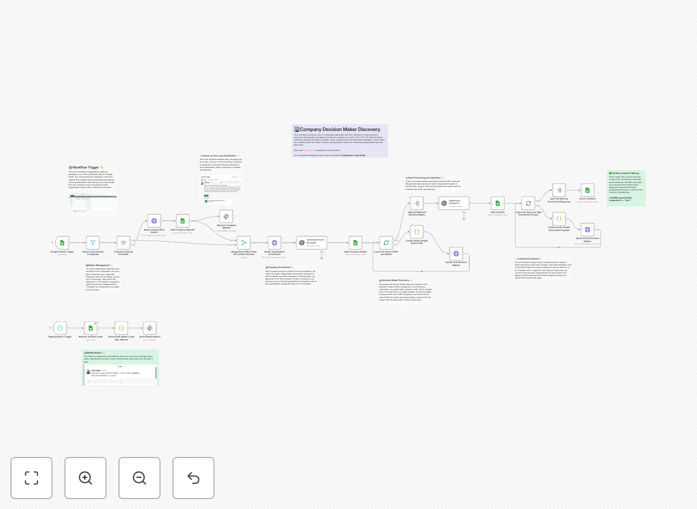
This workflow solves that by automating the entire lead discovery and enrichment process. It takes a list of target companies, uses Apollo's APIs to find key decision-makers (CEOs, CTOs, VPs), enriches their profiles with LinkedIn URLs, emails, and phone numbers, then organizes everything in Google Sheets with human verification built in. The result is a clean, verified leads database that sales teams can actually use, updated automatically without manual intervention.
How It Works
The automation follows a logical sequence to ensure data quality and efficiency.
1. Company Input & Trigger
You add target companies to a Google Sheet (or the workflow can pull from your CRM). When a new company is added, the workflow automatically triggers, eliminating manual initiation.
2. Apollo Organization Search
The workflow queries Apollo's database to get detailed company information—industry, size, location, and technologies used. This context helps prioritize and personalize outreach later.
3. Decision-Maker Discovery
Using Apollo's People Search API, the workflow finds executives and managers matching your criteria (job titles, seniority, departments). It can target multiple roles per company in one pass.
4. Contact Enrichment
Each discovered contact gets enriched with available data: direct email, work phone, LinkedIn profile, and current job title. Apollo's verification systems help ensure data accuracy from the start.
5. Human Verification & Approval
Before finalizing, the workflow sends potential leads to a Slack channel for team review. This human-in-the-loop step catches false matches and maintains quality control.
6. Database Organization
Approved contacts are written to a "Verified Contacts" tab in Google Sheets, complete with timestamps, source data, and enrichment status. The original company record is marked as processed.
7. Weekly Reporting
Every Monday, the workflow generates a summary of newly discovered leads and sends it to your sales team, keeping everyone informed without manual reporting.
Pro tip: Use the AI summarization node to generate brief company overviews from Apollo data. This gives sales reps instant context before outreach, improving personalization and response rates.
Who This Is For
This automation delivers the most value for B2B companies with outbound sales or marketing teams. Specifically:
Sales Development Representatives (SDRs) who spend 30%+ of their time researching leads instead of selling. This workflow gives them pre-verified contact lists daily.
Marketing teams running account-based marketing (ABM) campaigns who need accurate contact data for target accounts. The enrichment ensures campaign emails reach the right people.
Startups and scale-ups that can't afford expensive sales intelligence platforms but need professional lead generation. This provides enterprise-grade capabilities at a fraction of the cost.
Agencies serving multiple clients who need consistent lead research across different industries and company sizes. One workflow adapts to all client requirements.
What You'll Need
- n8n instance (cloud or self-hosted) with workflow execution capabilities.
- Apollo.io account with API access (free tier works for testing, paid for production).
- Google Sheets with edit permissions for the automation to read/write data.
- Slack workspace for human verification notifications (optional but recommended).
- OpenAI or similar LLM API key for company summarization (optional enhancement).
- Basic understanding of how to import JSON workflows and configure API credentials in n8n.
Quick Setup Guide
Get this automation running in your environment in under 30 minutes.
1. Download & Import the template JSON file into your n8n instance using the import workflow feature.
2. Configure Credentials in n8n for Apollo, Google Sheets, and Slack. Test each connection to ensure API access works.
3. Duplicate the Google Sheet template provided in the workflow documentation. Update the workflow nodes to point to your new sheet ID.
4. Set Your Target Criteria by modifying the Apollo search nodes—adjust job titles, company sizes, locations, or industries to match your ideal customer profile.
5. Test with Sample Data by adding 2-3 company domains to the input sheet. Verify the workflow runs, finds contacts, and updates the verified sheet correctly.
6. Schedule Execution to run daily or weekly based on your lead volume needs. The workflow can also trigger instantly when new companies are added.
7. Train Your Team on reviewing Slack verification requests and using the enriched leads sheet for outreach.
Pro tip: Start with a small batch of 10 companies to test data quality before scaling. Adjust search filters based on the results you get—sometimes broader titles yield better contacts than overly specific ones.
Key Benefits
Save 10+ hours per week per sales rep on manual lead research. What used to take a full morning now happens automatically overnight, freeing your team for revenue-generating activities.
Improve lead data accuracy by 60%+ compared to manual entry. Automated enrichment pulls from verified sources, and human verification catches edge cases, resulting in cleaner outreach lists.
Scale lead generation without adding headcount. The same workflow that handles 50 companies can process 500 with minimal adjustment, growing with your business needs.
Accelerate sales cycles by providing reps with enriched context before first contact. Knowing a prospect's role, company tech stack, and recent news enables personalized outreach that converts.
Maintain consistent process across your entire sales team. Everyone works from the same verified data source with standardized enrichment, eliminating individual research inconsistencies.