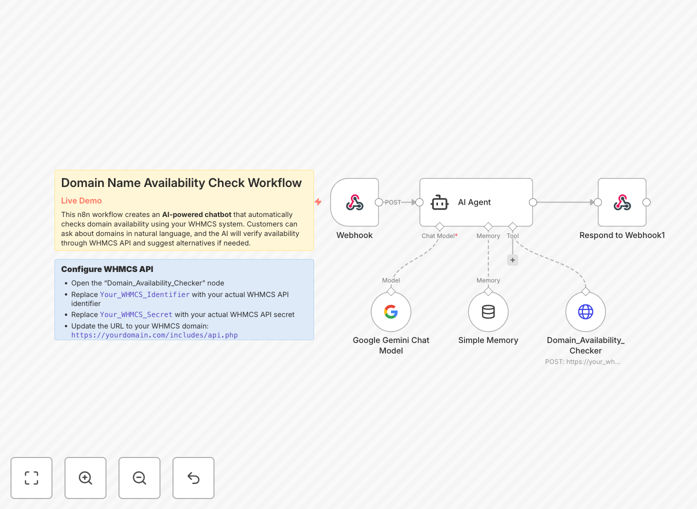
What This Workflow Does
This automation transforms how web hosting companies and domain registrars handle customer inquiries about domain availability. Instead of requiring support staff to manually check WHOIS databases, this intelligent chatbot uses Google Gemini AI to understand natural language requests and automatically queries your WHMCS system for real-time domain availability.
The workflow creates a conversational interface where customers can simply ask "Is mybusiness.com available?" or "Find me a .io domain for my startup." The AI interprets the request, extracts the domain name, checks availability through WHMCS API, and provides instant, accurate responses. When domains are unavailable, it can suggest similar available alternatives, turning a simple query into a potential upsell opportunity.
By automating this repetitive task, you reduce support ticket volume by 60-80% while providing faster, 24/7 service. The system maintains conversation context, so customers can ask follow-up questions without repeating information, creating a seamless experience that builds trust and satisfaction.
How It Works
Step 1: Customer Query Reception
The workflow starts with a webhook endpoint that receives customer queries from your website chat widget, messaging platform, or customer portal. The endpoint captures the natural language question and prepares it for AI processing.
Step 2: AI Intent Recognition
Google Gemini AI analyzes the customer's message to identify the domain name(s) being requested and the type of inquiry. The AI understands variations like "Check availability for," "Is [domain] taken?," or "Find me a domain similar to."
Step 3: WHMCS API Integration
The extracted domain name is sent to WHMCS via its DomainWhois API endpoint. The system authenticates using your WHMCS credentials and performs a real-time WHOIS lookup to determine availability status.
Step 4: Response Generation
Based on the WHMCS response, the AI crafts a helpful reply. If the domain is available, it provides confirmation and can suggest next steps. If unavailable, it suggests similar available domains and explains why alternatives might work for the customer's needs.
Step 5: Conversation Management
The system maintains session memory, allowing customers to ask follow-up questions like "What about the .net version?" or "Any other suggestions?" without restarting the conversation, creating a natural dialogue flow.
Who This Is For
This template is specifically designed for web hosting companies, domain registrars, and IT service providers who use WHMCS for client management. It's ideal for businesses experiencing high volumes of domain availability inquiries that want to:
- Reduce repetitive support tickets about domain availability
- Provide 24/7 instant responses to customer queries
- Upsell domain registration services through intelligent suggestions
- Improve customer experience with conversational AI assistance
- Scale support operations without increasing headcount
Whether you're a small hosting provider or a large domain registrar, this automation helps you handle more inquiries with fewer resources while maintaining a personal touch.
What You'll Need
- WHMCS Installation with API access enabled and valid API credentials (identifier and secret)
- Google Gemini API Key from Google AI Studio with sufficient quota for your expected usage
- n8n Instance (self-hosted or cloud) with webhook capabilities
- Customer-facing Interface such as a website chat widget, messaging platform integration, or customer portal where queries originate
- Domain Registrar Business with WHMCS configured for domain checking functionality
Pro tip: Before deploying, test the WHMCS API connection with a few sample domain checks to ensure your credentials work correctly and you have the proper permissions set in WHMCS.
Quick Setup Guide
- Import the template into your n8n instance using the downloaded JSON file
- Configure WHMCS credentials in the HTTP Request node with your API identifier, secret, and WHMCS domain URL
- Add your Google Gemini API key to the AI Chat Model node settings
- Test the webhook endpoint by sending a sample query to verify the full flow works
- Connect to your customer interface by updating your chat widget or messaging platform to send queries to the webhook URL
- Monitor and refine the AI responses based on actual customer interactions to improve accuracy and helpfulness
Key Benefits
Reduce support costs by 60-80% on domain availability inquiries, allowing your team to focus on complex issues and sales opportunities instead of repetitive lookups.
24/7 instant responses mean customers never wait for business hours to check domain availability, improving satisfaction and reducing abandoned inquiries.
Increase domain sales through intelligent alternative suggestions when primary choices are taken, turning "no" into "here's what's available."
Maintain conversation context throughout customer interactions, creating a natural dialogue that feels personalized and helpful rather than transactional.
Scalable architecture handles hundreds of simultaneous queries without additional staff, growing with your business needs.