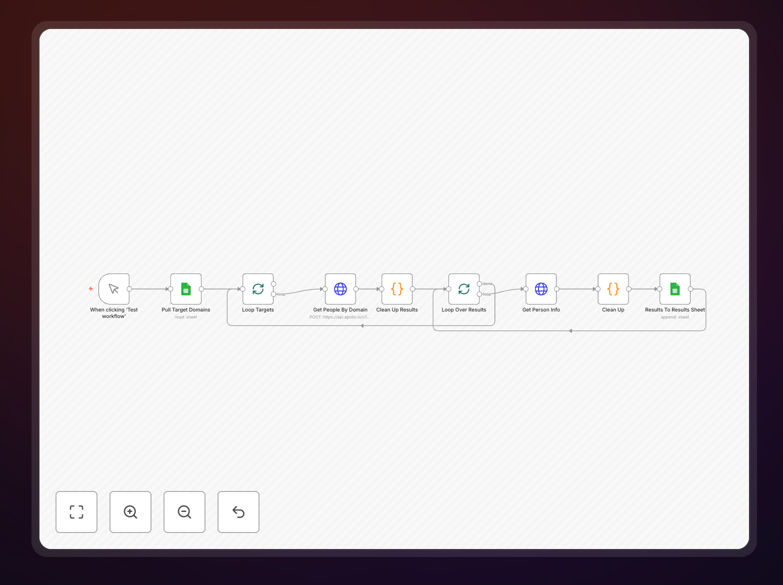
What This Workflow Does
Finding accurate business email addresses for targeted outreach is a time-consuming manual process that sales and marketing teams face daily. This workflow automates the entire lead list building process by connecting Apollo's powerful sales intelligence API with Google Sheets.
The automation transforms a simple list of company domains into enriched contact databases containing verified email addresses, job titles, LinkedIn profiles, and other key information. It eliminates hours of manual research, data entry, and API interaction by handling the complex two-step process required by Apollo's API automatically.
Business development teams can now scale their outreach efforts without proportional increases in research time, enabling them to focus on what matters most—building relationships and closing deals.
How It Works
Step 1: Domain Input from Google Sheets
The workflow begins by reading a list of target company domains from a Google Sheet. Each domain represents a company you want to research for potential leads. The automation processes these domains in batches to respect API rate limits while maximizing efficiency.
Step 2: Apollo API Search Execution
For each domain, the workflow sends a search request to Apollo's API to find associated people at that company. Apollo returns a list of potential contacts with basic profile information that serves as the foundation for further enrichment.
Step 3: Contact Enrichment Loop
The workflow then loops through each person found and makes a second API call to Apollo to enrich their profile data. This step extracts detailed information including verified email addresses, accurate job titles, seniority levels, and LinkedIn URLs.
Step 4: Data Cleaning and Structuring
Raw API responses are processed and cleaned to extract only the most valuable information. The workflow structures this data into a consistent format with proper field mapping, ensuring compatibility with your existing systems and processes.
Step 5: Results Export to Google Sheets
Finally, the enriched contact information is written back to a separate results sheet in Google Sheets. The automation creates a structured database with columns for company, first name, last name, title, email, LinkedIn URL, and other relevant fields.
Who This Is For
This workflow is ideal for sales professionals, business development teams, marketers, and recruiters who need to build targeted contact lists efficiently. Specifically, it benefits:
- Sales Teams conducting account-based marketing campaigns who need to identify and contact decision-makers at target accounts
- Marketing Agencies building outreach lists for client campaigns across multiple industries
- Recruitment Agencies searching for potential candidates with specific roles at target companies
- Startup Founders looking to build investor or partnership contact lists from relevant domains
- Business Development Professionals expanding into new markets who need to identify key contacts
What You'll Need
- An n8n instance (cloud or self-hosted) to run the automation workflow
- An Apollo.io account with API access enabled (requires a paid subscription for API usage)
- A Google account with access to Google Sheets for data input and output
- A Google Sheet prepared with two tabs: "Target Domains" and "Results" with appropriate column headers
- Basic understanding of API keys and credential management in n8n
Pro tip: Start with a small batch of test domains (5-10 companies) to verify the workflow is working correctly before scaling to larger lists. This helps you understand Apollo's data coverage for your specific industry and adjust expectations accordingly.
Quick Setup Guide
- Import the workflow into your n8n instance using the downloaded JSON file
- Set up Google Sheets credentials in n8n by creating an OAuth2 connection with appropriate permissions
- Update the Google Sheets document ID in both Google Sheets nodes to point to your specific spreadsheet
- Add your Apollo API key to both HTTP Request nodes in the workflow configuration
- Review and adjust API rate limits if needed, especially if you're processing large domain lists
- Test with sample domains by adding a few company domains to your "Target Domains" sheet and running the workflow manually
- Verify results by checking the "Results" sheet for properly populated contact information
Key Benefits
Save 10-15 hours per week on manual lead research. What previously required hours of manual searching across LinkedIn, company websites, and various databases now happens automatically while your team focuses on higher-value activities.
Increase outreach accuracy with verified contact data. Apollo's verification processes ensure higher email deliverability rates compared to manually gathered or purchased lists, leading to better campaign performance and ROI.
Scale your prospecting efforts without adding headcount. The automation enables a single sales development representative to research and qualify significantly more leads, effectively multiplying your team's capacity.
Maintain organized, structured lead databases automatically. All extracted information is consistently formatted and stored in Google Sheets, ready for import into your CRM or marketing automation platform.
Reduce human error in data entry and research. Automated processes eliminate typos, missed fields, and inconsistent formatting that commonly occur with manual data collection.