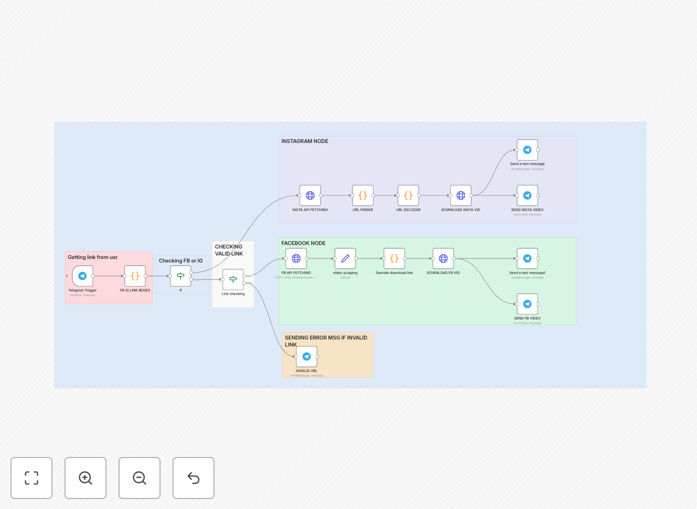
What This Workflow Does
This n8n workflow creates a Telegram bot that automatically downloads videos from Instagram and Facebook when you send it a link. Instead of using unreliable online downloaders or screen recording, you can now save any Reel or video directly to your device with a simple message.
The automation solves the common frustration of wanting to save social media videos for reference, content curation, or offline viewing. Content creators, marketers, and researchers often need to archive videos but face limitations with native platform features. This workflow provides a private, on-demand solution without requiring third-party apps or browser extensions.
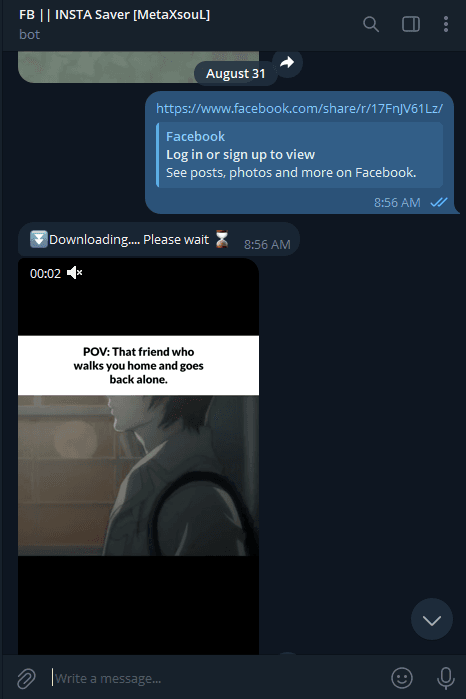
How It Works
1. Send a link to your Telegram bot
When you share an Instagram Reel or Facebook video URL with your bot, n8n immediately receives the message through Telegram's webhook integration.
2. URL validation and processing
The workflow checks if the link is a valid Instagram or Facebook video URL. It extracts the essential video identifier while filtering out invalid or unsupported links.
3. Video downloading
Using n8n's HTTP Request node, the workflow fetches the video file from the social media platform. It handles authentication and bypasses platform restrictions to access the media file.
4. File delivery
The downloaded video is sent back through Telegram as a downloadable file attachment. You receive it directly in your chat with the bot, ready to save to your device.
Pro tip: You can enhance this workflow by adding automatic cloud storage backup to Google Drive or Dropbox for all downloaded videos.
Who This Is For
This automation is ideal for content creators, social media managers, marketers, and researchers who regularly need to save videos from Instagram and Facebook. Digital agencies managing multiple client accounts will find it particularly valuable for content curation and competitive analysis.
Educators and trainers who compile social media examples for presentations can use this to build their media libraries quickly. Individuals who want to save personal memories or favorite content for offline viewing will appreciate the simplicity of the Telegram interface.
What You'll Need
- An n8n instance (cloud or self-hosted)
- A Telegram bot token (create via @BotFather)
- Webhook URL configured in your n8n settings
- Basic understanding of n8n workflows
Quick Setup Guide
- Download the JSON template file
- Import it into your n8n instance
- Configure your Telegram bot token in the workflow settings
- Set up the webhook URL in your Telegram bot settings
- Activate the workflow and test by sending a video link to your bot
Key Benefits
Save hours of manual work - No more screen recording or using multiple online tools to download videos. Get any video with a single message.
Private and secure - Your downloaded videos stay between you and your bot, unlike public online downloaders that may store your data.
Works across devices - Access your download bot from any device with Telegram installed, whether desktop or mobile.
No software installation - The entire process happens through Telegram and n8n, with nothing to install on your local machine.
Customizable workflow - Easily extend the automation to save videos directly to cloud storage or organize them by category.