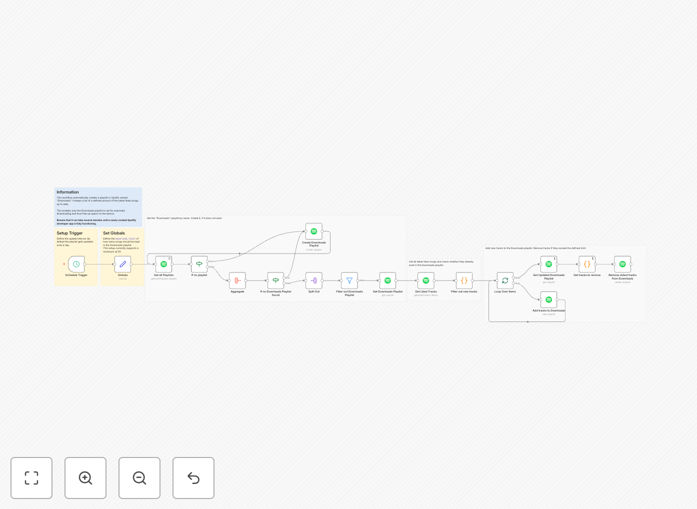
What This Workflow Does
If you're a music lover who frequently likes songs on Spotify but struggles with offline listening or device storage limits, this automation solves both problems. The workflow automatically creates and maintains a "Downloads" playlist containing only your most recent liked songs, which you can then set to download automatically in the Spotify app.
Instead of manually managing downloads or using up all your storage with entire music libraries, this system gives you a rotating selection of your latest favorites in high quality offline format. It's perfect for commutes, travel, or areas with poor connectivity where you want guaranteed access to music you actually enjoy right now.
How It Works
The automation follows a logical sequence to ensure your download playlist stays current without manual intervention.
1. Fetch Your Liked Songs
The workflow connects to your Spotify account via API and retrieves your most recently liked tracks. It checks for new additions since the last run, ensuring it only processes fresh content.
2. Create or Update Download Playlist
A dedicated "Downloads" playlist is created if it doesn't exist, or the existing one is cleared. The system then populates it with your latest liked songs, maintaining a configurable limit (typically 50 tracks) to prevent storage overload.
3. Enable Automatic Downloads
Once the playlist is updated in Spotify, you simply enable the "Download" toggle for that playlist in your Spotify mobile or desktop app. The app then automatically downloads the tracks for offline access.
4. Scheduled Maintenance
The workflow runs on a schedule you define (daily, weekly, etc.), constantly refreshing the download playlist with your newest musical discoveries while removing older tracks to make room.
Pro tip: Set the workflow to run weekly to balance freshness with download frequency. This gives you time to actually listen to your current batch of songs while ensuring you always have recent favorites available offline.
Who This Is For
This automation is ideal for Spotify Premium subscribers who value offline listening but don't want to manually manage downloads. It's perfect for daily commuters, frequent travelers, gym-goers who train in areas with poor reception, or anyone with limited mobile data plans. Music enthusiasts who discover new songs regularly will particularly benefit from having their latest discoveries automatically available offline.
Businesses like cafes, retail stores, or offices that curate background music from staff favorites could also adapt this workflow to maintain fresh, legally licensed playlists for their environments without manual updating.
What You'll Need
- Spotify Premium account – Required for downloading songs offline
- Spotify Developer credentials – Client ID and secret from the Spotify Developer Dashboard
- n8n instance – Self-hosted or cloud version of n8n
- Basic automation understanding – Ability to import JSON workflows and configure API connections
- Spotify mobile/desktop app – To enable downloads for the created playlist
Quick Setup Guide
Getting this automation running takes about 15 minutes if you have your Spotify credentials ready.
- Download the template using the button above and import it into your n8n instance
- Configure Spotify credentials in the "Spotify" nodes with your Client ID and Secret
- Set your playlist limit – Adjust the number of songs to keep in your download playlist (default is 50)
- Configure the schedule – Set how often you want the playlist refreshed (daily recommended)
- Test the workflow with the "Execute Workflow" button to create your initial playlist
- Enable downloads in Spotify – Find the "Downloads" playlist in your Spotify app and toggle download
Important: The current implementation supports up to 50 songs due to Spotify API payload limits. For larger collections, the workflow can be modified with batching logic to handle more tracks.
Key Benefits
Always have fresh music offline – Your download playlist automatically updates with your latest discoveries, so you're never stuck listening to outdated favorites when you're without internet.
Optimized storage usage – By limiting the download playlist to a set number of recent tracks, you avoid filling your device with entire libraries while still having plenty of music for typical listening sessions.
Zero manual management – The system eliminates the need to remember to download new songs or clean up old ones, saving you 30-60 minutes per month of administrative music tasks.
High-quality audio guaranteed – Downloaded Spotify tracks maintain their full quality, unlike streaming which can downgrade based on connection, ensuring perfect audio whether you're on a plane or in a subway.
Flexible customization – Easily adjust the number of tracks, update frequency, or add filtering logic (by genre, tempo, etc.) to tailor the automation to your specific listening preferences.