n8n Spotify Google Drive Google Sheets Music Automation

Download Spotify music to Google Drive with automatic logging in sheets

Automatically archive your Spotify tracks to Google Drive with detailed metadata logging in Google Sheets

Download Template JSON · n8n compatible · Free
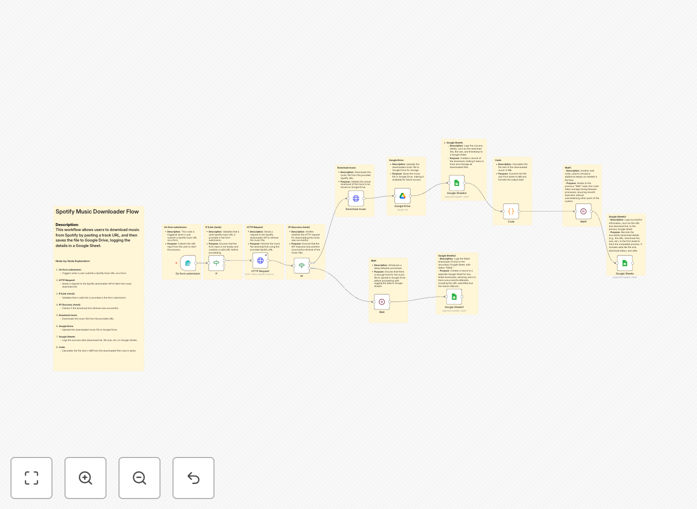
Spotify to Google Drive automation workflow diagram

What This Workflow Does

This automation solves the challenge of systematically archiving music from Spotify while maintaining detailed records of your downloads. Many music professionals, podcast creators, and audio enthusiasts need to maintain organized libraries of tracks they use across projects, but manual downloading and logging is time-consuming and error-prone.

The workflow automatically transfers specified Spotify tracks to your Google Drive storage while creating comprehensive logs in Google Sheets. Each entry includes metadata like artist, album, duration, and download timestamp, creating a searchable database of your audio assets. This eliminates manual file management while ensuring you always know what you've downloaded and where to find it.

How It Works

1. Spotify track selection

The workflow begins by identifying which Spotify tracks to download, either through manual selection or automated triggers like playlist additions. You can configure it to monitor specific playlists or receive track lists from other applications.

2. Secure download process

Using authorized APIs and services, the workflow securely retrieves the audio files while maintaining proper metadata. This ensures your downloads contain all the original track information for proper organization and copyright documentation.

3. Google Drive organization

Files are automatically saved to designated folders in your Google Drive, with consistent naming conventions based on artist, album, and track information. The workflow can create nested folder structures based on your preferences.

4. Automated Google Sheets logging

Each download triggers a new row in your designated Google Sheet, recording all relevant metadata along with the Google Drive file path. This creates a complete audit trail of your music library that's searchable and sortable.

Who This Is For

This workflow is ideal for music professionals, content creators, and audio enthusiasts who need to maintain organized libraries of tracks:

  • Podcast producers managing background music
  • Video editors building sound effect libraries
  • Musicians archiving reference tracks
  • DJs organizing their digital collections
  • Educators compiling audio resources

Pro tip: Combine this workflow with Google Drive's advanced search operators to instantly find tracks by BPM, duration, or other metadata logged in your Sheet.

What You'll Need

  1. An n8n instance (self-hosted or cloud)
  2. Spotify developer credentials
  3. Google Drive and Google Sheets access
  4. A legal method to download tracks (your own music or authorized sources)

Quick Setup Guide

  1. Download the JSON template file
  2. Import into your n8n instance
  3. Connect your Spotify and Google accounts
  4. Configure your target Google Drive folder and Sheet
  5. Set your track selection criteria (playlist, artist, etc.)
  6. Test with a single track to verify the flow
  7. Schedule regular runs or trigger manually as needed

Key Benefits

Save 5-10 hours per month on manual music downloading and organization. The automation handles file transfers, naming, and logging with perfect consistency.

Never lose track of a download with automatic Google Sheets documentation. Your entire music library becomes searchable by any metadata field.

Maintain copyright compliance with detailed records of when and where each track was obtained, essential for content creators managing usage rights.

Access your music anywhere through Google Drive's cross-platform sync, with consistent file paths that work across all your devices and applications.

Frequently Asked Questions

Common questions about Spotify music downloading and cloud organization

Spotify's terms prohibit downloading music outside their app, but you can legally download tracks you own through authorized services. This workflow helps organize downloads from legitimate sources while maintaining proper metadata and logs. Many musicians use this for their own tracks or royalty-free music libraries, keeping everything organized in Google Drive with automatic documentation in Sheets.

For commercial use, always ensure you have proper licensing. The automated logging helps maintain records of your rights to use each track, which is particularly valuable for content creators who need to demonstrate they have legal permission for the music in their projects.

  • Only download tracks you have rights to
  • Maintain documentation of licensing
  • Use metadata to track usage permissions

Automating music downloads saves hours of manual work while ensuring consistent organization. Key benefits include automatic file naming, centralized storage with Google Drive's search capabilities, and detailed logs of download history. Content creators particularly benefit from having all their audio assets automatically cataloged with timestamps and source information for easy reference.

The system eliminates duplicate downloads and ensures files are always stored in the correct location with proper metadata. For teams collaborating on audio projects, having everything automatically logged in Sheets provides visibility into what assets are available and where they're stored.

  • Eliminates manual file naming and organization
  • Creates searchable database of your music
  • Provides version control through Google Drive history

Automatic logging creates a searchable database of all your downloaded tracks with metadata like artist, album, download date, and file location. This is invaluable for musicians managing sample libraries, podcasters tracking background music, or educators building audio resources. The logs help prevent duplicate downloads and provide documentation for copyright compliance.

You can extend the Sheet with custom columns for project assignments, usage notes, or licensing expiration dates. Advanced users connect this data to other tools through Google Sheets API, creating a centralized music management system that integrates with their entire production workflow.

Yes, the workflow can be modified to log specific metadata fields that matter most to your use case. Common customizations include adding genre tags, BPM information, usage rights status, or personal ratings. The Google Sheet can be extended with additional columns for custom categorization and filtering of your music library.

For commercial music libraries, you might add columns for licensing terms or expiration dates. Educators could track curriculum alignment, while podcast producers might note which episodes used each track. The flexibility allows you to tailor the system to your specific audio management needs.

Effective organization combines automatic folder structures with smart naming conventions. The workflow can create folders by artist, genre, project, or date while maintaining consistent file naming. Adding searchable tags to both filenames and Sheet entries makes your library instantly accessible. Many users combine this with Google Drive's advanced search operators for powerful music retrieval.

Consider organizing by both permanent categories (genre, artist) and project-based groupings. The workflow can maintain multiple organizational schemes simultaneously by using Google Drive's "Add to multiple folders" feature without duplicating files, keeping your library flexible as your needs evolve.

Google Drive's desktop app automatically syncs your downloaded music library across all connected devices. For mobile access, you can use Google Drive's app or connect music players that support cloud storage. The workflow maintains consistent file paths so playlists remain intact across your ecosystem of devices and applications.

For professional audio work, consider setting up selective sync to keep frequently used tracks locally while storing the full archive in the cloud. The Sheet logs help you track which tracks are available offline on each device, preventing surprises when working without internet access.

Absolutely! GrowwStacks specializes in building tailored automation solutions for music professionals, content creators, and media teams. We can create custom workflows that integrate with your specific tools, add specialized metadata handling, or build advanced categorization systems. Our solutions help musicians, podcast producers, and audio archivists save hours each week on file management tasks.

Whether you need integration with digital audio workstations, specialized reporting for royalty tracking, or team collaboration features, we can design a system that fits your exact requirements. Our automations scale from individual creators to enterprise media libraries with thousands of tracks.

  • Custom metadata fields for your workflow
  • Integration with your existing tools
  • Team collaboration features

Need a Custom Music Download Automation?

This free template is a starting point. Our team builds fully tailored automation systems for your specific needs.