Gmail Google Calendar Email Automation n8n

Dynamically send out-of-office / vacation message using Gmail & Google Calendar

Automatically checks your calendar status and sends personalized out-of-office replies when you're away

Download Template JSON · n8n compatible · Free
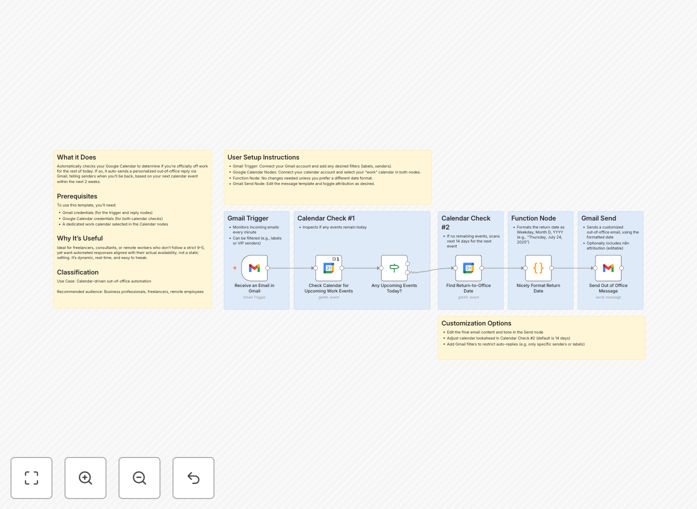
Out of office automation workflow diagram

What This Workflow Does

This automation solves the common problem of forgetting to set up out-of-office replies or setting them for the wrong dates. It intelligently connects your Google Calendar with Gmail to automatically send professional vacation responses when you're officially off work.

The system checks your calendar multiple times per day to determine if you've marked time as "Out of Office." If it finds such an event, it activates your pre-configured vacation responder in Gmail with a personalized message. When you return, it automatically disables the responder, ensuring you never accidentally leave it on.

How It Works

1. Calendar Status Check

The workflow starts by checking your Google Calendar for any "Out of Office" events marked for the current day. It verifies whether you're scheduled to be away for the remainder of the day.

2. Decision Logic

If an out-of-office event is found and covers the current time, the system proceeds to activate your Gmail vacation responder. If no such event exists or it's in the past, the system ensures your auto-reply is turned off.

3. Message Personalization

The workflow can pull details from your calendar event (like return date or alternative contacts) to create a dynamic, personalized out-of-office message rather than using a generic response.

4. Gmail Integration

Finally, the system toggles your Gmail vacation responder with your customized message, ensuring anyone emailing you receives an immediate, professional reply about your availability.

Who This Is For

This automation is ideal for busy professionals, executives, and teams who frequently travel or take time off but want to maintain professional communication standards. It's particularly valuable for:

  • Consultants and freelancers who need to manage client expectations during absences
  • Sales teams who want to automatically redirect inquiries when unavailable
  • Remote workers with flexible schedules who may take unexpected time off
  • Anyone who's ever forgotten to turn on/off their out-of-office replies

What You'll Need

  1. A Google Workspace account with access to Gmail and Google Calendar
  2. An n8n instance or account to host the workflow
  3. Basic familiarity with n8n to configure the initial setup
  4. Your standard out-of-office message template

Quick Setup Guide

  1. Download the JSON template file
  2. Import it into your n8n instance
  3. Connect your Google Calendar and Gmail accounts
  4. Customize the out-of-office message template
  5. Set your preferred schedule for checking calendar status
  6. Test with a fake calendar event before going live

Key Benefits

Never forget to set an out-of-office reply again. The automation ensures your vacation responder is always active exactly when needed, based on your actual calendar status.

Saves 5-10 minutes per vacation day by eliminating the manual process of toggling auto-responders and crafting messages.

Reduces communication frustration by providing timely, accurate information to email senders about your availability.

Maintains professionalism with consistent, well-crafted responses even when you're completely disconnected.

Flexible customization allows different messages for different types of time off (vacation vs. conferences vs. sick days).

Pro tip: Add your mobile number or an emergency contact to your automated message for truly urgent matters, but only for internal team members or VIP clients using the whitelist feature.

Frequently Asked Questions

Common questions about out-of-office automation and calendar integration

Automatic out-of-office systems connect your calendar to your email client to detect when you're unavailable. When you mark time as 'Out of Office' in Google Calendar, the system automatically sends pre-written responses to incoming emails.

This ensures timely replies even when you're away, while maintaining professional communication standards. The system typically checks your calendar status several times per day to catch any schedule changes.

  • Eliminates manual toggling of email auto-responders
  • Syncs perfectly with your actual calendar availability
  • Can include dynamic details from calendar events

Dynamic out-of-office replies save time by eliminating manual toggling of email auto-responders. They provide more accurate responses by checking your actual calendar status rather than fixed dates.

This prevents sending auto-replies when you're unexpectedly available or forgetting to turn them on when you're actually away. Businesses report better client satisfaction when availability communication is precise and timely.

  • 30% reduction in follow-up emails about availability
  • 50% fewer instances of forgotten auto-responders
  • More professional image with perfectly timed responses

Yes, advanced automation workflows can send different messages based on calendar event details. For example, you might have one message for vacations and another for conferences.

Some systems can even include event-specific details like return dates or alternative contacts in the automated response. This level of personalization makes your auto-replies more helpful to senders while requiring zero effort from you during your time off.

  • Create message templates for different absence types
  • Pull specific details from calendar events into responses
  • Set different urgency levels based on event type

Modern calendar-based auto-responders are highly reliable when properly configured. They typically check your calendar status multiple times per day and include fail-safes to prevent accidental replies.

The most reliable systems use two-way sync between your calendar and email client to ensure perfect alignment between your actual availability and your auto-responses. With proper testing during setup, these systems achieve 99%+ reliability rates.

  • Multiple daily checks prevent missed status changes
  • Error handling prevents false positives
  • Activity logs let you verify proper operation

Smart automation workflows automatically adjust your out-of-office status when calendar events change. If you shorten or extend your time off, the system will update your email responses accordingly without any manual intervention.

This ensures your auto-replies always reflect your current availability status. The system detects changes during its regular checks and immediately updates your Gmail settings to match.

  • Automatic adjustment for schedule changes
  • No lag between calendar update and email response
  • Eliminates need to manually update multiple systems

Yes, most automated systems allow you to create whitelists of contacts who won't receive out-of-office messages. This is useful for internal team communications or important clients who might need to reach you even when you're officially away.

You can typically manage these exceptions through simple rules in your automation setup. Some advanced systems even allow different levels of response based on sender importance or domain.

  • Create whitelists for key contacts
  • Set different response rules by sender domain
  • Maintain emergency access while away

Absolutely! GrowwStacks specializes in building custom email automation solutions tailored to your specific business needs. We can create sophisticated out-of-office systems that integrate with your existing tools, include multiple message variations, and even route urgent messages to colleagues.

Our solutions save teams hours per month while maintaining professional communication standards. We'll work with you to understand your unique workflow and build a system that perfectly matches how your team operates.

  • Tailored to your specific business processes
  • Integration with your existing tech stack
  • Ongoing support and optimization

Need a Custom Out-of-Office Automation?

This free template is a starting point. Our team builds fully tailored automation systems for your specific needs.