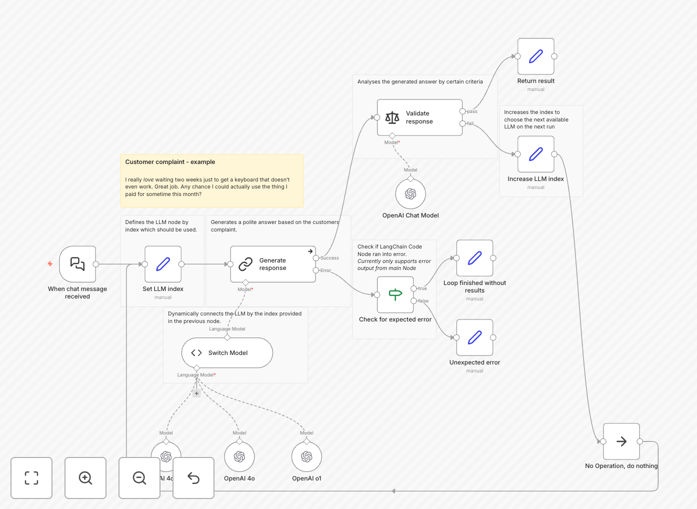
What This Workflow Does
This workflow solves the challenge of being locked into a single large language model (LLM) for your AI agent applications. Different LLMs have different strengths - some excel at creative writing, others at technical explanations, and others at cost efficiency. This template demonstrates how to dynamically route requests to the most appropriate LLM based on context, intent, or performance metrics.
By implementing this solution, you can optimize both performance and costs. Your AI agents will automatically use the best model for each specific task, whether that's GPT-4 for complex reasoning, Claude for document analysis, or a smaller open-source model for simple queries. The workflow uses LangChain's flexible architecture to make these switches seamless.
How It Works
1. Input Processing
The workflow begins by analyzing the incoming request - whether it's a user query, API call, or automated trigger. The content is processed to extract key characteristics like complexity, domain, and required response style.
2. LLM Selection Logic
Based on predefined rules and performance metrics, the workflow determines which LLM would be most appropriate. Factors considered might include cost, latency requirements, domain expertise, or current load balancing.
3. Dynamic Routing
Using LangChain's LLM routing capabilities, the request is directed to the selected model. The workflow maintains connections to multiple LLM providers and can switch between them dynamically.
4. Response Handling
The chosen LLM processes the request and generates a response, which is then formatted and returned through a consistent interface regardless of which model was used.
Who This Is For
This solution is ideal for businesses running AI agents that need flexibility in their LLM usage. It's particularly valuable for:
- Customer support chatbots that handle diverse query types
- Content generation platforms needing different writing styles
- Technical applications requiring specialized model capabilities
- Cost-sensitive implementations needing to optimize spend
What You'll Need
- An n8n instance (self-hosted or cloud)
- LangChain Python library installed
- API keys for at least two LLM providers (OpenAI, Anthropic, etc.)
- Basic understanding of AI agent architecture
Pro tip: Start with simple routing rules based on query length or keywords, then refine your selection logic as you gather performance data from each model.
Quick Setup Guide
- Download and import the JSON template into your n8n instance
- Configure your LLM API connections in the credentials section
- Adjust the routing logic to match your use case requirements
- Test with sample queries to verify proper model selection
- Deploy to your production environment
Key Benefits
Optimized performance: Get the best results for each query type by automatically using the most capable model.
Cost efficiency: Reduce expenses by routing simple queries to less expensive models while reserving premium models for complex tasks.
Future-proof architecture: Easily add new models as they become available without rewriting your entire application.
Improved reliability: Automatically failover to backup models if your primary provider experiences issues.