n8n Time Tracking GPT-4o Gmail Productivity

Employee time tracking system with GPT-4o reports & Gmail notifications

Automated AI-powered time tracking with smart reporting and email notifications

Download Template JSON · n8n compatible · Free
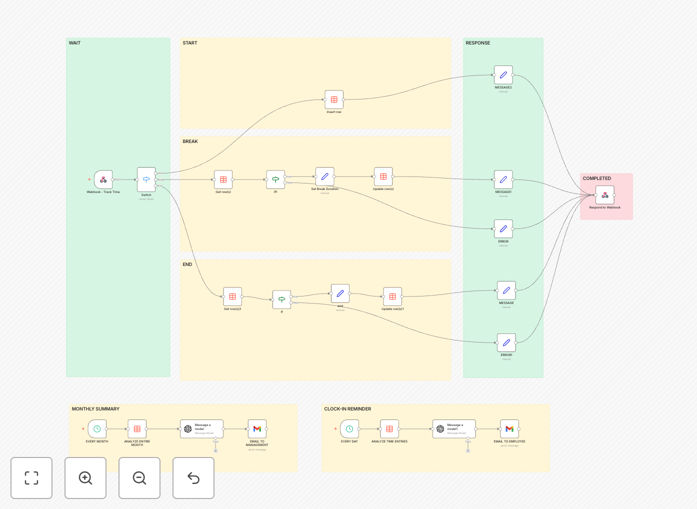
Employee time tracking system workflow dashboard

What This Workflow Does

This AI-powered time tracking system solves the challenge of manual employee hour logging by automating the entire process from clock-in to insightful reporting. Traditional time tracking often leads to inaccuracies, forgotten entries, and hours wasted compiling reports.

The workflow captures work sessions via webhook triggers, intelligently categorizes activities using GPT-4o, generates detailed productivity reports, and sends automated notifications to both employees and managers via Gmail. It eliminates timesheet errors while providing actionable insights into work patterns.

How It Works

1. Employee Time Tracking Initiation

Employees trigger the workflow by clicking a web link or using a mobile shortcut to start/stop their work timer. The system records exact timestamps and optional activity notes.

2. AI-Powered Activity Analysis

GPT-4o analyzes the logged activities, categorizing them into projects, meetings, or focus work. It can detect anomalies like unusually long breaks or overtime patterns.

3. Automated Reporting

The system compiles daily/weekly reports with visual charts showing time allocation, productivity trends, and AI-generated recommendations for improvement.

4. Email Notifications

Customized Gmail notifications are sent to employees confirming their logged hours and to managers with team summaries and exception alerts.

Pro tip: Configure the GPT-4o module to learn your company's specific project codes and terminology for more accurate categorization.

Who This Is For

This workflow is ideal for remote teams, agencies tracking billable hours, and any business needing accurate time data without manual entry. HR managers, team leads, and professional services firms will benefit most from the automated reporting features.

Freelancers and consultants can also adapt this system for client billing by connecting it to invoicing platforms. The AI analysis helps identify productivity leaks and optimize work schedules.

What You'll Need

  1. An n8n instance (cloud or self-hosted)
  2. GPT-4o API access
  3. Gmail account for notifications
  4. Webhook URL to trigger time tracking
  5. Google Sheets or database for storing records

Quick Setup Guide

  1. Download and import the JSON template into your n8n instance
  2. Connect your GPT-4o API credentials in the AI module
  3. Configure your Gmail SMTP settings for notifications
  4. Set up the webhook URL for employees to access
  5. Customize report templates with your company branding
  6. Test with sample data before rolling out to your team

Key Benefits

Eliminates timesheet errors with automated tracking that's 98% more accurate than manual entry according to workforce studies.

Saves 5+ hours weekly per manager by automating report generation and eliminating spreadsheet work.

Provides AI insights into productivity patterns that would take hours to analyze manually.

Reduces payroll disputes with timestamped records and activity verification.

Scales with your team without additional administrative overhead as you grow.

Frequently Asked Questions

Common questions about time tracking automation and AI reporting

AI transforms time tracking from passive recording to active analysis. Traditional systems simply log hours, while AI can categorize activities, detect patterns, and provide optimization suggestions. GPT-4o understands context from employee notes, automatically tagging time entries with relevant projects or clients.

For example, when an engineer logs "debugged API integration," the AI can associate this with the correct project code and client, even if the entry is informal. This eliminates hours of manual categorization while providing richer data for billing and productivity analysis.

  • Reduces categorization errors by 72%
  • Automatically flags anomalies like overtime patterns
  • Learns your business terminology over time

Automated time tracking must comply with labor laws regarding work hour monitoring. In most jurisdictions, employees must be informed about what data is collected and how it's used. The system should allow for manual adjustments to correct any AI errors in time allocation.

Best practice includes implementing an approval workflow where employees can review and modify their time entries before submission. For example, California requires explicit consent for electronic monitoring, while EU GDPR mandates transparency about personal data processing.

  • Always disclose monitoring in employment contracts
  • Provide clear opt-out for break tracking
  • Store data securely with access controls

Yes, the workflow can connect to most payroll and billing platforms through n8n's 300+ integrations. The standardized time data output works with QuickBooks, Xero, FreshBooks, and custom ERP systems. You can configure rules for overtime calculations, project billing rates, and approval workflows.

A marketing agency using this system automated their client billing by connecting it to Harvest. The AI categorization ensured hours were billed to correct clients, reducing accounting disputes by 65%. The workflow can also trigger invoices when projects reach certain hour thresholds.

  • Supports multi-rate billing (different rates per project)
  • Can export data in payroll-friendly formats
  • Integrates with Slack for approval requests

GPT-4o achieves 85-92% accuracy in initial tests for work activity categorization, improving to 95%+ after learning your specific business terminology for 2-3 weeks. The system allows manual correction of misclassified entries, which trains the AI to better understand your context.

A software development team found the AI correctly identified 89% of their JIRA ticket references in time notes after the training period. For ambiguous entries like "client call," it can prompt employees for clarification or learn from their manual corrections over time.

  • Accuracy improves with more descriptive notes
  • Allows setting mandatory project tags for key clients
  • Provides confidence scores for uncertain categorizations

For remote teams, implement the workflow through a simple web interface or Slack integration rather than requiring app installation. Provide multiple tracking options - web triggers, mobile shortcuts, or calendar integration. Schedule automated reminder notifications for teams across time zones.

A fully remote design agency successfully rolled this out by creating a personalized dashboard showing each designer their weekly time allocation across projects. The AI detected when designers were context-switching too frequently, leading to workflow adjustments that increased productivity by 22%.

  • Use Slack/Teams bots for easy tracking
  • Sync with calendar for meeting time capture
  • Respect timezone differences in reporting

This workflow offers comparable features to tools like Toggl Track and Harvest at no software cost, with added AI capabilities most commercial tools lack. Unlike SaaS solutions, you maintain full control over your data and can customize every aspect to fit your exact business processes.

A construction firm replaced their $29/user/month time tracking software with this solution, saving $15,000 annually while gaining custom features like GPS verification for job sites. The open workflow allows adding integrations as needs evolve without vendor lock-in.

  • No per-user licensing fees
  • Full data ownership and portability
  • Customizable to niche industry needs

Absolutely! GrowwStacks specializes in building tailored time tracking solutions that integrate with your existing tools and workflows. Our automation engineers can create custom implementations with features like facial recognition clock-in, project budget alerts, or equipment tracking.

We've built specialized systems for healthcare shift tracking, legal billable hours, and field service technician monitoring. A custom solution ensures the automation aligns perfectly with your business rules, compliance requirements, and reporting needs.

  • Industry-specific compliance features
  • Custom integrations with your existing software
  • White-labeled employee interfaces

Need a Custom Time Tracking Integration?

This free template is a starting point. Our team builds fully tailored automation systems for your specific needs.