Google Drive AI Processing Expense Management n8n Automation

Expense Organizer with Google Drive Routing & Gemini AI

Automatically process receipts, extract data with AI, organize in Google Drive, and send notifications. Perfect for small businesses and households.

Download Template JSON · n8n compatible · Free
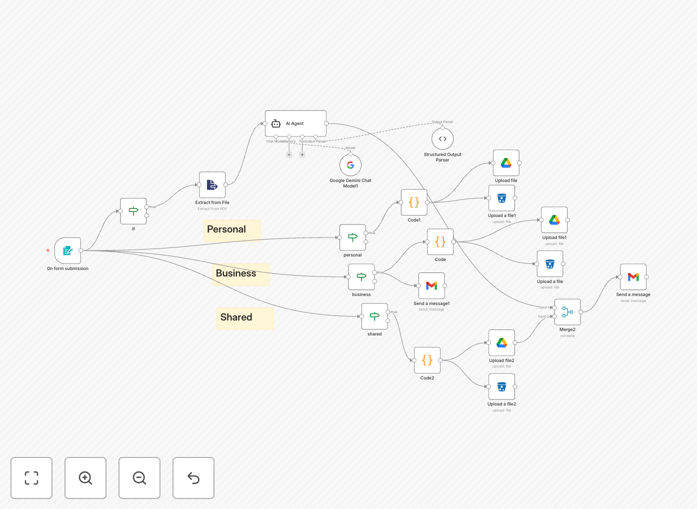
Expense organizer workflow diagram showing AI processing and Google Drive integration

What This Workflow Does

Manual expense tracking is a time-consuming, error-prone process that plagues businesses and individuals alike. This automation eliminates the headache of receipt organization by creating a complete, AI-powered expense management system. It transforms chaotic paper trails and digital clutter into structured, actionable financial data.

The workflow automatically processes uploaded receipts, uses Google Gemini AI to extract key information like vendor names, dates, and amounts, then intelligently routes documents to organized Google Drive folders based on expense category. It simultaneously backs up to cloud storage and sends detailed email notifications—creating a seamless, audit-ready financial record system without manual intervention.

How It Works

1. Form Submission & Receipt Upload

Users submit expenses through a simple web form, uploading receipt images or PDFs and selecting categories (Personal, Business, or Shared). The system accepts multiple file formats and prepares them for AI processing.

2. AI-Powered Data Extraction

Google Gemini AI analyzes receipt content, extracting structured data with remarkable accuracy. It identifies vendor information, transaction dates, amounts, tax details, and categorizes expenses based on content patterns—far surpassing manual data entry speed and consistency.

3. Smart Routing & Organization

Based on the categorized expense type, the system automatically routes receipts to appropriate Google Drive folders. It creates year/month directory structures, applies consistent naming conventions, and maintains separation between business, personal, and shared expenses.

4. Multi-Destination Storage

Documents are simultaneously stored in Google Drive for easy access and S3 cloud storage for backup and compliance. This dual-storage approach ensures data redundancy while maintaining organization across different storage systems.

5. Notification & Integration

Formatted HTML emails are sent with complete expense details and storage links. Business expenses can be automatically forwarded to accounting systems via email hooks, creating a bridge between receipt management and formal bookkeeping.

Pro tip: Configure the AI extraction to learn your most common vendors—it will become increasingly accurate at categorizing recurring expenses from familiar suppliers, saving even more time over manual methods.

Who This Is For

This automation delivers maximum value to small businesses needing organized expense records for tax purposes, freelancers and consultants tracking billable client expenses, households managing shared finances, and startups requiring clean financial data for investor reporting. Any individual or entity processing 20+ receipts monthly will see immediate time savings and accuracy improvements.

Particularly beneficial for service-based businesses with client reimbursable expenses, companies with multiple employees submitting receipts, and anyone tired of monthly receipt reconciliation marathons. The system scales effortlessly from solo entrepreneurs to teams of 50+.

What You'll Need

  1. Google Gemini API credentials for AI-powered receipt analysis
  2. Google Drive OAuth2 access for personal and/or business accounts
  3. Gmail OAuth2 credentials for sending notification emails
  4. S3-compatible storage (AWS S3, Wasabi, DigitalOcean Spaces, etc.)
  5. n8n instance (cloud or self-hosted) to run the workflow
  6. Web form endpoint for users to submit expenses (included in template)

Quick Setup Guide

  1. Download and import the JSON template into your n8n instance
  2. Configure credentials for Gemini AI, Google Drive, Gmail, and S3 storage in n8n's credential management
  3. Update placeholder values in the workflow nodes with your specific folder IDs, email addresses, and bucket names
  4. Test the form submission with a sample receipt to verify AI extraction accuracy
  5. Validate folder creation in Google Drive and check notification emails arrive correctly
  6. Activate the workflow and share the form URL with your team or set up for personal use

Implementation note: Start with a small set of test receipts to fine-tune the AI extraction before rolling out to your entire team. The system learns from consistent data patterns, so initial calibration ensures long-term accuracy.

Key Benefits

Save 5-10 hours monthly by eliminating manual receipt data entry, categorization, and filing. What previously required dedicated monthly reconciliation becomes an automated background process.

Reduce categorization errors by 90% compared to manual methods. AI consistently applies rules without fatigue or oversight, ensuring expense classification matches your accounting standards.

Create audit-ready records automatically with organized digital trails, timestamps, and backup copies. Tax season preparation transforms from a stressful project into simple report generation.

Gain real-time spending visibility through organized data rather than scattered receipts. Make informed budgeting decisions based on actual categorized expenses instead of estimates.

Scale effortlessly with business growth without adding administrative overhead. The system handles 10 or 10,000 receipts with identical efficiency and accuracy.

Frequently Asked Questions

Common questions about expense automation and AI document processing

Automating expense management saves 5-10 hours monthly by eliminating manual data entry, reduces human error in categorization by 90%, ensures tax compliance through organized digital records, and provides real-time visibility into spending patterns for better budgeting decisions.

Beyond time savings, automation creates consistency in how expenses are processed, eliminates receipt loss, and provides searchable digital records. Businesses recover previously wasted administrative time that can be redirected to revenue-generating activities.

AI like Google Gemini can extract structured data from receipts with 95%+ accuracy, including vendor names, dates, amounts, and categories that manual entry often misses. It processes receipts in seconds versus minutes, learns from corrections, and handles various receipt formats consistently.

Unlike humans who fatigue and make inconsistent judgments, AI applies the same rules to every receipt regardless of time of day or volume. It can also identify patterns across multiple receipts from the same vendor, suggesting optimal categorization based on historical data.

Small businesses with 5-50 employees, freelancers with multiple income streams, consulting firms with client billable expenses, households managing shared finances, and startups needing clean financial records for investors benefit most. Any entity processing 20+ receipts monthly sees immediate ROI.

Service businesses with reimbursable expenses gain particular advantage through accurate client billing. Companies with remote teams appreciate the centralized digital system that eliminates physical receipt collection from multiple locations.

Enterprise-grade encryption protects data both in transit and at rest. Access controls limit who can view sensitive financial documents. Automated systems actually improve security by eliminating email attachments and reducing paper receipts that can be lost or stolen.

Properly configured automation provides audit trails showing exactly who accessed which documents and when. Compared to paper receipts in desk drawers or unsecured email inboxes, automated cloud storage with permission controls represents a significant security upgrade.

Yes, automation platforms like n8n can connect expense data directly to accounting systems via APIs or formatted exports. This eliminates double entry, ensures categorization consistency, and provides real-time financial reporting without manual reconciliation.

The structured data extracted by AI can be mapped directly to accounting software fields, creating seamless integration. Some implementations even include approval workflows before expenses reach the accounting system, maintaining financial controls while automating data transfer.

Using templates like this one, basic setup takes 2-4 hours including credential configuration and testing. Custom implementations for specific business rules might take 1-2 days. The automation pays for itself in time savings within the first month of use.

Most time is spent configuring credentials and testing with sample receipts to ensure accurate extraction. Once operational, the system requires minimal maintenance beyond occasional categorization rule updates as business needs evolve.

The system uses conditional logic based on expense categories (business, personal, shared) to route receipts to appropriate folder structures. It automatically creates year/month folders, names files consistently, and maintains organization without manual intervention.

Advanced implementations can route based on vendor, project codes, or dollar thresholds. The folder structure becomes a living financial archive that's both organized for human review and structured for potential data analysis or reporting tools.

Yes, GrowwStacks specializes in building tailored expense automation systems that match your specific business processes, accounting software, approval workflows, and reporting needs. We handle everything from AI model training to multi-user access controls.

Custom implementations can include mobile receipt capture, multi-level approval chains, integration with your existing accounting platform, and custom reporting dashboards. We work with you to understand your unique requirements and build a system that feels natural to your team while delivering maximum automation benefits.

  • Integration with your specific accounting software
  • Custom approval workflows matching your financial controls
  • Training and ongoing support for your team

Need a Custom Expense Automation?

This free template is a starting point. Our team builds fully tailored automation systems for your specific business needs.