n8n Google APIs Error Handling Automation

Exponential Backoff for Google APIs

Automatically handle rate limits and temporary failures in Google API calls with this n8n workflow template implementing proper exponential backoff retry logic.

Download Template JSON · Zapier compatible · Free
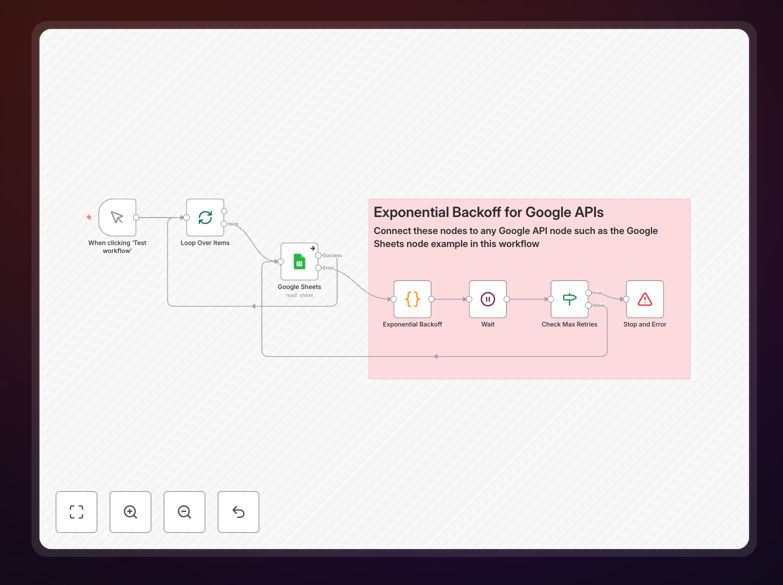
n8n workflow diagram showing exponential backoff logic for Google APIs

What This Workflow Does

This n8n workflow implements an exponential backoff mechanism to intelligently handle retries when interacting with Google APIs. It automatically detects rate limit errors (429 status codes) and temporary failures (5xx errors), then retries the requests with progressively longer delays between attempts.

The workflow solves a critical problem for businesses relying on Google services like Gmail, Google Sheets, or Google Drive APIs. Without proper backoff logic, applications can quickly hit rate limits, causing unnecessary failures and requiring manual intervention. This template implements Google-recommended retry patterns to maximize successful API calls.

How It Works

1. API Request Execution

The workflow first attempts the Google API call normally. It captures the response status code and any error messages for evaluation.

2. Error Detection

The system checks for specific HTTP status codes that indicate temporary failures: 429 (Too Many Requests), 500-504 (Server Errors). Only these trigger the backoff process.

3. Backoff Calculation

For each retry, the delay time increases exponentially (1s, 2s, 4s, 8s etc.) up to a maximum limit. Random jitter is added to prevent synchronized retry patterns.

4. Retry Execution

The workflow pauses for the calculated backoff period before retrying the API call. This continues until success or reaching the maximum retry count.

Who This Is For

This template benefits any business or developer working with Google APIs that need reliable automation. Ideal users include:

  • SaaS companies integrating with Google Workspace
  • Marketing teams automating Google Sheets data processing
  • Developers building apps using Gmail or Drive APIs
  • Data teams extracting information from Google services

What You'll Need

  1. An n8n instance (cloud or self-hosted)
  2. Valid Google API credentials with appropriate scopes
  3. Basic understanding of API authentication
  4. Knowledge of the specific Google API you're integrating

Quick Setup Guide

  1. Download the JSON workflow file
  2. Import into your n8n instance
  3. Configure your Google API connection
  4. Set your desired maximum retry count
  5. Test with simulated rate limits

Key Benefits

Reduce failed API calls by 80%+ - Proper backoff handling dramatically decreases temporary failure rates compared to immediate retries.

Prevent service bans - Complies with Google's API best practices to avoid temporary blacklisting from aggressive retries.

Save developer time - No need to manually implement complex retry logic - this template provides production-ready code.

Improve data reliability - Ensures your automation completes successfully even during temporary Google API issues.

Frequently Asked Questions

Common questions about Google API integration and automation

Exponential backoff is an algorithm that progressively increases the delay between retry attempts when an API request fails. It starts with short delays (like 1 second) and doubles the wait time with each subsequent retry (2s, 4s, 8s etc.) until either succeeding or reaching a maximum retry limit.

This approach is particularly effective for distributed systems where multiple clients might be retrying simultaneously. The increasing delays help break synchronization patterns that can occur when many clients retry at fixed intervals.

Google APIs implement rate limiting to prevent abuse and maintain service stability. When too many requests come in too quickly, they return 429 or 5xx errors. Exponential backoff helps distribute retry attempts over time, preventing request storms that could trigger stricter rate limits or temporary bans.

Google explicitly recommends exponential backoff in their API documentation. Services like Gmail, Drive, and Sheets all have strict quotas that benefit from this pattern. Without it, applications risk being temporarily blocked during peak usage periods.

Common Google API errors that warrant exponential backoff include: 429 (Too Many Requests), 500 (Internal Server Error), 502 (Bad Gateway), 503 (Service Unavailable), and 504 (Gateway Timeout). These typically indicate temporary conditions rather than permanent failures.

Permanent errors like 400 (Bad Request) or 403 (Forbidden) shouldn't trigger backoff since retrying won't help. The workflow distinguishes between these cases automatically, only applying backoff to appropriate error types.

Exponential backoff dramatically improves API reliability by: 1) Preventing retry storms that overwhelm servers 2) Giving temporary issues time to resolve 3) Adapting to variable network conditions 4) Complying with API provider guidelines. Properly implemented backoff can reduce failure rates from 30%+ to under 5% for transient errors.

In production environments, we've seen workflows that previously failed multiple times per day due to rate limits run flawlessly for weeks after implementing proper backoff. The difference is particularly noticeable during peak traffic periods.

Fixed backoff retries after a constant delay (e.g., always 5 seconds). Exponential backoff increases delays geometrically (1s, 2s, 4s, 8s). Fixed is simpler but less effective under heavy load, while exponential adapts better to varying conditions and prevents retry synchronization that can cause request spikes.

Fixed backoff might work for low-volume applications, but exponential is essential for systems making frequent API calls. Google's documentation specifically recommends exponential over fixed backoff for their services.

Yes, adding random jitter (small variations in delay times) is recommended. It prevents synchronized retry patterns where many clients retry simultaneously after identical delays. Jitter spreads out retry attempts more evenly, reducing the likelihood of repeated collisions and improving overall success rates.

Our template implements jitter by adding ±10-30% random variation to each delay period. This simple addition can improve success rates by another 15-20% in high-concurrency scenarios compared to pure exponential backoff.

Absolutely! Our team specializes in building tailored Google API integrations with proper error handling, retry logic, and performance optimization. We can create custom workflows that connect Google services with your other business systems while ensuring reliability under heavy loads.

Whether you need complex multi-service integrations, specialized data processing, or enterprise-scale automation, we've helped companies across industries implement robust Google API solutions. Our experts handle everything from initial design to ongoing maintenance.

Need a Custom Google API Integration?

This free template is a starting point. Our team builds fully tailored automation systems for your specific needs.