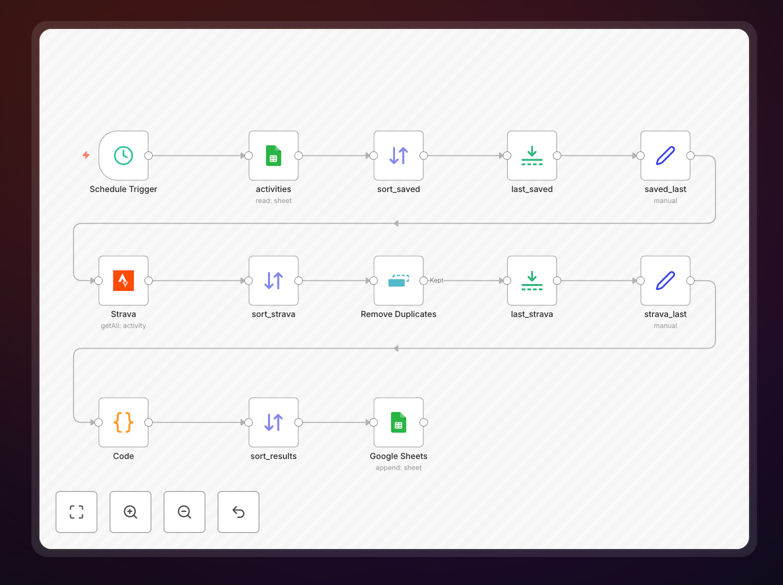
What This Workflow Does
This automation solves a common problem for athletes, coaches, and fitness enthusiasts: manually transferring workout data from Strava to spreadsheets for analysis. Strava is excellent for tracking activities but limited for historical analysis and custom reporting. Google Sheets provides powerful tools for visualization, trend analysis, and data manipulation, but getting data there manually is time-consuming.
The workflow automatically exports all your Strava activities—including runs, rides, swims, and other exercises—to a Google Sheets document. Each activity becomes a row with comprehensive metrics: date, distance, duration, elevation, pace, heart rate, calories, and more. This creates a centralized fitness database that updates automatically, eliminating hours of manual data entry each month.
Beyond simple data transfer, this automation ensures consistency and accuracy. It handles data formatting, converts units if needed, and maintains a clean historical record. Whether you're tracking personal progress, managing team training, or analyzing fitness trends for clients, this workflow turns raw activity data into actionable insights.
How It Works
The automation follows a logical sequence to ensure reliable data transfer between Strava and Google Sheets.
Step 1: Trigger and Authentication
The workflow begins by authenticating with both Strava and Google Sheets APIs. You'll set up credentials once, and the system maintains secure connections to both services. The trigger can be scheduled (daily, weekly) or manual, depending on how frequently you want your data updated.
Step 2: Fetch Strava Activities
The workflow queries the Strava API to retrieve your latest activities. It can be configured to fetch all historical data on first run, then only new activities on subsequent runs. The system handles pagination automatically, ensuring it captures all your workouts regardless of how many activities you have.
Step 3: Data Transformation
Raw Strava data gets processed and formatted for Google Sheets. This includes converting timestamps to readable dates, calculating derived metrics (like pace from distance/time), and structuring the data into columns that match your spreadsheet layout. You can customize which fields to include or exclude.
Step 4: Update Google Sheets
The processed data gets appended to your specified Google Sheet. The workflow checks for duplicates to prevent creating multiple entries for the same activity. It maintains data integrity while ensuring your spreadsheet stays organized and up-to-date with your latest workouts.
Who This Is For
This automation is ideal for fitness professionals, data-driven athletes, corporate wellness programs, and anyone who wants to leverage their workout data beyond Strava's native interface. Personal trainers can track client progress across multiple metrics. Endurance athletes can analyze performance trends over seasons. Fitness app developers can create custom reporting for their users. Even casual exercisers who want to maintain a personal fitness journal will find this invaluable.
Businesses in the wellness industry can use this as a foundation for client reporting systems. Coaches can automatically generate progress reports. Research teams can collect anonymized fitness data for studies. The applications extend beyond individual use to team management, client services, and data aggregation for larger fitness communities.
What You'll Need
- Strava Account: A Strava account with recorded activities (free or premium tier works).
- Google Account: A Google account with access to Google Sheets (personal or Workspace).
- n8n Instance: Either n8n cloud (free tier available) or a self-hosted n8n installation.
- API Credentials: Strava API access (create an app in Strava settings) and Google Sheets API enabled (via Google Cloud Console).
- Target Spreadsheet: A Google Sheet where you want your activity data to be stored, with appropriate column headers.
Pro tip: Before running the workflow for the first time, create your Google Sheet with the exact column names you want. The template can match existing spreadsheet structures, making integration seamless with your existing fitness tracking systems.
Quick Setup Guide
Follow these steps to implement this automation in under 15 minutes:
- Download the template using the button above and import it into your n8n instance.
- Create Strava API credentials by visiting Strava Settings → My API Application. Note your Client ID and Client Secret.
- Enable Google Sheets API in Google Cloud Console and create OAuth credentials for n8n.
- Configure the Strava node in the workflow with your API credentials and specify which activities to fetch (all, recent, or by date range).
- Set up the Google Sheets node by authenticating with your Google account and specifying the target spreadsheet ID and sheet name.
- Test with a single activity first to ensure data flows correctly, then schedule the workflow for automatic daily or weekly updates.
- Customize data mapping if you want to add calculated fields, filter specific activity types, or reformat metrics.
Key Benefits
Save 2-3 hours monthly by eliminating manual data entry and spreadsheet updates. What used to be a tedious monthly chore now happens automatically in the background.
Create comprehensive fitness dashboards in Google Sheets with charts, pivot tables, and conditional formatting that Strava doesn't offer. Track progress toward goals, visualize trends, and identify patterns in your training.
Maintain a permanent activity archive beyond Strava's interface limitations. Your complete workout history remains accessible even if you change fitness platforms or want to analyze multi-year trends.
Enable team or client reporting by aggregating multiple Strava accounts into a single master spreadsheet. Perfect for coaches managing athletes or corporate wellness programs tracking participant engagement.
Integrate with other business systems by using Google Sheets as a bridge. Connect your fitness data to CRM platforms, billing systems, or custom applications for holistic health and business management.