What This Workflow Does
Sales teams waste countless hours manually checking the CRM, copying deal information into spreadsheets, and sending update messages. This creates delays, errors, and missed opportunities for quick celebration or analysis.
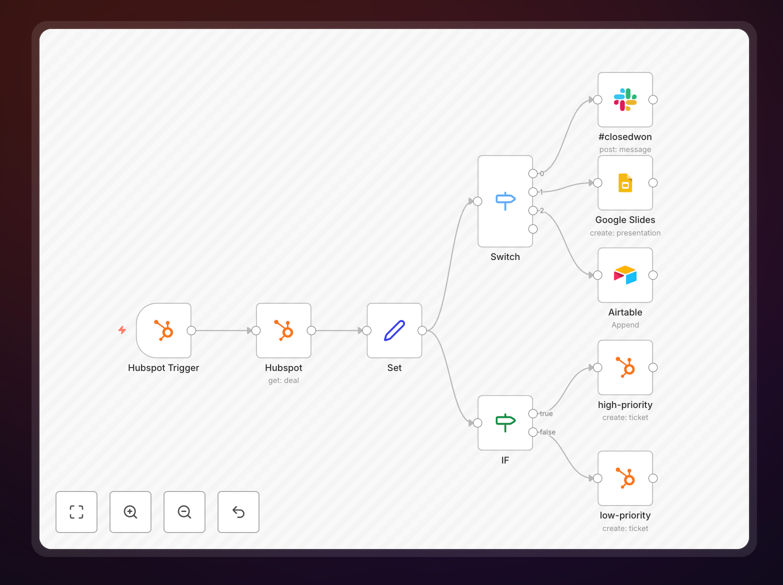
This automation solves that by instantly processing every new deal created in HubSpot. It intelligently routes information based on the deal's outcome: celebrating wins in Slack, creating presentation materials when needed, and logging lost deals in Airtable for post-mortem review. It also automatically creates follow-up tickets in HubSpot based on deal value and business type, ensuring nothing falls through the cracks.
The result is a self-managing sales pipeline where your team is always informed, data is consistently captured, and managers gain valuable insights without lifting a finger.
How It Works
The workflow follows a logical, branching path to handle different deal scenarios efficiently.
Step 1: Trigger on New HubSpot Deal
The workflow activates the moment a new deal is created in your HubSpot CRM. It captures all relevant deal data: amount, stage, company name, contact, and custom properties.
Step 2: First Branch – Deal Outcome Processing
Using an "If" node, the workflow checks the deal's stage and properties, then takes one of three actions:
- Closed-Won: Sends a celebratory message to a designated Slack channel, tagging relevant team members to share the success instantly.
- Presentation Scheduled: Automatically generates a Google Slides presentation from a template, populating it with the deal's details for the sales rep.
- Closed-Lost: Adds the deal's full details to a specified Airtable base. This creates a searchable log of lost opportunities for analyzing why deals were lost and identifying patterns.
Step 3: Second Branch – Priority Ticket Creation
Another logic check assesses the deal's value and whether it's for a new or existing business.
- New Business & High Value (>500): Creates a high-priority support ticket in HubSpot and assigns it to an experienced team member for immediate, focused follow-up.
- Existing Business & Lower Value (<500): Creates a standard-priority ticket, ensuring appropriate tracking without overwhelming resources.
All this happens in seconds, completely autonomously.
Who This Is For
This template is ideal for sales teams, revenue operations (RevOps) managers, and business owners who use HubSpot as their CRM and want to eliminate manual data handling. It's perfect for:
- B2B Sales Teams: Who need instant team alerts for new opportunities and wins.
- Sales Managers: Who want to systematically analyze lost deals to improve coaching and process.
- Startups and SMBs: Looking to implement sophisticated, automated pipeline management without a large IT budget.
- Operations Teams: Tasked with improving data flow between sales, support, and leadership.
Pro tip: Use the Airtable log of lost deals to run quarterly reviews. Tag deals with reasons like "Budget", "Timing", or "Feature Gap" to generate powerful reports for product and sales strategy.
What You'll Need
- An active HubSpot account with deals enabled.
- A Slack workspace where you have permission to create webhooks and post to channels.
- An Airtable base with a table structured to receive deal data (fields like Deal Name, Amount, Close Date, Loss Reason).
- A running instance of n8n (self-hosted or n8n.cloud).
- API credentials or OAuth access for HubSpot, Slack, and Airtable to authenticate the nodes within n8n.
Quick Setup Guide
Get this automation running in your environment in under 30 minutes.
- Download the Template: Click the download button above to get the JSON file.
- Import to n8n: In your n8n dashboard, go to Workflows > Import from File and select the downloaded JSON.
- Configure Credentials: Set up the credentials for HubSpot, Slack, and Airtable in n8n's credentials management. Use OAuth for a more secure connection.
- Map Your Data: In the HubSpot Trigger node, select the specific deal properties you want to capture. Update the Slack channel ID and Airtable base/table IDs in their respective nodes.
- Customize Logic (Optional): Adjust the dollar value thresholds and deal stage names in the "If" nodes to match your business rules.
- Test and Activate: Turn on the workflow and create a test deal in HubSpot. Verify that notifications appear in Slack and data is recorded in Airtable correctly.
Key Benefits
Eliminate 5–10 hours of manual admin work per salesperson each month. No more copying, pasting, or sending manual updates. The automation handles it all instantly and accurately.
Improve sales team morale and alignment with real-time win celebrations. Instant Slack notifications keep the team motivated and informed, fostering a culture of recognition and shared success.
Gain actionable insights from lost deals to reduce future losses. The automated Airtable log provides a structured database for analysis, helping you identify competitive weaknesses, pricing issues, or common objections.
Ensure consistent follow-up on high-value opportunities. Automatic ticket creation guarantees that significant new business deals receive immediate, prioritized attention from the right team member.
Create a single source of truth for pipeline activity. Bridge the gap between your CRM (HubSpot), team communication (Slack), and long-term analysis (Airtable) without any manual integration effort.