Odoo API Data Export n8n Automation

Export Odoo Company Data via API Endpoint

Automatically retrieve company records from Odoo and deliver them as JSON or Excel files through a secure API endpoint.

Download Template JSON · n8n compatible · Free
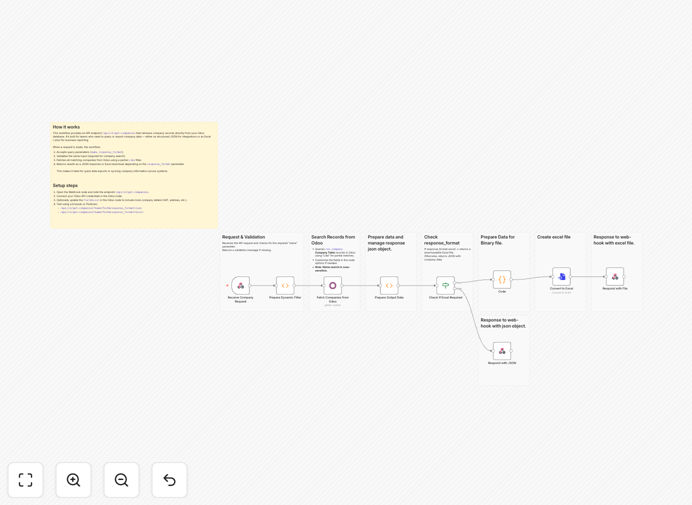
Odoo company data export API workflow visualization showing data flow from Odoo to API endpoint

What This Workflow Does

This workflow solves the common business problem of manually extracting company data from Odoo for reporting, integrations, or analysis. Instead of logging into Odoo, running queries, and exporting CSV files, this automation provides a ready-to-use API endpoint that instantly delivers filtered company records in your preferred format.

When teams need current company information for sales outreach, compliance reporting, or data synchronization with other systems, they can simply call the API with search parameters and receive structured data. This eliminates hours of manual work each week and ensures data consistency across your organization.

The solution is particularly valuable for businesses that need to share Odoo data with non-technical team members, external partners, or other software systems without granting direct database access.

How It Works

The automation follows a logical sequence to receive requests, fetch data, and deliver results:

1. API Request Reception

The workflow exposes a webhook endpoint at /api/v1/get-companies that accepts GET requests with query parameters. It validates required inputs like company name search terms and response format preferences.

2. Odoo Data Retrieval

Using secure API credentials, the workflow connects to your Odoo instance and executes a search for company records matching the provided criteria. It uses "like" filters for partial name matching to ensure relevant results.

3. Data Processing & Formatting

The retrieved company data is processed to include relevant fields (name, VAT, address, etc.). Based on the request parameter, the workflow prepares the data either as structured JSON for API integrations or as an Excel file for human consumption.

4. Response Delivery

The final step delivers the formatted data with appropriate headers. JSON responses include status codes and structured data, while Excel requests trigger file downloads with proper MIME types for immediate use in spreadsheet applications.

Who This Is For

This automation template is ideal for Odoo users across various business functions:

Sales & Marketing Teams: Need current company data for outreach campaigns, territory management, or account planning without IT assistance.

Finance & Operations: Require regular exports of company records for compliance reporting, audit documentation, or supplier management.

IT & Development Teams: Building integrations between Odoo and other business systems like CRM platforms, BI tools, or custom applications.

Business Analysts: Creating regular reports and dashboards that pull data from Odoo without manual extraction steps.

External Partners: Agencies or consultants who need secure, limited access to specific company data without full Odoo licenses.

What You'll Need

  1. Odoo Instance: A running Odoo installation (cloud or self-hosted) with company data you want to export.
  2. API Access: Odoo API credentials with appropriate permissions to read company/partner records.
  3. n8n Environment: A running n8n instance (cloud or self-hosted) where you can import and run workflows.
  4. Basic Technical Knowledge: Understanding of APIs, webhooks, and how to configure credentials in automation tools.
  5. Use Case: A clear business need for exporting company data, whether for reporting, integration, or analysis purposes.

Quick Setup Guide

Follow these steps to implement this automation in your environment:

Pro tip: Test the workflow in a development environment first before connecting to production Odoo data.

  1. Download & Import: Download the template file and import it into your n8n instance using the workflow import function.
  2. Configure Webhook: Note the webhook URL generated by n8n (typically includes /webhook-test/ or similar). This becomes your API endpoint.
  3. Set Up Odoo Credentials: Add your Odoo API credentials in the Odoo node, ensuring the connection has read access to company records.
  4. Customize Fields: Optionally modify the fields list in the Odoo node to include additional company information relevant to your use case.
  5. Test the Endpoint: Use a browser, Postman, or curl to call your endpoint with test parameters like ?name=Test&response_format=json.
  6. Deploy & Secure: Activate the workflow and implement any additional security measures like authentication tokens if exposing externally.

Key Benefits

Eliminate Manual Exports: Save 2-5 hours per week previously spent logging into Odoo, running queries, and exporting files manually. This time can be redirected to higher-value analysis and decision-making.

Ensure Data Consistency: Automated exports guarantee that everyone receives the same data structure and formatting, eliminating version confusion and manual errors that occur with ad-hoc exports.

Enable Real-Time Access: Provide stakeholders with immediate access to current company data through API calls rather than waiting for scheduled manual reports or database access approvals.

Simplify Integrations: Create a clean, documented API layer between Odoo and other systems, making it easier to connect CRM, accounting, and analytics platforms without complex custom development.

Improve Security Posture: Reduce the need for direct database access by providing controlled API endpoints with specific data permissions, minimizing security risks associated with broad access privileges.

Frequently Asked Questions

Common questions about Odoo data automation and API integration

Automating Odoo data exports eliminates manual reporting, reduces errors, and provides real-time access to company information. Instead of running manual queries, you can build an API endpoint that instantly delivers filtered data to other systems, dashboards, or stakeholders.

For example, sales teams can get current company lists for territory planning, finance can automate compliance reporting, and partners can access specific data without full Odoo licenses. This transforms Odoo from a closed system into an open data platform.

  • Reduces manual work by 70-90% for regular data exports
  • Ensures data consistency across all consumers
  • Enables self-service access for non-technical teams

An API for Odoo data enables seamless integration with other business tools like CRMs, BI platforms, and custom applications. It allows for scheduled exports, real-time data sync, and secure access control without exposing your Odoo database directly.

Consider a manufacturing company that needs to sync customer information from Odoo to their custom production scheduling system. An API layer allows this integration without complex database connections, with built-in transformation logic and error handling.

  • Standardized data access across all integrated systems
  • Built-in transformation and filtering capabilities
  • Audit trails for all data access and modifications

Odoo API integration connects your ERP data to external systems through standardized endpoints. For example, you can sync company records to Salesforce for sales teams, push financial data to Power BI for analytics, or update inventory levels in Shopify—all without manual data entry.

The integration acts as a middleware layer that translates Odoo's data structure into formats other systems understand. It can handle authentication, rate limiting, error recovery, and data transformation, making complex integrations manageable for business teams.

  • Supports both push and pull data synchronization patterns
  • Handles authentication and security between systems
  • Includes error handling and retry logic for reliability

The most valuable Odoo data for API exports includes company/partner records, sales orders, invoices, inventory levels, and customer interactions. These datasets power external reporting, customer portals, supplier dashboards, and compliance documentation.

Company data specifically enables numerous business processes: sales teams use it for account planning, marketing for segmentation, finance for credit checks, and operations for supplier management. Each department benefits from automated access to current, accurate company information.

  • Company/partner records for CRM and sales operations
  • Sales orders and invoices for financial reporting
  • Inventory data for supply chain management

Yes, you can schedule automated Odoo exports using workflow automation tools. Set up daily sales reports, weekly inventory summaries, or monthly financial statements that generate and deliver files automatically via email, cloud storage, or direct API calls to destination systems.

For instance, configure a workflow that runs every Monday morning, exports last week's new companies, transforms the data into a specific format, and emails it to the sales team before their weekly meeting. This ensures timely information without manual intervention.

  • Schedule exports by time, date, or triggering events
  • Deliver to multiple destinations simultaneously
  • Include conditional logic for different recipient groups

Key security considerations include using API tokens instead of passwords, implementing IP whitelisting, setting granular permissions per endpoint, encrypting data in transit, and auditing access logs. Always follow the principle of least privilege when granting API access.

For sensitive company data, consider additional measures like data masking for certain fields, request rate limiting to prevent abuse, and integration with your existing identity management system for user authentication and authorization.

  • Use OAuth or API tokens instead of password-based authentication
  • Implement field-level security for sensitive data elements
  • Maintain comprehensive audit logs of all data access

Yes, GrowwStacks specializes in custom Odoo automation solutions tailored to your specific business processes. We build workflows that connect Odoo to your unique tech stack, handle complex data transformations, and scale with your operational needs.

Our team works with you to understand your exact requirements, whether it's integrating Odoo with niche industry software, creating custom reporting pipelines, or building complete automation systems that span multiple departments and systems.

  • End-to-end automation design and implementation
  • Integration with your existing tools and workflows
  • Ongoing support and optimization as needs evolve

Need a Custom Odoo Automation?

This free template is a starting point. Our team builds fully tailored automation systems for your specific business needs.